Key Concepts
This section covers the foundational concepts you need to understand before working with Data Streams. Get familiar with these concepts; they’re referenced throughout the component, and its related documentation.
Publishing Methods
Data published to a Data Streams channel using any of the following methods is distributed to all connected subscribers in real time.
Catalyst SDK
The Data Streams SDK offers publishData() (or publish_data() in Python) method, which accepts channel ID and the required data as inputs. The data is then sent to the channel through the SDK’s REST-based interface without requiring a WebSocket connection.
Using Catalyst SDK (Java, JavaScript, and Python) to publish data from a server-side function or application is ideal when your backend service or function generates the data to be streamed. For example, you could have a Catalyst Advanced I/O function that processes incoming data and publishes the results to a channel.
Learn more about publishing data across all supported runtimes.
Data Streams REST API
Using the Data Streams REST API, is preferred when your application isn’t using the Catalyst SDK directly or when you need to publish data from an external system or third-party service.
Refer to the API documentation.
Catalyst Signals
Catalyst Signals is an event bus service that enables event-driven communication between decoupled applications or systems. We can use this service to automatically publish data to a Data Streams channel when an events occur in connected services.
For example, let’s say that when a user has data to publish and signs up for your application through Authentication, you need to perform a required row insert in Catalyst Data Store, and a record update in your Zoho CRM. You can have this entire process automated with an event-driven workflow by using the Signals service.
Using a configured Signals publisher, the sign-up event can be routed to a Data Streams channel through Signals Rules and Targets. The event data is then streamed to all subscribers connected to the channel.
Using this method, you can build event-driven streaming architectures without manually coding publishing logic. For example:
- A new order in Zoho CRM automatically streams the order details to a live dashboard.
- A file upload in Catalyst Stratus triggers a notification stream to all connected clients.
- A cache update in a Catalyst Cache segment streams the updated value to the applications acting as subscribers.
You can use the Triggers section present in the channel dashboard to configure an integration with the Catalyst Signals service. Alternatively, you can also directly configure it in the Catalyst Signals section of the console.
WebSocket Connections
Data Streams uses websocket connections to deliver streamed data from channels to subscribers in real time. Unlike traditional HTTP requests, where a new connection is created for every request-response cycle, a WebSocket connection remains open once established. This allows the server to push data to connected subscribers instantly whenever new events are published, without requiring clients to repeatedly poll for updates.
Catalyst offers SDK support in the following runtimes to provide websocket client classes for establishing and managing subscriber connections:
Learn more about creating and managing WebSocket connections.
Token Pair
A token pair is the subscribers’ authentication credentials, required to create or keep open an authenticated websocket connection in a Data Streams channel. This token pair is a mandatory requirement to subscribe to a channel.
Catalyst offers SDK support in the following runtimes to easily generate the required token pairs:
Learn more about implementing token pairs.
Subscriber Types
A subscriber type determines how and from which point a subscriber begins receiving data from a channel. Data Streams support the following subscriber types:
| Subscriber Type | Description |
|---|---|
| ‘0’ | Live events only - Receive only new messages published after subscribing. |
| ‘-1’ | Earliest available - Receive all available messages starting from the earliest stored event within the channel's retention period. Note: This type delivers events from the earliest available point within the channel's 48-hour retention period. Events older than 48 hours are no longer available. |
| ‘-2’ | Resume - Resume from where the subscribers' last session left off. For new subscribers, this behaves the same as '0' (live events only). |
| ‘<streaming-id>’ | From a specific Streaming ID - Resume from a specific Streaming ID. Messages published after this ID will be delivered. |
Learn more about using each subscriber type.
Message Event Structure
When a subscriber receives data from a channel, the incoming message event contains the following fields:
| Field | Type | Description |
|---|---|---|
| streamingId | string | A unique identifier for this message in the stream. |
| data | string | The published data, always delivered as a string. Present for inline events. |
| url | string | URL to fetch bulk data. Present for bulk events. |
| method | string | HTTP method to fetch bulk data. Present for bulk events. |
Example Message Event Structure:
{
  "streamingId": "16965000000027481",
  "data": "{\"orderId\": 12345, \"status\": \"shipped\"}"
}{
"streamingId": "16965000000027482",
"url": "https://api.catalyst.zoho.com/baas/v1/data-streams/bulk/xyz",
"method": "GET"
}Acknowledgement
Data Streams delivers messages to subscribers in sequence. After receiving and processing a message event, the subscriber must send an acknowledgement to confirm that the message has been handled. Until the acknowledgement is sent, the next message in the stream will not be delivered.
This mechanism ensures ordered, reliable message delivery. If a subscriber disconnects before acknowledging a message, it can reconnect using the ‘-2’ (resume) subscribe type to continue from where it left off.
Learn more about using the Acknowledgement feature.
Connection Lifecycle
The following diagram illustrates the connection lifecycle:
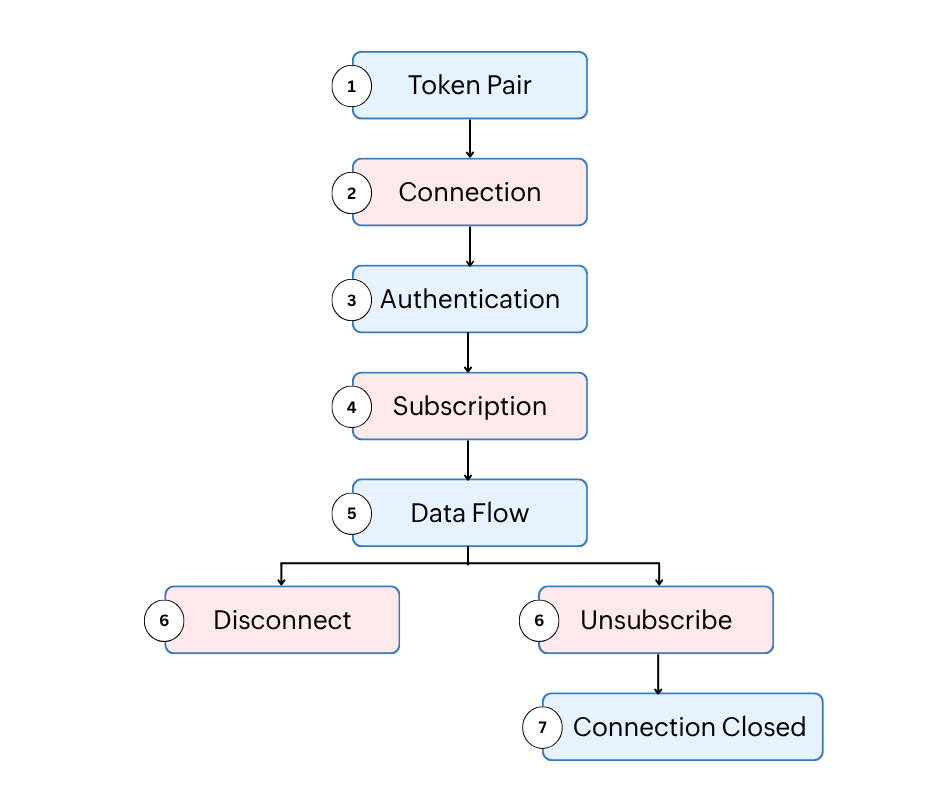
Catalyst SDK (Java, JavaScript, and Python) offers support and manages the following lifecycle aspects automatically for subscriber connections:
- Token Pair — Generate a token pair using the subscriber’s user ID or connection name. This token pair provides the credentials required to authenticate the WebSocket connection.
- Connection — Opens a WebSocket to the Data Streams server using the generated token pair.
- Authentication — The server validates the token pair (Key and Session ID). If authenticated, an ‘open’ event is emitted and the server returns the session credentials.
- Subscription — Your code calls the subscribe method with a subscribe type to start receiving data.
- Data Flow — The server pushes message events. Your code processes each event and calls the acknowledgement method.
- Disconnect or Unsubscribe — From here, you can either invoke the close method to disconnect and terminate the WebSocket connection directly, or the unsubscribe method to stop receiving data from the channel.
- Connection Closed — After unsubscribing, the WebSocket connection is closed, ending the lifecycle.
Data Retention
Each Data Streams channel retains published data for 48 hours from the time it is published. Subscribers can reconnect within this retention period and receive events that were streamed during that time by using the appropriate subscribe type (’-1’ for earliest available, ‘-2’ for resume, or a specific streaming ID).
Events older than 48 hours will not be available and cannot be retrieved.
Last Updated 2026-10-25 10:27:11 +0530 IST
Yes
No
Send your feedback to us
 Ask ChatGPT
 Ask Claude
 Ask Perplexity