Security Update (CVE-2026-111497): Fixed Node.js Vulnerability
We want to make you aware that on October 21, 2026, the Node.js project released security updates for a high-severity vulnerability, CVE-2026-111497, in the Brotli decompression library that ships with Node.js.
If an application decompresses Brotli data crafted by an attacker, the attacker may be able to corrupt the application’s memory and run their own code inside it. This vulnerability affects every application running on an unpatched version of Node.js, including all end-of-life versions such as Node.js 20 and older. It is not specific to Catalyst by Zoho.
How we’ve patched it
We have updated Catalyst’s managed Node.js runtimes to the patched versions:
| Runtime | Patched Version |
|---|---|
| Node.js 24 | 24.22.1 |
| Node.js 22 | 22.23.4 |
This fix applies to Catalyst Functions, AppSail (Catalyst-managed runtimes), Slate builds, and the default image used by Catalyst Pipelines, which now runs Node.js 24.
Catalyst by Zoho has applied these security patches only to Catalyst-managed runtimes that have not reached end-of-life, as described in the Language Runtime Support Policy. Runtimes that have reached end-of-life and custom runtimes do not receive these patches.
If you are on an end-of-life runtime, upgrade to a supported runtime and redeploy your application. The patches will be applied automatically. Since custom runtimes run your own container images, you need to apply the patches yourself.
What you need to do
Check the runtime of your application
To confirm the Node.js version your Function or AppSail service is using, log process.version from within it. If the version is earlier than v22.23.4 on Node.js 22, or earlier than v24.22.1 on Node.js 24, perform the applicable actions below.
1. Redeploy Your Node.js Functions, AppSail Services and Slate Applications
If your application is already running or was built before this security update, it continues to use the earlier version. Redeploy your application to pick up the patched version.
Using the Catalyst console:
-
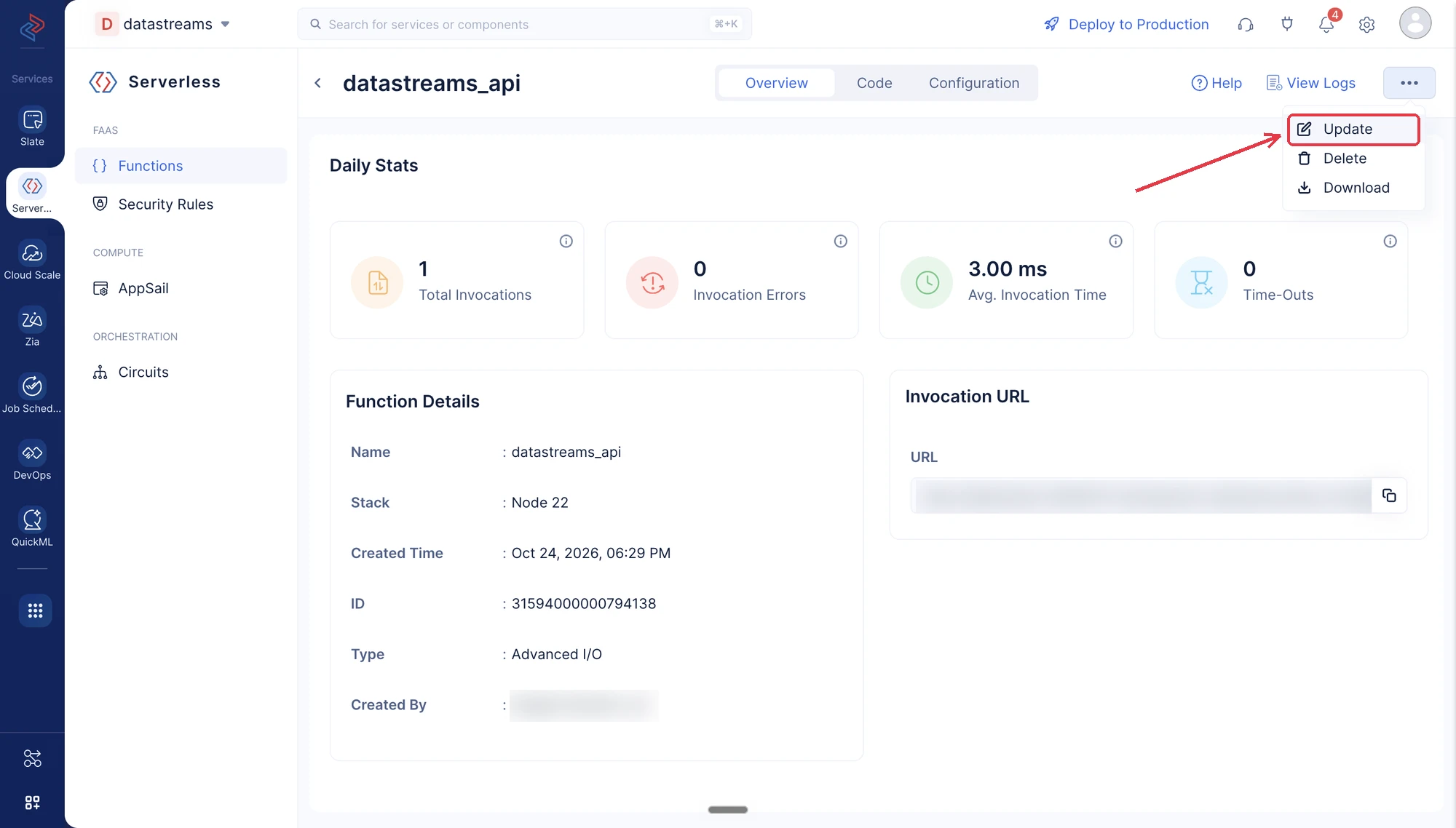
Functions: Go to Serverless → Functions, open your function, click the ⋯ icon at the top right, then Update, and click Save. Learn more about updating a function.
-
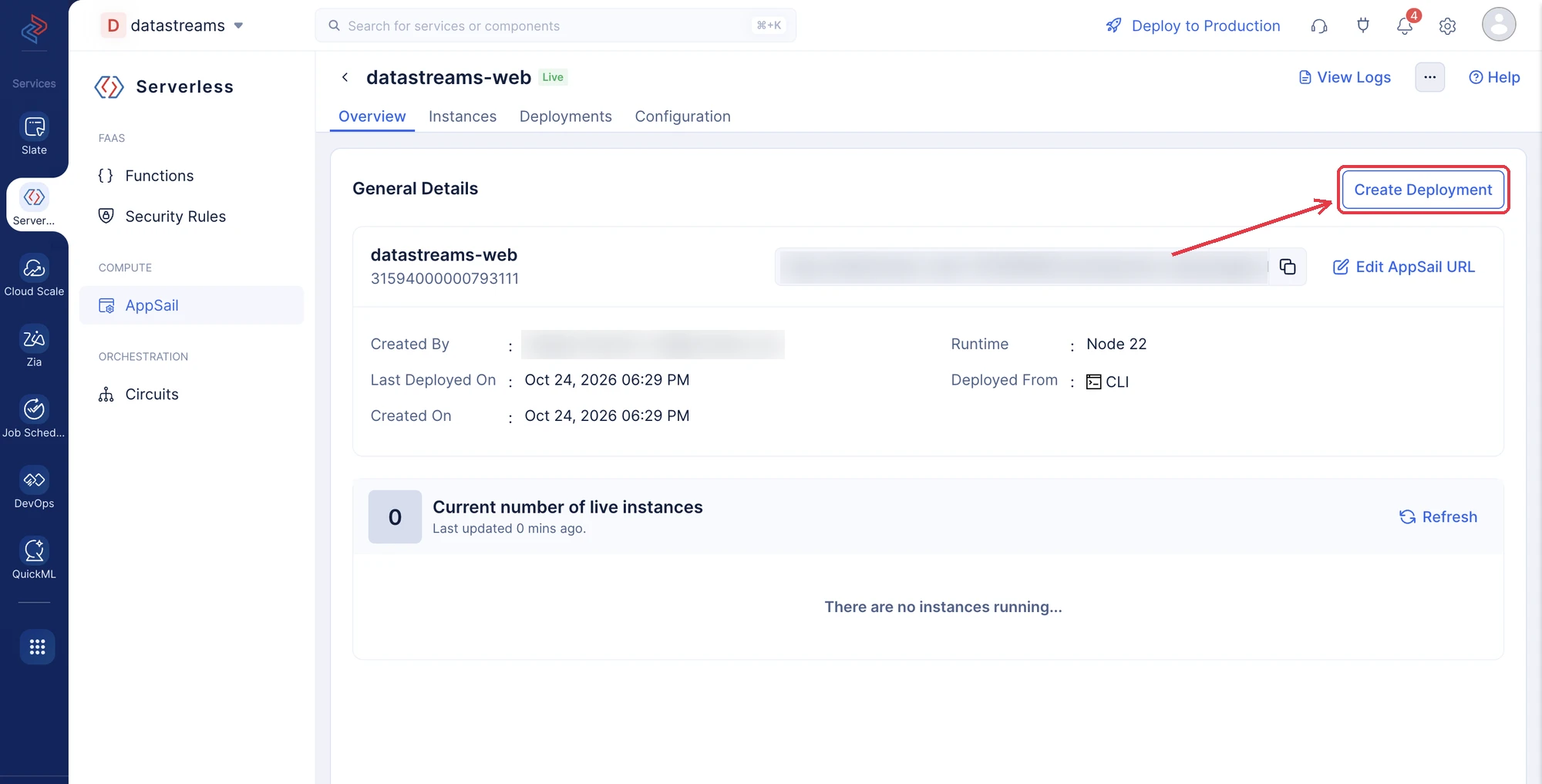
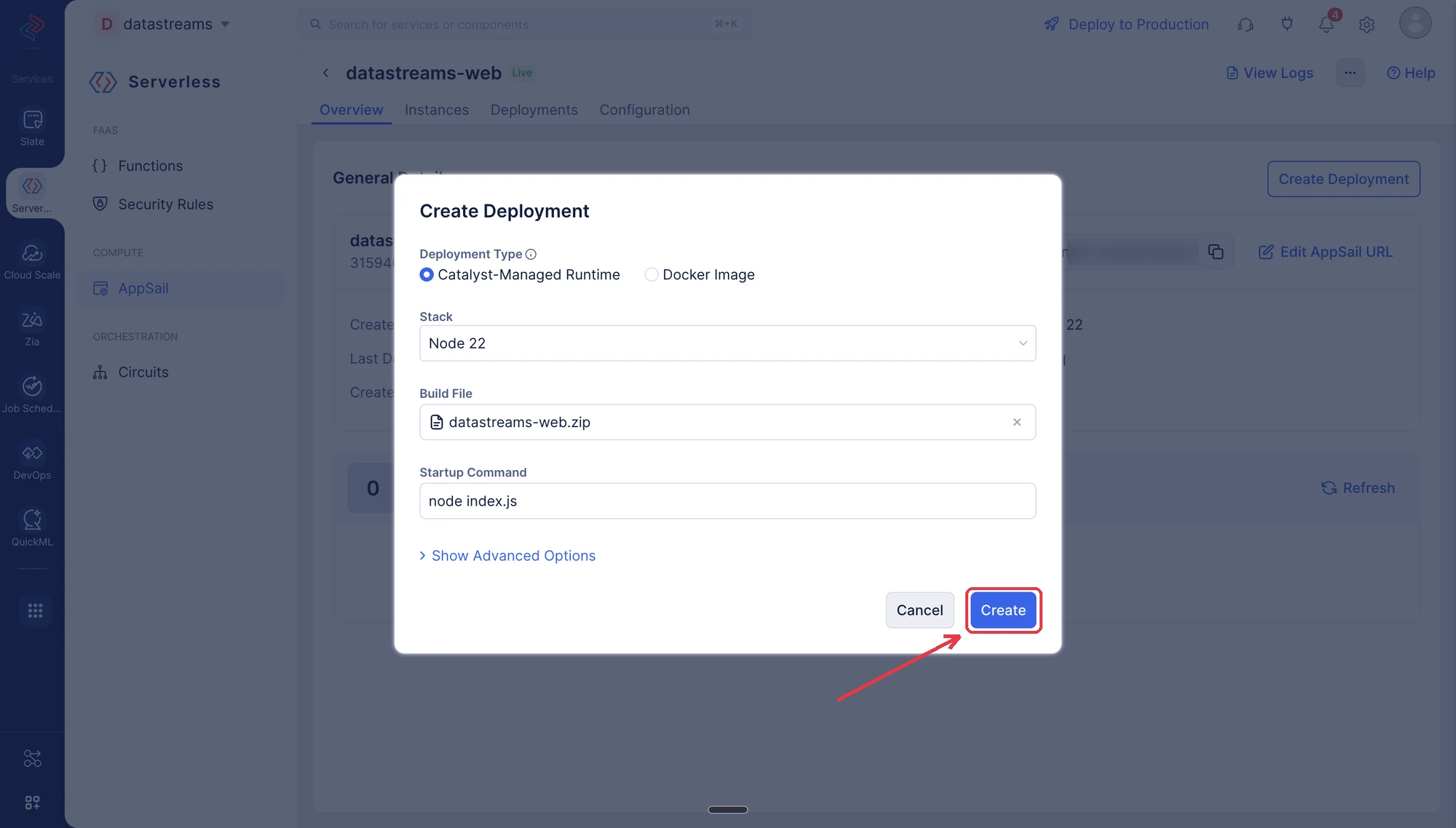
AppSail: Go to Serverless → AppSail, open your service, and click Create Deployment. Keep your current Stack, upload your app’s build file (ZIP) under Build File, and click Create. Learn more about creating a new deployment.
-
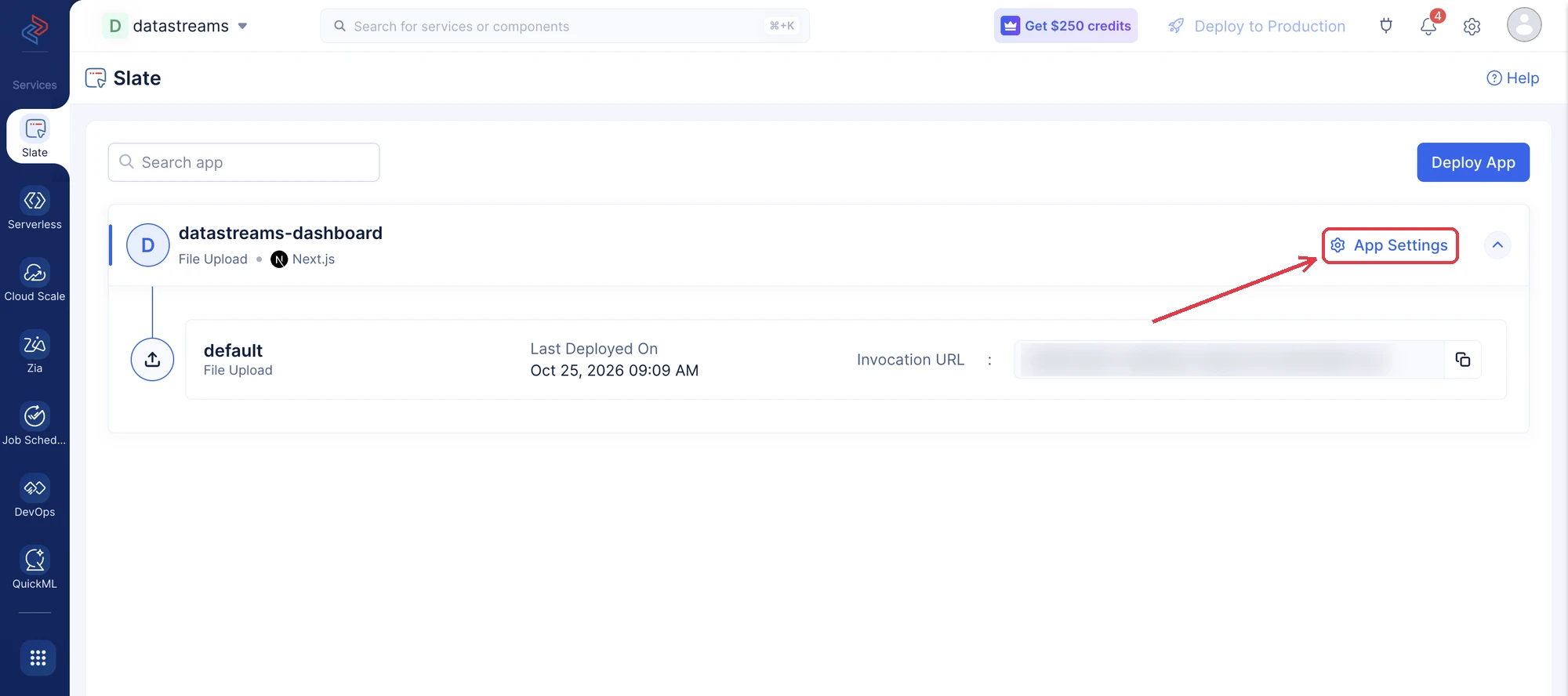
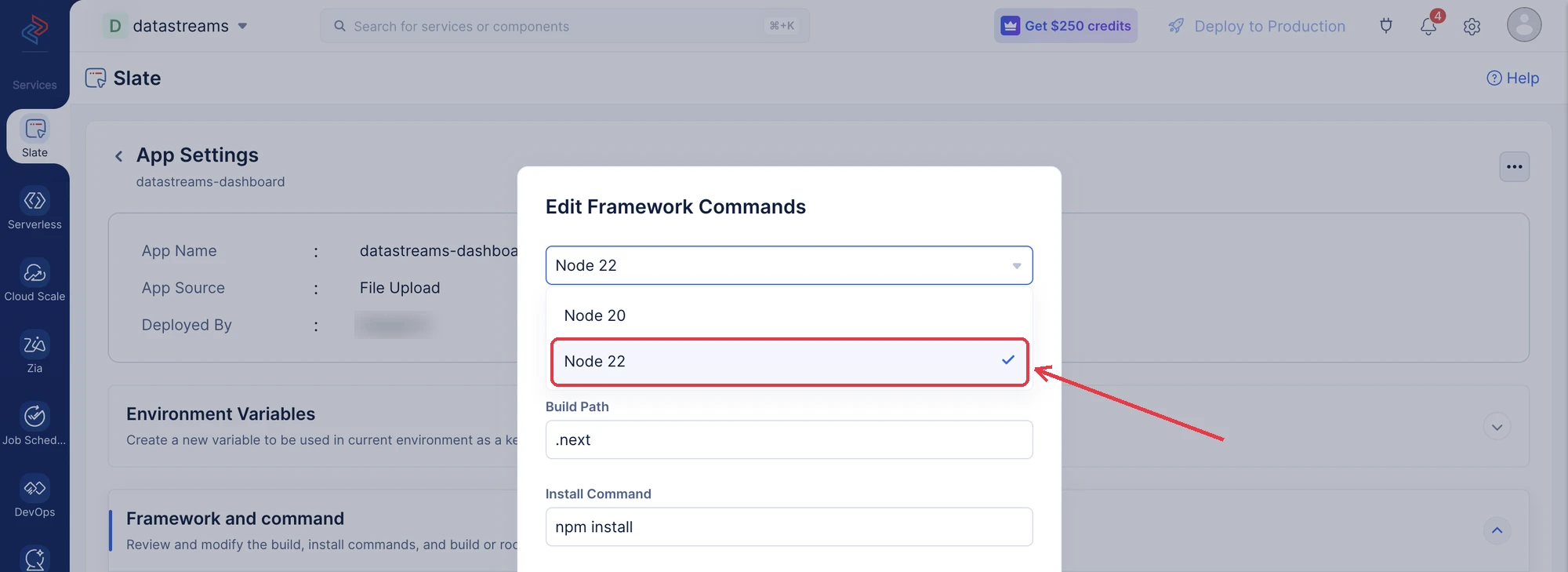
Slate: Go to Slate and click your app to expand it, then click App Settings. Expand Framework and command, click Edit, select Node 22 from the runtime drop-down, and click Update. Learn more about updating the Node.js runtime of an app. Changing the runtime doesn’t rebuild your app, so redeploy it:
-
Git-connected apps: Click Create Deployment, or push a new commit to your repository. With Auto Deploy on, it deploys automatically.
-
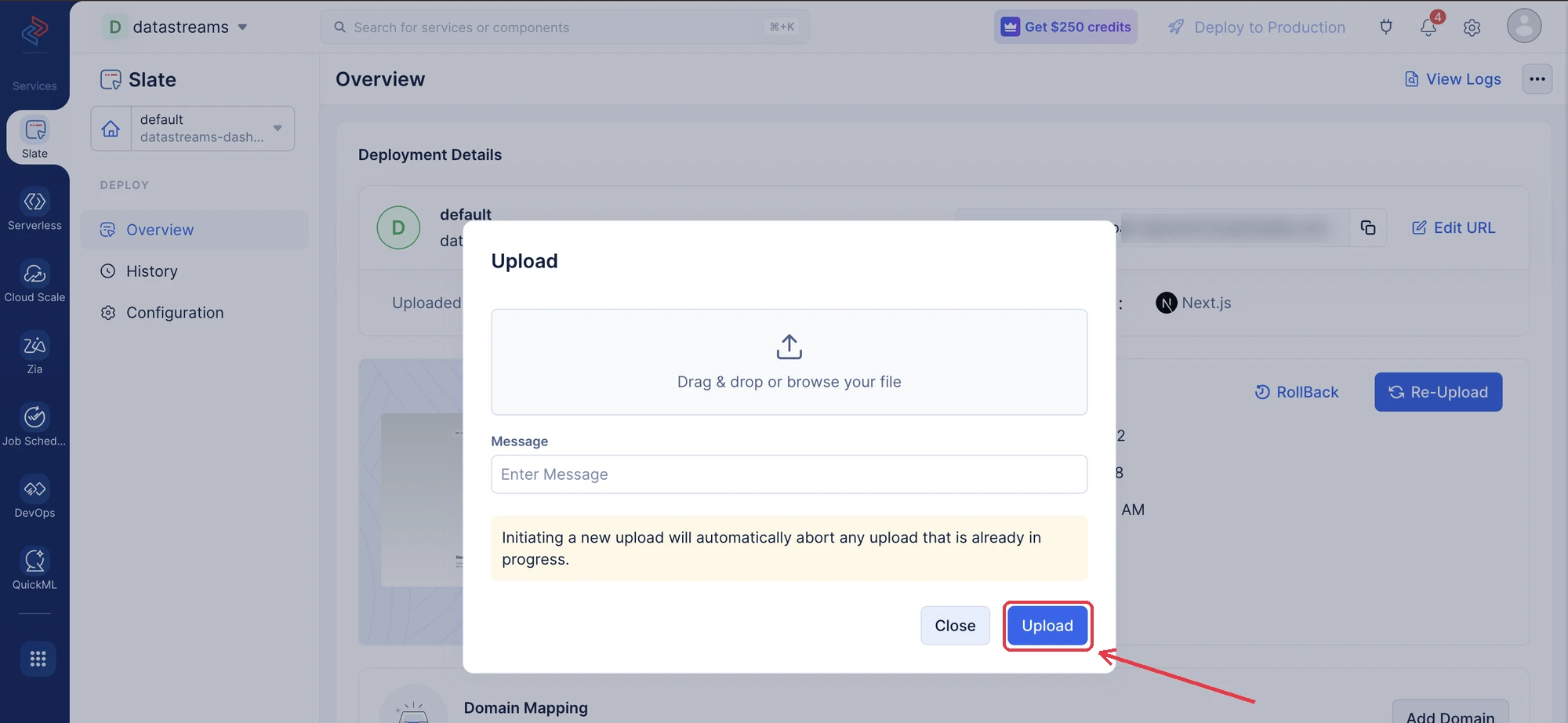
Uploaded apps: Click Re-Upload on the app’s Overview screen and upload your app.
-
Using the CLI: Run catalyst deploy from your project directory. This deploys Functions, AppSail and Slate together. To deploy only Slate, run catalyst deploy slate. Learn more about deploy options and deploying to Slate.
2. Move Off Node.js Versions Earlier Than 22
Node.js 20 reached end-of-life on April 30, 2026, and the Node.js project isn’t releasing a fix for it. Catalyst won’t patch any Node.js runtime earlier than Node.js 22 (Node.js 20, 18, 16 and older). See the Node.js runtime deprecations for the timeline.
If your Functions, AppSail services or Slate apps use any of these versions, update them to a supported version: Node.js 22 or 24 for Functions and AppSail, and Node.js 22 for Slate.
Using the Catalyst console:
-
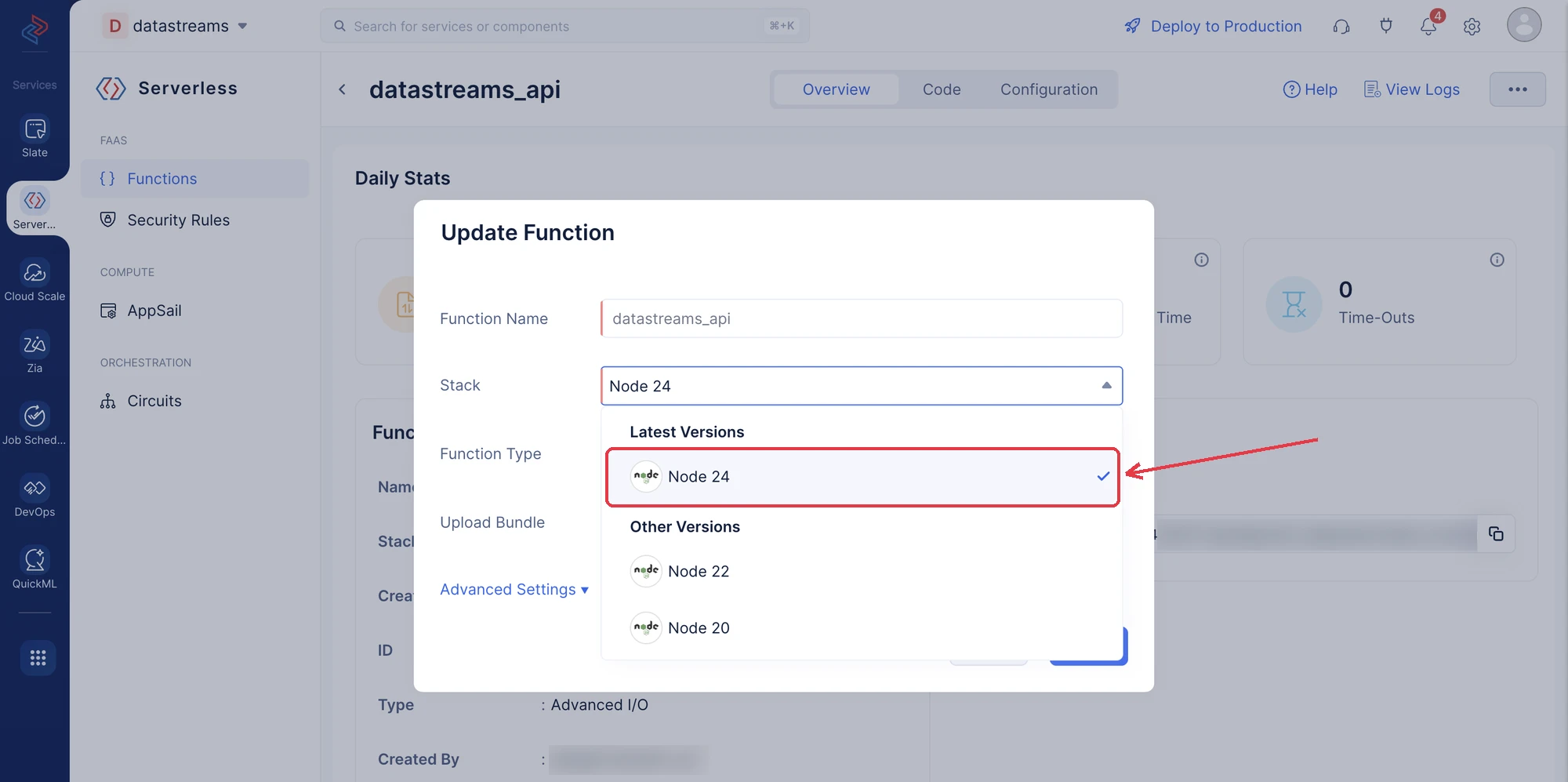
Functions: Use ⋯ → Update, select the new runtime version from the Stack drop-down, and click Save.
-
AppSail: Open your service, click Create Deployment, select Node 24 or Node 22 from the Stack drop-down, upload your build file, and click Create.
-
Slate: Follow the Slate steps in step 1, select Node 22, and redeploy your app.
Using the CLI: Change the stack value in your function’s catalyst-config.json or your service’s app-config.json (for example, node24), then test your app and run catalyst deploy.
3. Rebuild Custom Containers
If you deploy your own Docker or OCI image to AppSail, rebuild it on a patched Node.js base image and redeploy.
4. Check Your Catalyst Pipelines
If your pipelines use the default image, no action is needed. It now runs a patched version of Node.js 24 (previously Node.js 18).
If you specify your own image in catalyst-pipelines.yaml (for example, image: node:20), update it to a patched Node.js image such as node:24 or node:22, and run your pipeline again.
5. Update Node.js on Your Machine
The Catalyst CLI and your local builds use the Node.js installed on your computer and in your CI pipelines. Update it to Node.js 22.23.4, 24.22.1 or later. You can check your current version with:
node -vYou would have come across reports that browsers are withdrawing trust from certain certificates issued by eMudhra (emSign). Catalyst by Zoho is not affected by this compromise, and no action is needed for your Catalyst domains.
This applies to apps in every language, not only Node.js. We’ve updated the trusted certificate lists in Catalyst’s Node.js, Java, and Python runtimes, and redeploying your apps will pick up these updates.
If you bundle your own certificate store or dependencies, for example, a custom AppSail container, a JDK, or the Python certificate package, ensure you’ve updated them to the latest versions.
If you have any questions or need help upgrading, reach out to us at support@zohocatalyst.com.
Last Updated 2026-10-26 12:36:56 +0530 IST
Yes
No
Send your feedback to us
 Ask ChatGPT
 Ask Claude
 Ask Perplexity