エクスポート/インポートZIPファイル形式
ZIPファイルのコンポーネント
Catalystでは、データを含めずに、プロジェクトのスキーマと設定をFunctionsとClientコードとともにエクスポートまたはインポートできます。Data Storeテーブルのレコード、アプリケーションのユーザーリストなどのデータは、ZIPファイルに含まれません。
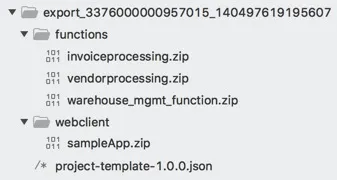
ローカルディレクトリからプロジェクトをエクスポートするときに作成されるZIPファイルには、以下のコンポーネントが含まれます。
-
FunctionsディレクトリのZIPファイル: エクスポートZIPには、標準構造のプロジェクトのFunctionsディレクトリが含まれます。プロジェクトディレクトリで初期化されたすべてのFunctionsが、設定ファイルとSDKコンポーネントとともに個別のZIPファイルとして含まれます。
-
ClientディレクトリのZIPファイル: エクスポートZIPには、プロジェクトのClientディレクトリも含まれます。プロジェクトで初期化されたWebクライアントは、すべてのClientファイルとともにwebclientフォルダ内のZIPファイルとして含まれます。
-
Project-Template JSONファイル: プロジェクトのコンポーネントの設定は、エクスポートZIPファイル内の単一のJSONファイルに含まれます。JSONファイルには、プロジェクトとコンポーネント設定の定義が含まれます。これらの設定には、Data Storeのスキーマとメタデータ、Cacheセグメント、Cronジョブ、Circuit設定、セキュリティルール、メールドメインとアドレス、Event Listenersとルール、API GatewayのAPI、メールテンプレート、ユーザープロファイルなどが含まれます。
サンプルproject-template JSONからの抜粋を以下に示します:
{
  "name" : "project-template",
  "version" : "1.0.0",
  "parameters" : { },
  "components" : {
"Circuits" : [ {
  "type" : "circuit",
  "name" : "InvoiceGen",
  "properties" : {
"name" : "InvoiceGen",
"states" : {
  "State1" : {
"next" : "End",
"start" : true,
"type" : "pass"
  }
}
  },
  "dependsOn" : [ ]
} ],
"Functions" : [ {
  "type" : "function",
  "name" : "warehouseportal",
  "properties" : {
"stack" : "node14",
"code" : {
  "path" : "functions/warehouseportal.zip"
},
"configuration" : {
  "memory" : 256
},
"type" : "basicio",
"name" : "warehouseportal"
  },
  "dependsOn" : [ ]
}
 ],
"WebClient" : [ {
  "type" : "client",
  "name" : "warehousePortal",
  "properties" : {
"app_name" : "warehousePortal",
"code" : {
  "path" : "webclient/warehousePortal.zip"
}
  },
  "dependsOn" : [ ]
} ],
"Cron" : [ {
  "type" : "cron",
  "name" : "dailyBackup",
  "properties" : {
"cron_url_details" : {
  "headers" : { },
  "request_body" : "",
  "request_method" : "POST",
  "params" : { },
  "url" : "https://catalyst.zoho.com/help/index.html"
},
"end_time" : -1,
"description" : "",
"cron_name" : "dailyBackup",
"job_detail" : {
  "hour" : 1,
  "timezone" : "America/Los_Angeles",
  "minute" : 0,
  "second" : 0,
  "repetition_type" : "Daily"
},
"cron_type" : "Calendar",
"status" : true
  },
  "dependsOn" : [ ]
} ],
"Datastore" : [ {
  "type" : "table",
  "name" : "InventoryDB",
  "properties" : {
"table_name" : "InventoryDB"
  },
  "dependsOn" : [ ]
}, {
  "type" : "column",
  "name" : "InventoryDB-ProductID",
  "properties" : {
"decimal_digits" : 2,
"column_name" : "ProductID",
"data_type" : "int",
"is_unique" : false,
"is_mandatory" : false,
"search_index_enabled" : false,
"table_id" : "InventoryDB",
"table_name" : "InventoryDB",
"max_length" : 10
  },
  "dependsOn" : [ "Datastore.table.InventoryDB" ]
},
{
  "type" : "tableScope",
  "name" : "InventoryDB-App Administrator",
  "properties" : {
"role_name" : "App Administrator",
"table_scope" : "GLOBAL",
"type" : "App Administrator",
"table_name" : "InventoryDB"
  },
  "dependsOn" : [ "Datastore.table.InventoryDB" ]
}, {
  "type" : "tableScope",
  "name" : "InventoryDB-App User",
  "properties" : {
"role_name" : "App User",
"table_scope" : "GLOBAL",
"type" : "App User",
"table_name" : "InventoryDB"
  },
  "dependsOn" : [ "Datastore.table.InventoryDB" ]
}, {
  "type" : "tablePermission",
  "name" : "InventoryDB-App Administrator",
  "properties" : {
"role_name" : "App Administrator",
"type" : "App Administrator",
"table_permissions" : [ "SELECT", "UPDATE", "INSERT", "DELETE" ],
"table_name" : "InventoryDB"
  },
  "dependsOn" : [ "Datastore.table.InventoryDB" ]
}, {
  "type" : "tablePermission",
  "name" : "InventoryDB-App User",
  "properties" : {
"role_name" : "App User",
"type" : "App User",
"table_permissions" : [ "SELECT" ],
"table_name" : "InventoryDB"
  },
  "dependsOn" : [ "Datastore.table.InventoryDB" ]
}]
}
}
-
ZIPファイルにproject-template JSONファイルが含まれていない場合、Catalystはプロジェクトをインポートできません。これはプロジェクトの設定を定義する必須ファイルです。
-
現在、CatalystプロジェクトのJSONファイルを生成する唯一の方法は、エクスポートすることです。手動で生成することはできません。JSONを直接生成する機能のアップデートは間もなくリリースされる予定です。
最終更新日 2026-08-17 17:46:04 +0530 IST
Yes
No
Send your feedback to us
 Ask ChatGPT
 Ask Claude
 Ask Perplexity