Execute RAG EndpointAdmin Scope
RAG
Retrieval-Augmented Generation (RAG) combines a large language model with your organization’s own knowledge base to deliver accurate, context-aware responses grounded in the organization specific documents.
Catalyst QuickML is equipped with RAG system under Generative AI services, to deliver responses grounded in the organization’s own documents with ground truth citations of the documents for traceability. Multiple RAG modes have been introduced each designed for a different use case. Every mode exposes its own dedicated parameters, giving you absolute control over how the RAG system generates responses.
Let’s take a quick look at the RAG modes:
-
Response Generation: Response Generation is the standard RAG mode where model generates response grounded with relevant chunks of information from the documents.
-
Agentic RAG: An agent layer on top of RAG that can reason over complex queries, decompose them into sub-queries, and handle conversational interactions.
-
Document Search: It is retrieval-only task, doesn’t generate a response but returns the most relevant chunks of content from the documents.
Execute RAG Endpoint
Create a RAG endpoint from a saved RAG configuration. The RAG mode, selected large language model, respective parameters, and document store are captured from the saved configuration at the time of endpoint creation. It cannot be overridden through the SDK.
The SDK method you call depends on the RAG mode the endpoint was configured with:
| RAG mode | SDK method |
|---|---|
| Response Generation | generateRagResponse(ragEndpointKey, ragPrompt) |
| Document Search | searchDocuments(searchEndpointKey, searchQuery) |
| Agentic RAG (without history) | askRagAgent(ragAgentEndpointKey, ragAgentPrompt) |
| Agentic RAG (with history) | converseWithRagAgent(ragConversationEndpointKey, ragConversationPrompt, ragConversationId) |
-
You will need to have the RAG endpoint created and published in your project using the Catalyst console, before you execute the code snippets below.
-
QuickML is currently available to Catalyst users accessing from the US, IN, and EU data centers.
a. Generate a RAG Response
The generateRagResponse(endpointKey, prompt) method sends a question to a published RAG endpoint. The service retrieves the most relevant content from the endpoint’s document store and generates a response grounded in that content.
Parameters used
| Parameter | Description | Values |
|---|---|---|
| endpointKey | The unique ID of the RAG endpoint published in your project | String |
| prompt | The query which is sent to the model. | String |
Sample Code Snippet
// -------------------------------------------------------------------
// RAG - Generate Response
// -------------------------------------------------------------------
const ragEndpointKey = “<ENDPOINT_KEY>”;
const ragPrompt = “<YOUR_PROMPT>”;
const ragResponse = await quickML.generateRagResponse(
ragEndpointKey,
ragPrompt
);
console.log(ragResponse);
The syntax of the response received is shown below:
{
    "status": "success",
    "result": [
        {
            "content": "The answer, grounded in the retrieved documents.",
            "citations": [
                {
                    "document_name": "employee_handbook_2026.pdf",
                    "document_id": "doc_10294",
                    "chunk_id": "chunk_58",
                    "page_number": 14,
                    "text": "The excerpt of source text the answer was grounded in.",
                    "score": 0.91
                }
            ],
            "usage": {
                "input_tokens": 1420,
                "output_tokens": 112,
                "total_tokens": 1532
            }
        }
    ]
}
Use this method for document-based question answering, summarization, and support assistants.
b. Search Documents
The searchDocuments(searchEndpointKey, searchQuery) method performs retrieval only. It returns the chunks of content from the document store that most closely match the query, without generating a response.
Parameters used
| Parameter | Description | Values |
|---|---|---|
| searchEndpointKey | The unique ID of the RAG endpoint published in your project | String |
| searchQuery | The search query is sent to the document store. | String |
Sample Code Snippet
// -------------------------------------------------------------------
// RAG - Document Search
// -------------------------------------------------------------------
const searchEndpointKey = “<ENDPOINT_KEY>”;
const searchQuery = “<SEARCH_QUERY>”;
const searchResponse = await quickML.searchDocuments(
searchEndpointKey,
searchQuery
);
console.log(searchResponse);
The syntax of the response received is shown below:
{
    "status": "success",
    "result": [
        {
            "chunk_id": "chunk_58",
            "document_name": "employee_handbook_2026.pdf",
            "document_id": "doc_10294",
            "page_number": 14,
            "text": "The retrieved chunk of content that matched the query.",
            "score": 0.91
        },
        {
            "chunk_id": "chunk_59",
            "document_name": "employee_handbook_2026.pdf",
            "document_id": "doc_10294",
            "page_number": 15,
            "text": "The next most relevant chunk of content.",
            "score": 0.84
        }
    ]
}
Use this method when your application needs the raw retrieved passages for downstream processing, ranking, or custom rendering.
c. Ask a RAG Agent
The askRagAgent(endpointKey, prompt) method sends a single message to an Agentic RAG endpoint. The agent can decompose complex queries into sub-queries, refine them, and perform multi-step reasoning over the document store before returning a response.
Parameters Used
| Parameter | Description | Values |
|---|---|---|
| endpointKey | The unique ID of the RAG endpoint published in your project | String |
| prompt | The query which is sent to the model | String |
Sample Code Snippet
 // -------------------------------------------------------------------
// RAG - Chat without History
// -------------------------------------------------------------------
const ragAgentEndpointKey = “<ENDPOINT_KEY>”;
const ragAgentPrompt = “<YOUR_PROMPT>”;
const ragAgentResponse = await quickML.askRagAgent(
ragAgentEndpointKey,
ragAgentPrompt
);
console.log(ragAgentResponse);
The syntax of the response received is shown below:
{
    "status": "success",
    "result": [
        {
            "content": "The agent's answer after reasoning over the document store.",
            "sub_queries": [
                "First decomposed sub-query the agent generated.",
                "Second decomposed sub-query the agent generated."
            ],
            "citations": [
                {
                    "document_name": "policy_v3.pdf",
                    "document_id": "doc_10877",
                    "chunk_id": "chunk_12",
                    "page_number": 3,
                    "text": "The excerpt of source text the answer was grounded in.",
                    "score": 0.88
                }
            ],
            "usage": {
                "input_tokens": 3180,
                "output_tokens": 204,
                "total_tokens": 3384
            }
        }
    ]
}
d. Converse with a RAG Agent
The converseWithRagAgent(ragConversationEndpointKey, ragConversationPrompt, ragConversationId) method sends a message to an Agentic RAG endpoint while retaining the context of previous turns. Use this method to build multi-turn assistants that answer follow-up questions using the same document store.
Parameters Used
| Parameter | Description | Values |
|---|---|---|
| ragConversationEndpointKey | The unique ID of the RAG endpoint published in your project | String |
| ragConversationPrompt | The query which is sent to the model | String |
| ragConversationId | Identifies the conversation thread the message belongs to | String |
Sample Code Snippet
// -------------------------------------------------------------------
// RAG - Chat with History
// -------------------------------------------------------------------
const ragConversationEndpointKey = “<ENDPOINT_KEY>”;
const ragConversationPrompt = “<YOUR_PROMPT>”;
/*
- For the first request, use “-1”.
- For subsequent requests, use the conversation ID returned
- in the previous response.
*/
const ragConversationId = “<CONVERSATION_ID>”;
const ragConversationResponse = await quickML.converseWithRagAgent(
ragConversationEndpointKey,
ragConversationPrompt,
ragConversationId
);
console.log(ragConversationResponse);
The syntax of the response received is shown below:
{
    "status": "success",
    "result": [
        {
            "conversation_id": "55663000000288001",
            "content": "The agent's answer, informed by earlier turns in this conversation.",
            "citations": [
                {
                    "document_name": "policy_v3.pdf",
                    "document_id": "doc_10877",
                    "chunk_id": "chunk_12",
                    "page_number": 3,
                    "text": "The excerpt of source text the answer was grounded in.",
                    "score": 0.88
                }
            ],
            "usage": {
                "input_tokens": 3612,
                "output_tokens": 188,
                "total_tokens": 3800
            }
        }
    ]
}
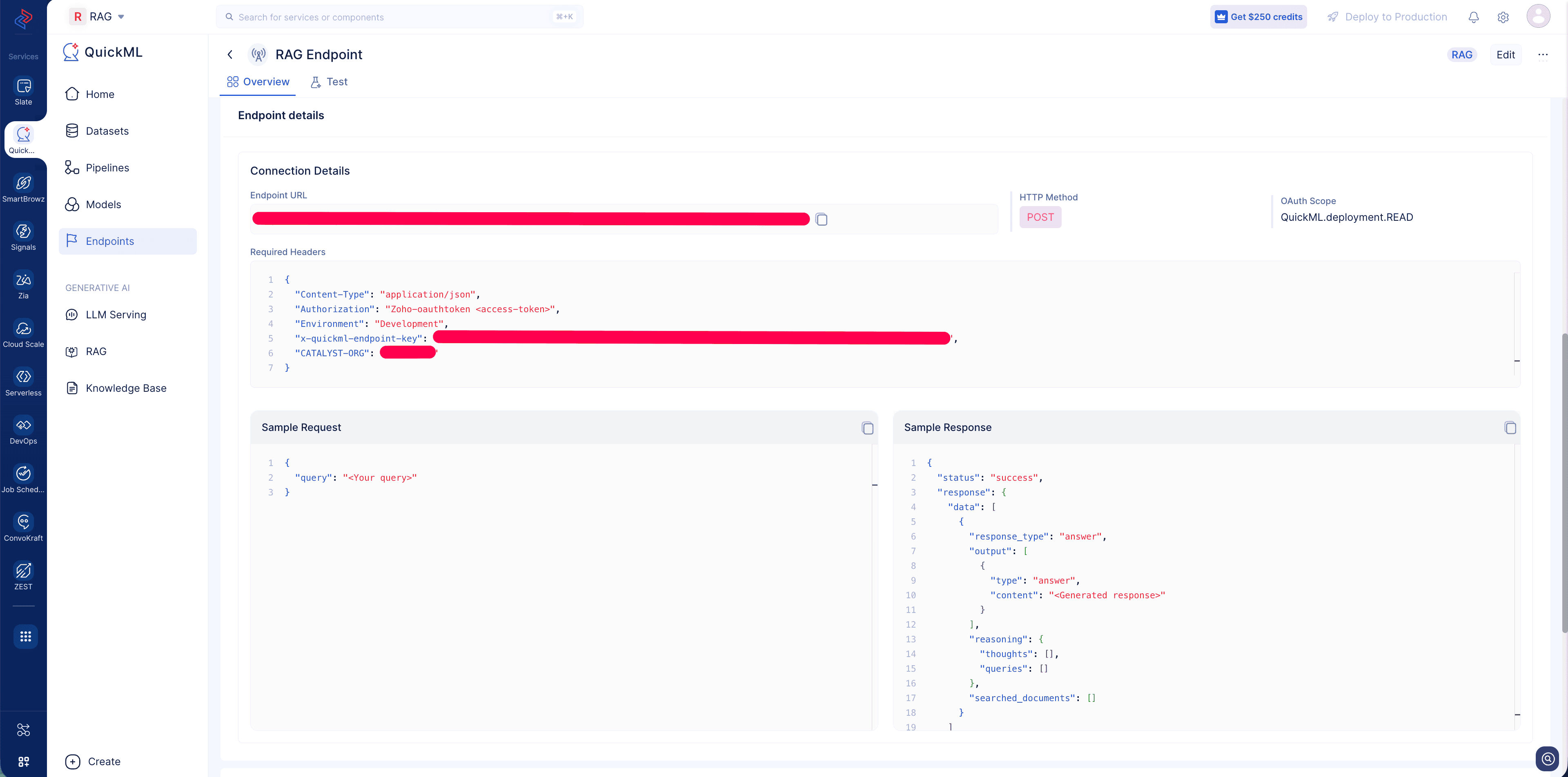
Where to find the endpoint information
Create an endpoint for your Saved RAG configuration and access the endpoint details page to view the Endpoint URL, required headers and a sample request response.
Last Updated 2026-09-23 18:41:30 +0530 IST
Yes
No
Send your feedback to us
 Ask ChatGPT
 Ask Claude
 Ask Perplexity