Execute Custom ML EndpointAdmin Scope
The code snippet given below allows you to pass input data to a published QuickML endpoint, and get the inferences from the ML model. The output returns the prediction of the values of the target column that is defined while creating the ML pipeline.
-
You will need to have the LLM endpoint created and published in your project using the Catalyst console, before you execute the code snippets below.
-
The model and its parameters are fixed at the time of endpoint creation and cannot be overridden through the SDK.
-
QuickML is currently available to Catalyst users accessing from the US, IN, & EU data centers.
The QuickML instance is created as shown below. Creating the instance does not make a server-side call. You can then define an input object containing the data to be passed to the model endpoint as key-value pairs. The keys in the input object must match the features expected by the model.
The endpointKey is the unique ID of the endpoint published for the ML model configured in your project. Pass the endpoint key and input data to the runInference(endpointKey, inputData) method to run inference on the model. The app reference used in the code below is the Catalyst app instance returned during SDK initialization.
Sample Code Snippet
 //ML-endpoint change method name for ml endpoint predict to runInference
    const app = await zcAuth.init(req);
    const quickML = new QuickML(app);
    //ml endpoint
    const endpointKey = "";
   // Replace with your model input.
   // The input object should match the features expected by your model.
  const inputData = {
    "": "",
    "": ""
   };
   const predictionResponse = await quickML.runInference(endpointKey,inputData);
console.log(predictionResponse);
The syntax of the model response received is shown below:
{
    "status": "success",
    "result": [
        {
            "prediction": "1",
            "confidence": 0.87
        }
    ]
}
Parameters Used
| Parameter Name | Definition |
|---|---|
| endpointKey | A mandatory parameter. Will store the unique ID of the endpoint published for the ML model. |
| inputData | A mandatory parameter. Will pass the required data input to the endpoint. |
The predict(endpointKey, inputData) method continues to be supported for existing implementations and performs the same operation as runInference(endpointKey, inputData). We recommend using runInference() in new implementations for consistency with the updated QuickML SDK methods.
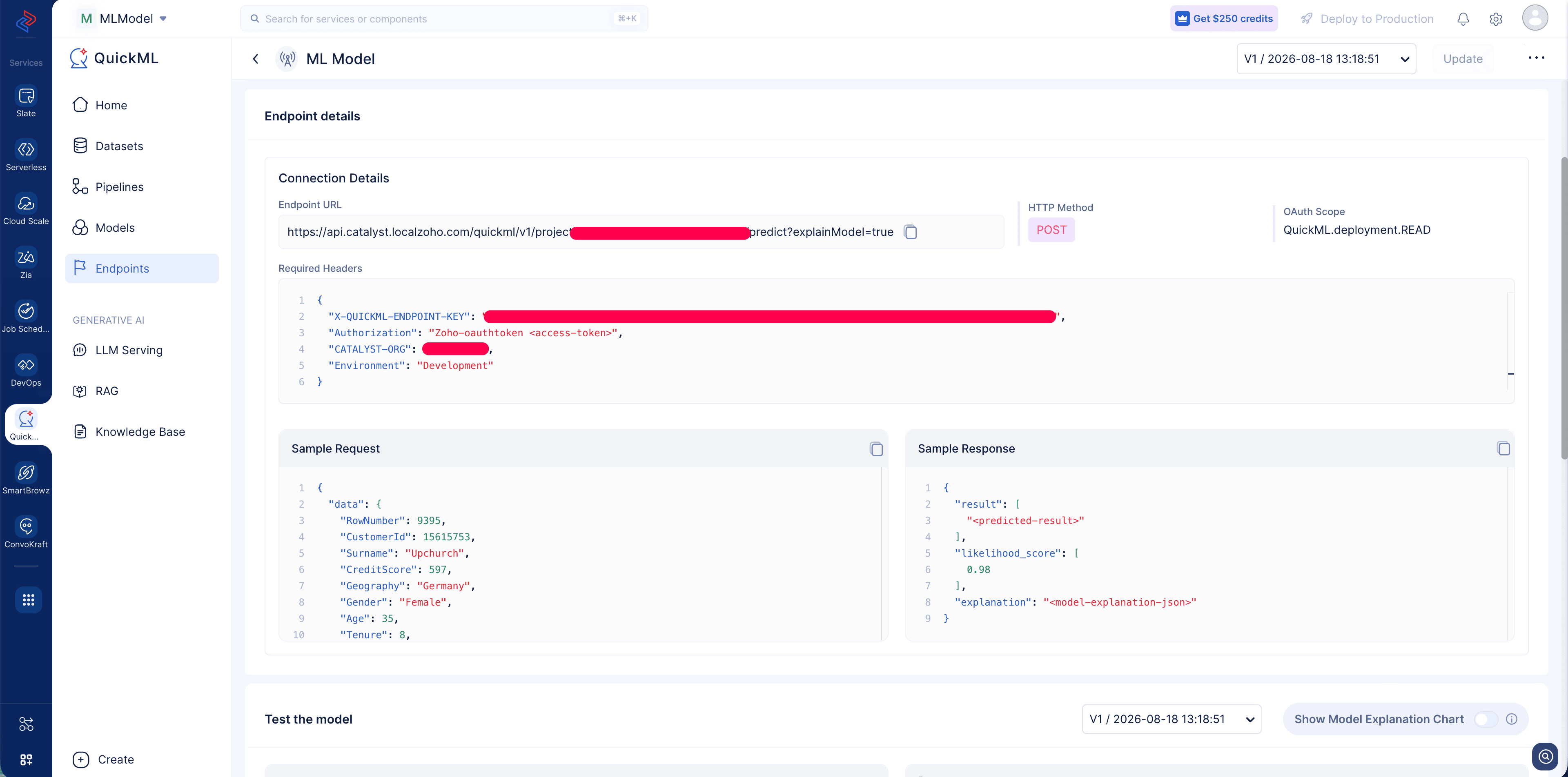
Where to find the endpoint information?
Create an endpoint for your trained ML model and access its endpoint details page in the Catalyst console. The page provides the Endpoint URL, required headers, and a sample request and response.
Last Updated 2026-09-15 11:25:13 +0530 IST
Yes
No
Send your feedback to us
 Ask ChatGPT
 Ask Claude
 Ask Perplexity