Execute Custom ML Endpoint
The code snippet given below allows you to pass input data to a published QuickML endpoint and retrieve the inference results from the ML model. The response contains the prediction generated by the ML model based on the input features provided.
-
You will need to have the ML pipeline and the model’s endpoint configured and published in your project using the Catalyst console, before you execute this code to predict the outcome with the code snippet below.
-
QuickML is currently available to Catalyst users accessing from the US, IN, EU, JP, SA, or CA data centres.
The ZCQuickML instance is initialized using the getInstance() method. This initialization does not make a server-side call.
You must then create a HashMap containing the input data required by the ML model as key-value pairs. The keys in the HashMap must match the feature names expected by the trained model, and the corresponding values must contain the input data for those features.
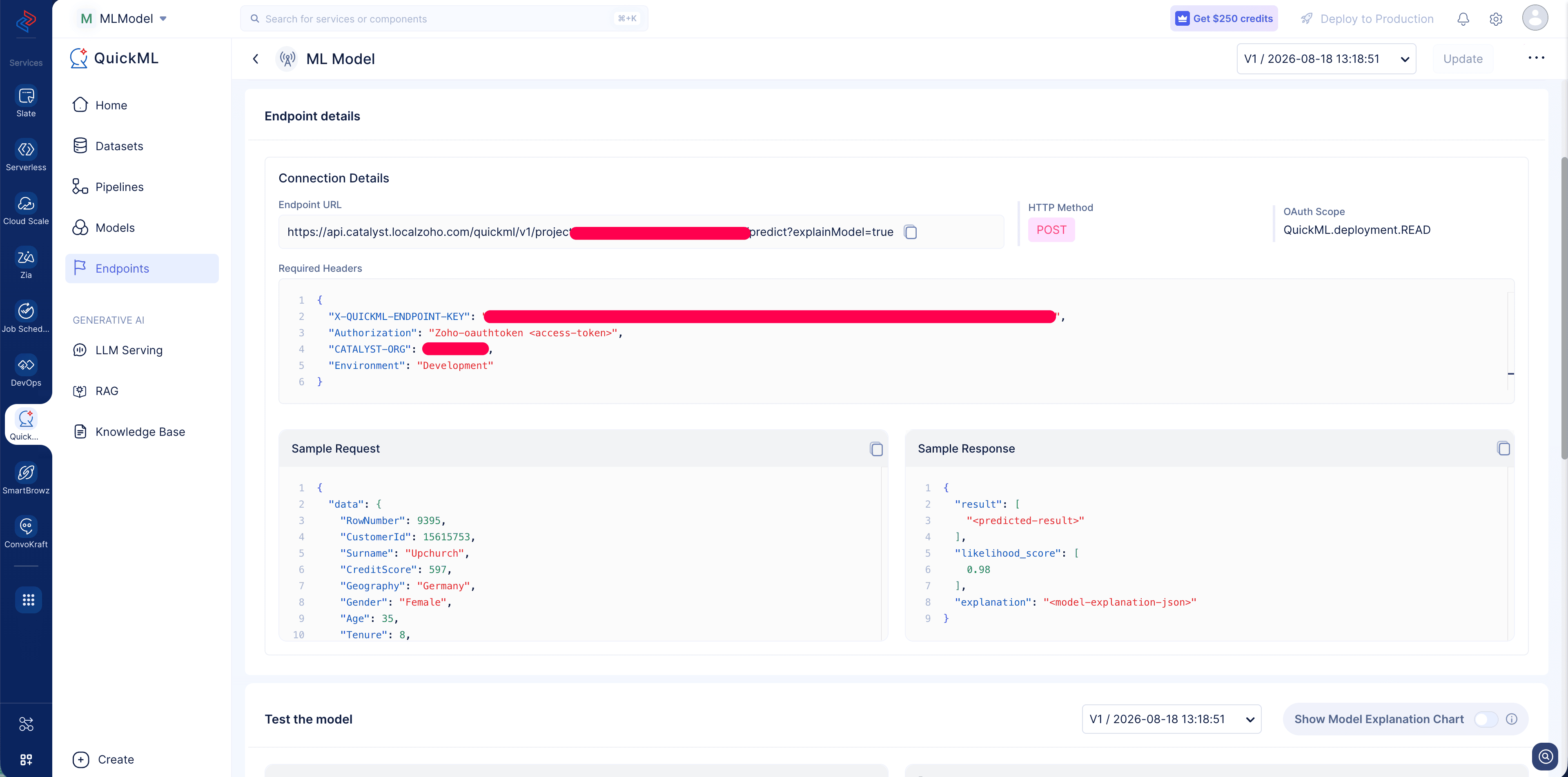
The endpointKey is the unique identifier of the endpoint published for the ML model in your Catalyst project.
The endpoint key and input data are passed to the runInference(endpointKey, input_data) method to execute the ML endpoint. The runInference() method returns a ZCQuickMLDetail object containing the inference response.
Sample Code Snippet
//ML-endpoint change method name for ml endpoint predict to runInference
HashMap input_data = new HashMap<>();
// Give the column names and values based on your dataset.
map.put("<FEATURE_1>", “<VALUE_1>”);
map.put("<FEATURE_2>", “<VALUE_2>”);
map.put("<FEATURE_3>", “<VALUE_3>”);
ZCQuickML quickMlInstance = ZCQuickML.getInstance();
String endpointKey = “<ENDPOINT_KEY>”;
ZCQuickMLDetail result = quickMlInstance.runInference(endpointKey, input_data);
System.out.println(result.getResponse());
The syntax of the model response received is shown below:
{
  "status": "success",
  "result": [
    {
      "prediction": "1",
      "confidence": 0.87
    }
  ]
}
Parameters Used
| Parameter Name | Definition |
|---|---|
| endpointKey | A mandatory parameter that specifies the unique ID of the endpoint published for the ML model. |
| input_data | A mandatory parameter that contains the input data required by the ML model as key-value pairs. The keys must match the features expected by the trained model. |
-
The
predict(endpointKey, input_data)method continues to be supported for existing implementations and performs the same operation as runInference(endpointKey, input_data). -
We recommend using
runInference()in new implementations for consistency with the other QuickML SDK methods.
Where to Find the Endpoint Information?
Create an endpoint for your trained ML model and open the endpoint details page in the Catalyst console. The endpoint details page provides information such as the Endpoint URL, required headers, and sample request and response .
Last Updated 2026-09-09 16:31:45 +0530 IST
Yes
No
Send your feedback to us
 Ask ChatGPT
 Ask Claude
 Ask Perplexity