Definir Respuestas del Bot
Esta sección proporciona información detallada sobre las diversas estructuras de respuesta que pueden configurarse en el bot de ConvoKraft. Puedes configurar respuestas para acciones que proporcionen respuestas directas o basadas en lógica de negocio definida. Discutiremos los tipos de respuestas y su sintaxis en esta sección.
Respuesta Directa
Cuando creas una acción que responde basándose en la respuesta directa configurada, puedes dar formato a la respuesta según tus necesidades específicas usando las opciones listadas a continuación.
- Bold
- Italics
- Underline
- Strikethrough
- Highlight
- Heading
- Bullet list
- Numbered List
- Image
- Blockquote
- Table
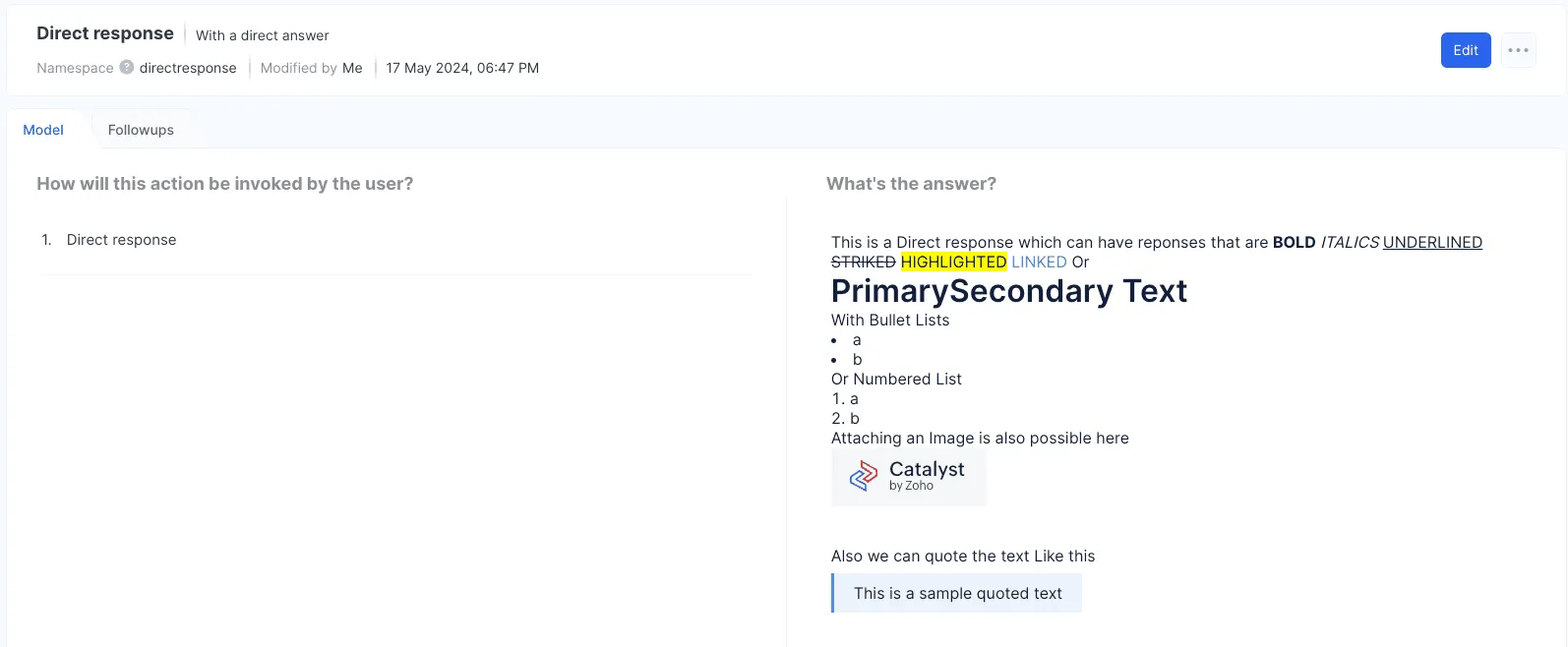
Puedes usar los menús de formato justo arriba del editor, simplemente haz clic en ellos para aplicar el formato particular. La captura de pantalla a continuación muestra una respuesta formateada con todos los estilos aplicables.
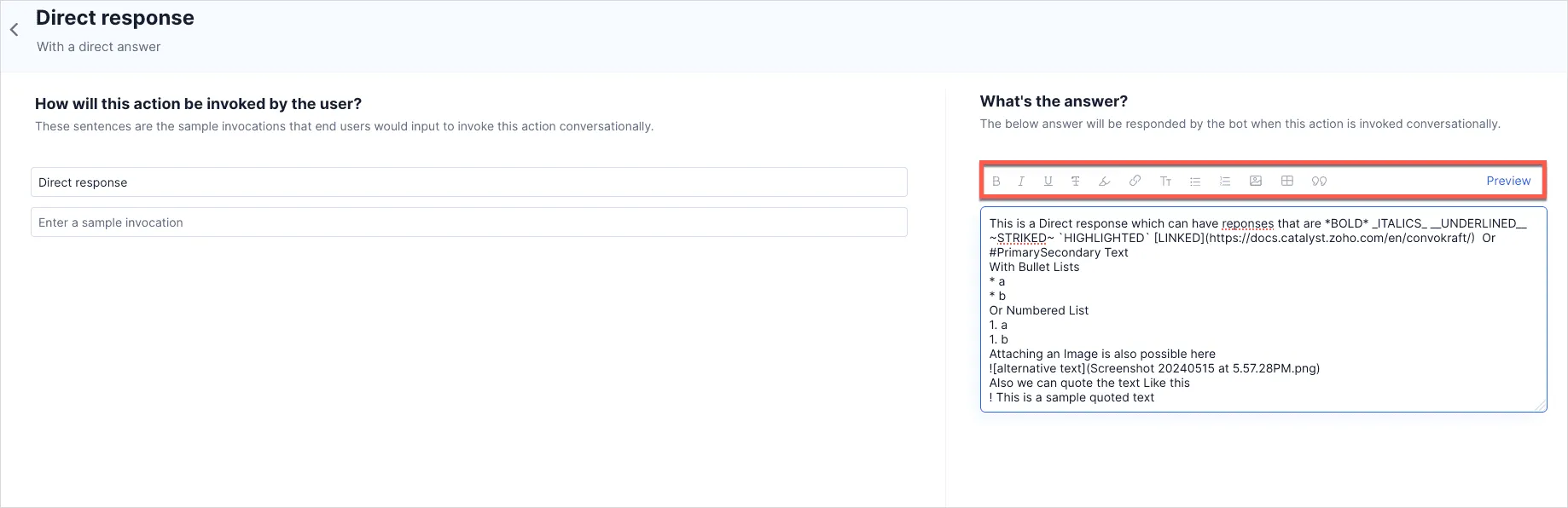
Click on Preview to view the output text of the formatted response.
Al crear una acción que responde basándose en la lógica de negocio configurada, puedes configurar diversas respuestas en la Catalyst Integration Function, Deluge, o Webhooks usando las sintaxis a continuación. Exploremos los diferentes tipos de respuestas y sus estructuras en detalle.
Texto Plano
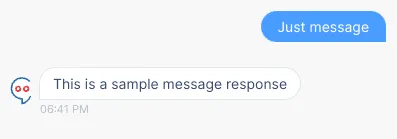
Para enviar un mensaje de texto simple como respuesta a una consulta del usuario en el bot de ConvoKraft, utiliza la siguiente estructura.
JSON
{
 "message": "This is a sample message response"
}
Java
public class ExecuteHandler {
public JSONObject handleExecuteRequest(JSONObject reqBody) {
JSONObject jsonResponse = new JSONObject();
jsonResponse.put("message", "This is a sample message response");
}
return jsonResponse;
}
Node.js
export default function handleExecute(request) {
let result={};
result.message="This is a sample message response";
return result;
}
Python
def handle_execute_request(req_body):
result = {}
result['message'] = "This is a sample message response"
return result
La respuesta se ve así:
Tarjeta
Para configurar una respuesta de tarjeta en el bot de ConvoKraft, sigue las siguientes estructuras a continuación. Puedes aprender más sobre la configuración de una respuesta de tarjeta específicamente en la función de Deluge, en this section.
Tarjeta simple con título y nota
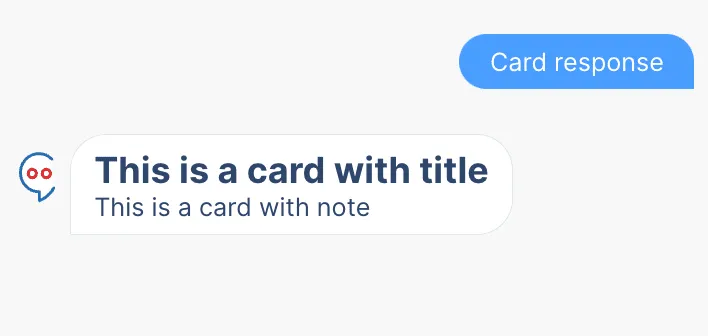
Este fragmento de código te permite definir un mensaje simple en la tarjeta que incluye un título y una nota.
JSON
{
 "message": "Plain Card response",
 "card": [
 {
 "type": "title",
 "content": "This is a card with title"
 },
 {
 "type": "note",
 "content": "This is a card with note"
 }
 ]
}
Java
public class ExecuteHandler {
public JSONObject handleExecuteRequest(JSONObject reqBody) {
JSONObject jsonResponse = new JSONObject();
jsonResponse.put("card", new JSONArray()
 .put(new JSONObject().put("type", "title").put("content", "This is a card with title"))
 .put(new JSONObject().put("type", "note").put("content", "This is a card with note")));}
return jsonResponse;
}
Node.js
export default function handleExecute(request) {
let result={};
result.card=[];
result.card.push({
 "type":"title",
 "content":"This is a card with title"
 })
 result.card.push({
 "type":"note",
 "content":"This is a card with note"
 })
 return result;
 }
Python
def handle_execute_request(req_body):
result = {}
result['card'] = [
 {"type": "title", "content": "This is a card with title"},
 {"type": "note", "content": "This is a card with note"}
 ]
return result
La respuesta se ve así:
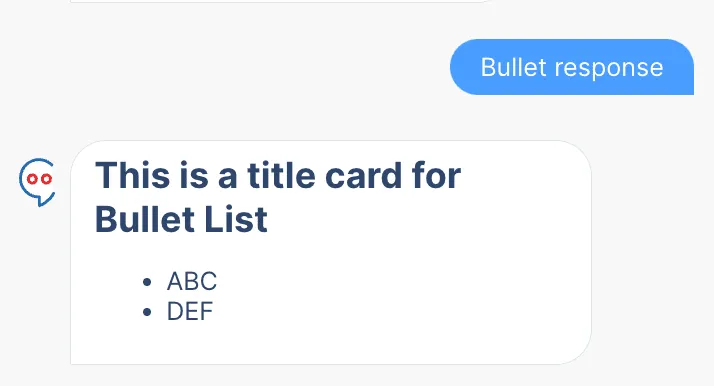
Tarjeta con Lista de Viñetas
Este fragmento de código te permite definir una lista de viñetas dentro de la tarjeta en la respuesta de ConvoKraft.
JSON
{
 "message": "Bullet List RESPONSE",
 "card": [
 {
 "type": "title",
 "content": "This is a title card for Bullet List"
 },
 {
 "type": "list",
 "format": "bullet",
 "elements": [
 {
 "label": "ABC"
 },
 {
 "label": "DEF"
 }
 ]
 }
 ]
}
Java
public class ExecuteHandler {
public JSONObject handleExecuteRequest(JSONObject reqBody) {
JSONObject jsonResponse = new JSONObject();
jsonResponse.put("card", new JSONArray()
 .put(new JSONObject().put("type", "title").put("content", "This is a title card for Bullet List"))
 .put(new JSONObject().put("type", "list").put("format", "bullet").put("elements", new JSONArray()
 .put(new JSONObject().put("label", "ABC"))
 .put(new JSONObject().put("label", "DEF")))));return jsonResponse;
}
Node.js
export default function handleExecute(request) {
let result={};
result.card=[];
result.card.push({
 "type":"title",
 "content":"This is a title card for Bullet List"
 })
 result.card.push({
 "type":"list",
 "format":"bullet",
 "elements":[
 {
 "label":"ABC"
 },
 {
 "label":"DEF"
 }
 ]
 });
 return result;
 }
Python
def handle_execute_request(req_body):
result = {}
result['card'] = [
 {"type": "title", "content": "This is a title card for Bullet List"},
 {"type": "list", "format": "bullet", "elements": [{"label": "ABC"}, {"label": "DEF"}]}
 ]
return result
La respuesta en el bot se ve así:
Tarjeta con Lista Numerada
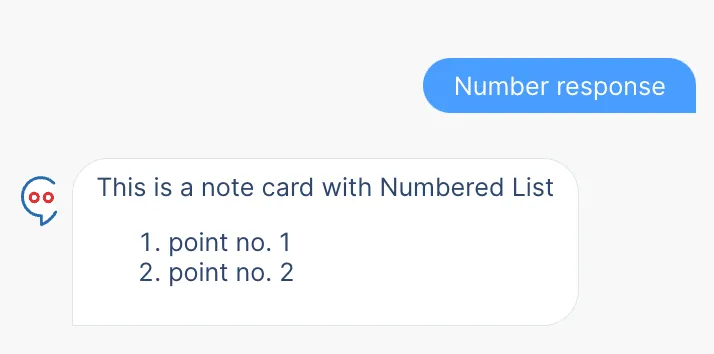
Este fragmento de código te permite definir una lista numerada dentro de la tarjeta en la respuesta de ConvoKraft.
JSON
{
 "message": "Numbered List RESPONSE",
 "card": [
 {
 "type": "note",
 "content": "This is a note card with Numbered List"
 },
 {
 "type": "list",
 "format": "numbered",
 "elements": [
 {
 "label": "point no. 1"
 },
 {
 "label": "point no. 2"
 }
 ]
 }
 ]
}
Java
public class ExecuteHandler
{
public JSONObject handleExecuteRequest(JSONObject reqBody) {
JSONObject jsonResponse = new JSONObject();
jsonResponse.put("card", new JSONArray()
 .put(new JSONObject().put("type", "note").put("content", "This is a note card with Numbered List"))
 .put(new JSONObject().put("type", "list").put("format", "numbered").put("elements", new JSONArray()
 .put(new JSONObject().put("label", "point no. 1"))
 .put(new JSONObject().put("label", "point no. 2")))));
return jsonResponse;
}
Node.js
export default function handleExecute(request) {
let result={};
result.card=[];
 result.card.push({
 "type":"note",
 "content":"This is a note card with Numbered List"
 })
result.card.push({
 "type":"list",
 "format":"numbered",
 "elements":[
 {
 "label":"point no. 1"
 },
 {
 "label":"point no. 2"
 }
 ]
 });
 return result;
 }
Python
def handle_execute_request(req_body):
result = {}
result['card'] = [
 {"type": "note", "content": "This is a note card with Numbered List"},
 {"type": "list", "format": "numbered", "elements": [{"label": "point no. 1"}, {"label": "point no. 2"}]}
 ]
return result
La respuesta en el bot se ve así:
Respuesta con Enlace
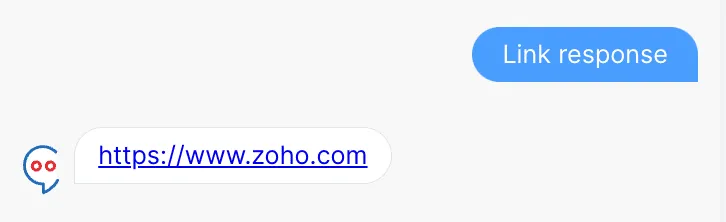
Este fragmento de código te permite enviar un hipervínculo dentro de la tarjeta en la respuesta de ConvoKraft.
JSON
{
 "message": "LINK RESPONSE",
 "card": [
 {
 "type": "link",
 "text": "Click Here to Know about ZOHO",
 "content": "https://www.zoho.com"
 }
 ]
}
Java
public class ExecuteHandler {
public JSONObject handleExecuteRequest(JSONObject reqBody) {
JSONObject jsonResponse = new JSONObject();
jsonResponse.put("card", new JSONArray()
 .put(new JSONObject().put("type", "link").put("text", "Click Here to Know about ZOHO").put("content", "https://www.zoho.com")));
return jsonResponse;
}
Node.js
export default function handleExecute(request) {
let result={};
result.card=[];
 result.card.push({
 "type":"link",
 "text":"Click Here to Know about ZOHO",
 "content":"https://www.zoho.com"
 })
return result;
 }
Python
def handle_execute_request(req_body):
result = {}
result['card'] = [
 {"type": "link", "text": "Click Here to Know about ZOHO", "content": "https://www.zoho.com"}
 ]
return result
La respuesta en el bot se ve así:
Respuesta con Tabla
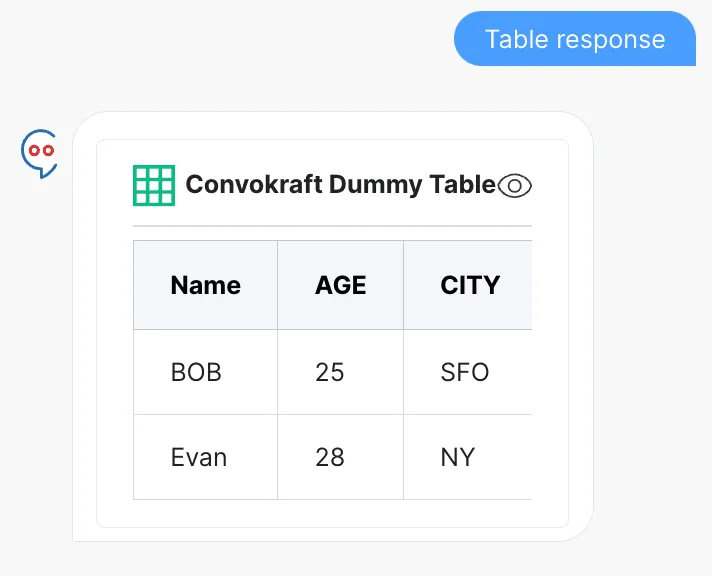
Este fragmento de código te permite mostrar una tabla con valores dentro de la tarjeta en la respuesta de ConvoKraft.
JSON
{
 "message": "TABLE RESPONSE",
 "card": [
 {
 "type": "table",
 "heading": "Convokraft Dummy Table",
 "columns": [
 "Name",
 "AGE",
 "CITY"
 ],
 "rows": [
 [
 "BOB",
 "25",
 "SFO"
 ],
 [
 "Evan",
 "28",
 "NY"
 ]
 ]
 }
 ]
}
Java
public class ExecuteHandler {
public JSONObject handleExecuteRequest(JSONObject reqBody) {
JSONObject jsonResponse = new JSONObject();
jsonResponse.put("card", new JSONArray()
 .put(new JSONObject().put("type", "table").put("heading", "Convokraft Dummy Table").put("columns", new JSONArray()
 .put("Name").put("AGE").put("CITY")).put("rows", new JSONArray()
 .put(new JSONArray().put("BOB").put("25").put("SFO"))
 .put(new JSONArray().put("Evan").put("28").put("NY")))));
return jsonResponse;
}
Node.js
export default function handleExecute(request) {
let result={};
result.card=[];
 result.card.push({
 "type":"table",
 "heading":"Convokraft Dummy Table ",
 "columns":[
 "Name",
 "AGE",
 "CITY"
 ],
 "rows":[
 [
 "BOB",
 "25",
 "SFO"
 ],
 [
 "Evan",
 "28",
 "NY"
 ]
 ]
 })
return result;
 }
Python
def handle_execute_request(req_body):
result = {}
result['card'] = [
 {"type": "table", "heading": "Convokraft Dummy Table", "columns": ["Name", "AGE", "CITY"],
 "rows": [["BOB", "25", "SFO"], ["Evan", "28", "NY"]]}
 ]
return result
La respuesta en el bot se ve así:
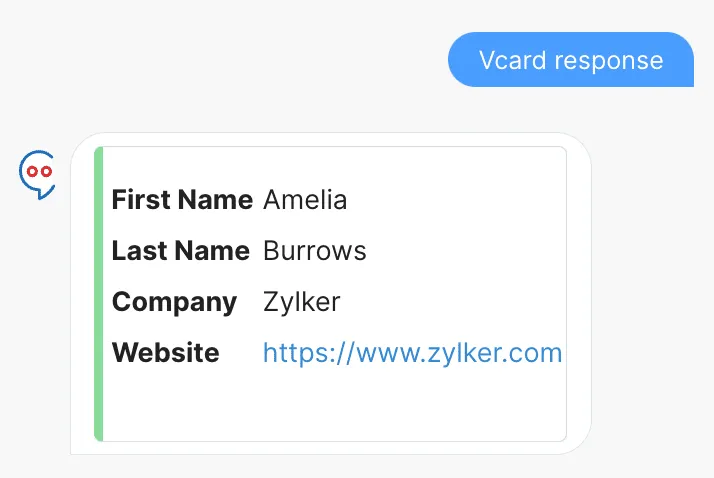
Respuesta VCard
Este fragmento de código te permite definir información de contacto incluyendo nombre, apellido, nombre de la empresa y sitio web dentro de la tarjeta en la respuesta de ConvoKraft.
JSON
{
 "message": "VCard Response",
 "card": [
 {
 "type": "vcard",
 "info": {
 "image": "https://contacts.zoho.com/file?ID=53157432",
 "fields": [
 {
 "First Name": "Prashaanth"
 },
 {
 "Last Name": "Ramesh"
 },
 {
 "Company": "Zoho"
 },
 {
 "Website": "https://www.zoho.com"
 }
 ]
 }
 }
 ]
}
Java
public class ExecuteHandler {
public JSONObject handleExecuteRequest(JSONObject reqBody) {
JSONObject jsonResponse = new JSONObject();
jsonResponse.put("card", new JSONArray()
 .put(new JSONObject().put("type", "vcard").put("info", new JSONObject().put("image", "https://contacts.zoho.com/file?ID=53157432").put("fields", new JSONArray()
 .put(new JSONObject().put("First Name", "Prashaanth"))
 .put(new JSONObject().put("Last Name", "Ramesh"))
 .put(new JSONObject().put("Company", "Zoho"))
 .put(new JSONObject().put("Website", "https://www.zoho.com"))))));
return jsonResponse;
}
Node.js
export default function handleExecute(request) {
let result={};
result.card=[];
 result.card.push({
 "type":"vcard",
 "info":{
 "image":"https://contacts.zoho.com/file?ID=53157432",
 "fields":[
 {
 "First Name":"Prashaanth"
 },
 {
 "Last Name":"Ramesh"
 },
 {
 "Company":"Zoho"
 },
 {
 "Website":"https://www.zoho.com"
 }
 ]
 }
 })
return result;
}
Python
def handle_execute_request(req_body):
result = {}
result['card'] = [
 {"type": "vcard", "info": {"image": "https://contacts.zoho.com/file?ID=53157432",
 "fields": [{"First Name": "Prashaanth"}, {"Last Name": "Ramesh"},
 {"Company": "Zoho"}, {"Website": "https://www.zoho.com"}]}}
 ]
return result
La respuesta en el bot se ve así:
Respuesta con Archivo
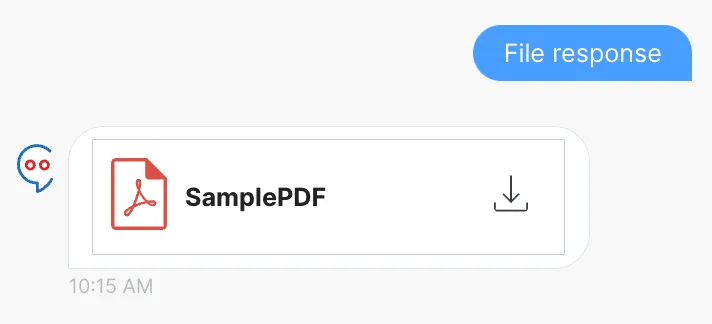
Este fragmento de código te permite enviar un archivo dentro de la tarjeta en la respuesta de ConvoKraft.
JSON
{
 "message": "FILE Response",
 "card": [
 {
 "type": "file",
 "name": "SamplePDF",
 "format": "pdf", // Extensión de archivo
 "content": "https://pdfobject.com/pdf/sample.pdf"
 }
 ]
}
Java
public class ExecuteHandler {
public JSONObject handleExecuteRequest(JSONObject reqBody) {
JSONObject jsonResponse = new JSONObject();
jsonResponse.put("card", new JSONArray()
 .put(new JSONObject().put("type", "file").put("name", "SamplePDF").put("format", "pdf").put("content", "https://pdfobject.com/pdf/sample.pdf")));return jsonResponse;
}
Node.js
export default function handleExecute(request) {
let result={};
result.card=[];
 result.card.push({
 "type":"file",
 "name":"SamplePDF",
 "format":"pdf", // Extensión de archivo
 "content":"https://pdfobject.com/pdf/sample.pdf"
 })
return result;
}
Python
def handle_execute_request(req_body):
result = {}
result['card'] = [
 {"type": "file", "name": "SamplePDF", "format": "pdf", "content": "https://pdfobject.com/pdf/sample.pdf"}
 ]
return result
La respuesta en el bot se ve así:
Última actualización 2026-08-17 17:46:04 +0530 IST
Yes
No
Send your feedback to us
 Ask ChatGPT
 Ask Claude
 Ask Perplexity