Bot応答の定義
このセクションでは、ConvoKraft Botに設定できるさまざまな応答構造について詳しく説明します。Actionsの応答をDirect answerまたは定義済みのBusiness Logicに基づいて設定できます。このセクションでは、応答の種類とその構文について説明します。
Direct Answer応答
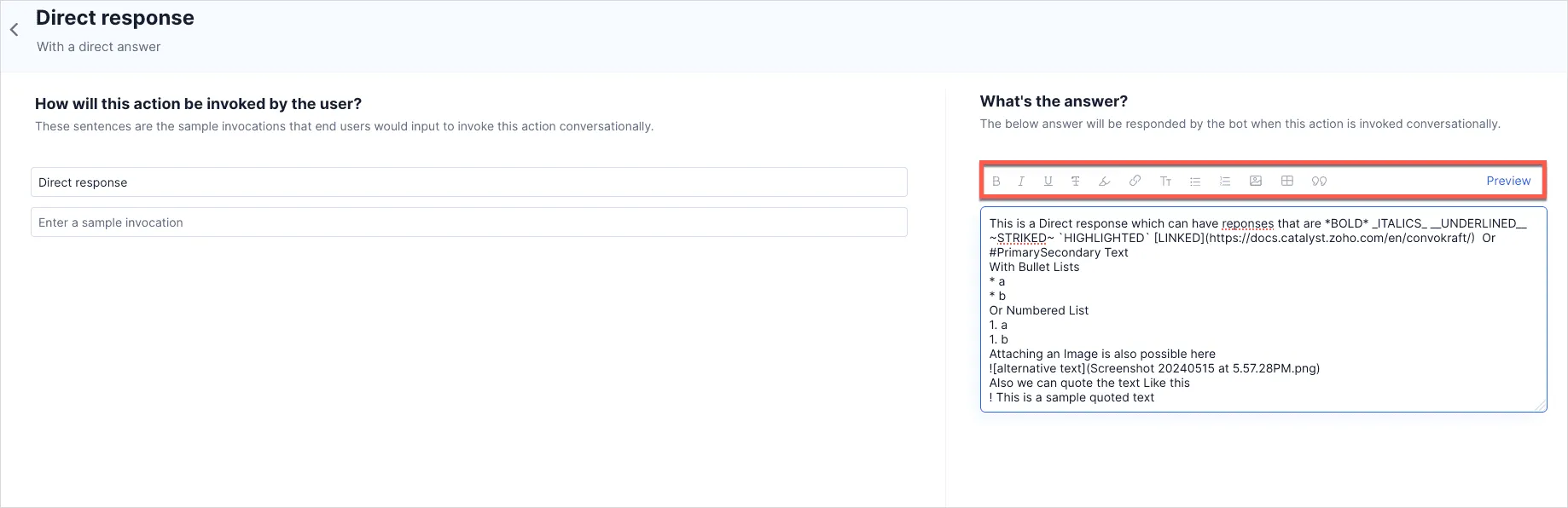
Actionを作成し、設定されたDirect answerに基づいて応答する場合、以下のオプションを使用して特定のニーズに合わせて回答をフォーマットできます。
- 太字
- 斜体
- 下線
- 取り消し線
- ハイライト
- 見出し
- 箇条書きリスト
- 番号付きリスト
- 画像
- 引用
- テーブル
エディタの上部にあるフォーマットメニューを使用し、クリックするだけで特定のフォーマットを適用できます。以下のスクリーンショットは、適用可能なすべてのスタイルでフォーマットされた回答を示しています。
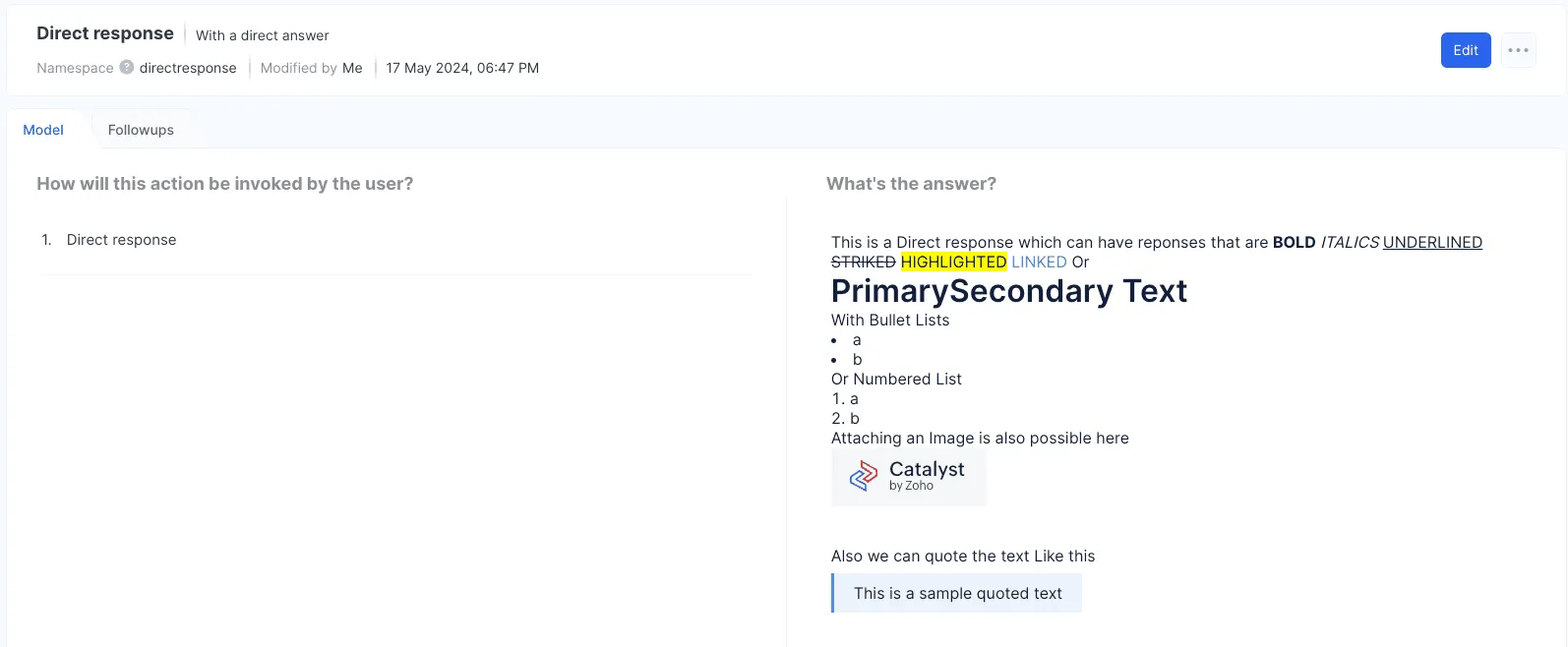
Previewをクリックして、フォーマットされた応答の出力テキストを表示します。
設定されたBusiness Logicに基づいて応答するActionを作成する場合、以下の構文を使用してCatalyst Integration Function、Deluge、またはWebhooksでさまざまな応答を設定できます。さまざまな応答の種類とその構造を詳しく見ていきましょう。
プレーンテキスト
ConvoKraft Botでユーザーのクエリに対してシンプルなテキストメッセージを応答として送信するには、以下の構造を使用してください。
JSON
{
 "message": "This is a sample message response"
}
Java
public class ExecuteHandler {
public JSONObject handleExecuteRequest(JSONObject reqBody) {
JSONObject jsonResponse = new JSONObject();
jsonResponse.put("message", "This is a sample message response");
}
return jsonResponse;
}
Node.js
export default function handleExecute(request) {
let result={};
result.message="This is a sample message response";
return result;
}
Python
def handle_execute_request(req_body):
result = {}
result['message'] = "This is a sample message response"
return result
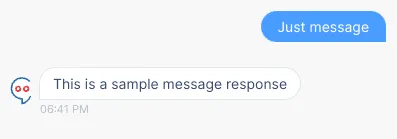
応答は以下のように表示されます:
カード
ConvoKraft Botでカード応答を設定するには、以下の構造に従ってください。Deluge関数でのカード応答の設定の詳細については、こちらのセクションをご覧ください。
タイトルとノート付きのプレーンカード
このコードスニペットでは、タイトルとノートを含むカード内のシンプルなメッセージを定義できます。
JSON
{
 "message": "Plain Card response",
 "card": [
 {
 "type": "title",
 "content": "This is a card with title"
 },
 {
 "type": "note",
 "content": "This is a card with note"
 }
 ]
}
Java
public class ExecuteHandler {
public JSONObject handleExecuteRequest(JSONObject reqBody) {
JSONObject jsonResponse = new JSONObject();
jsonResponse.put("card", new JSONArray()
 .put(new JSONObject().put("type", "title").put("content", "This is a card with title"))
 .put(new JSONObject().put("type", "note").put("content", "This is a card with note")));}
return jsonResponse;
}
Node.js
export default function handleExecute(request) {
let result={};
result.card=[];
result.card.push({
 "type":"title",
 "content":"This is a card with title"
 })
 result.card.push({
 "type":"note",
 "content":"This is a card with note"
 })
 return result;
 }
Python
def handle_execute_request(req_body):
result = {}
result['card'] = [
 {"type": "title", "content": "This is a card with title"},
 {"type": "note", "content": "This is a card with note"}
 ]
return result
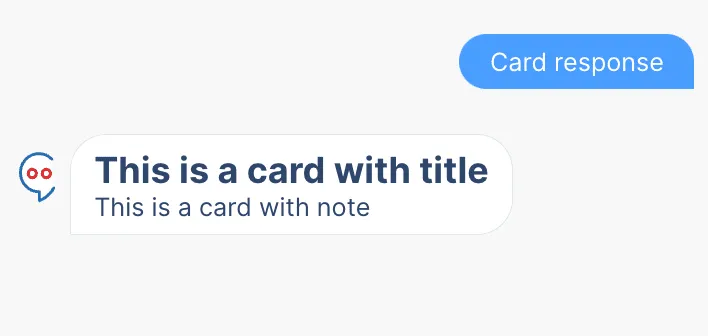
応答は以下のように表示されます:
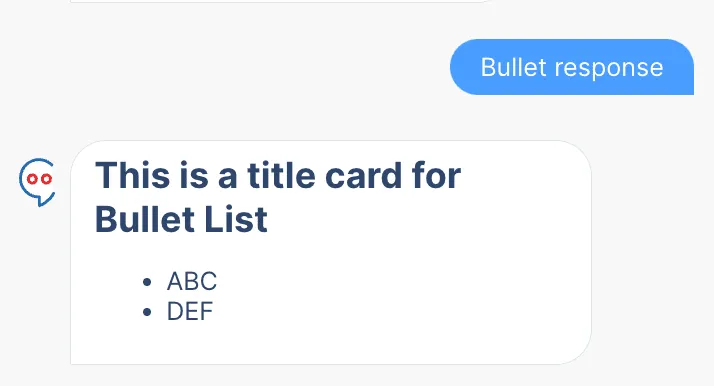
箇条書きリストカード
このコードスニペットでは、ConvoKraft応答のカード内に箇条書きリストを定義できます。
JSON
{
 "message": "Bullet List RESPONSE",
 "card": [
 {
 "type": "title",
 "content": "This is a title card for Bullet List"
 },
 {
 "type": "list",
 "format": "bullet",
 "elements": [
 {
 "label": "ABC"
 },
 {
 "label": "DEF"
 }
 ]
 }
 ]
}
Java
public class ExecuteHandler {
public JSONObject handleExecuteRequest(JSONObject reqBody) {
JSONObject jsonResponse = new JSONObject();
jsonResponse.put("card", new JSONArray()
 .put(new JSONObject().put("type", "title").put("content", "This is a title card for Bullet List"))
 .put(new JSONObject().put("type", "list").put("format", "bullet").put("elements", new JSONArray()
 .put(new JSONObject().put("label", "ABC"))
 .put(new JSONObject().put("label", "DEF")))));return jsonResponse;
}
Node.js
export default function handleExecute(request) {
let result={};
result.card=[];
result.card.push({
 "type":"title",
 "content":"This is a title card for Bullet List"
 })
 result.card.push({
 "type":"list",
 "format":"bullet",
 "elements":[
 {
 "label":"ABC"
 },
 {
 "label":"DEF"
 }
 ]
 });
 return result;
 }
Python
def handle_execute_request(req_body):
result = {}
result['card'] = [
 {"type": "title", "content": "This is a title card for Bullet List"},
 {"type": "list", "format": "bullet", "elements": [{"label": "ABC"}, {"label": "DEF"}]}
 ]
return result
Botでの応答は以下のように表示されます:
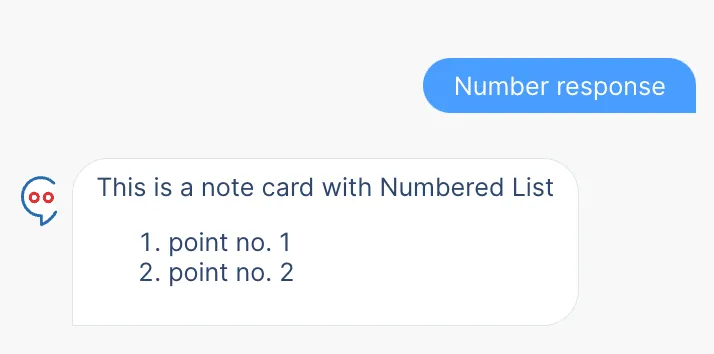
番号付きリストカード
このコードスニペットでは、ConvoKraft応答のカード内に番号付きリストを定義できます。
JSON
{
 "message": "Numbered List RESPONSE",
 "card": [
 {
 "type": "note",
 "content": "This is a note card with Numbered List"
 },
 {
 "type": "list",
 "format": "numbered",
 "elements": [
 {
 "label": "point no. 1"
 },
 {
 "label": "point no. 2"
 }
 ]
 }
 ]
}
Java
public class ExecuteHandler
{
public JSONObject handleExecuteRequest(JSONObject reqBody) {
JSONObject jsonResponse = new JSONObject();
jsonResponse.put("card", new JSONArray()
 .put(new JSONObject().put("type", "note").put("content", "This is a note card with Numbered List"))
 .put(new JSONObject().put("type", "list").put("format", "numbered").put("elements", new JSONArray()
 .put(new JSONObject().put("label", "point no. 1"))
 .put(new JSONObject().put("label", "point no. 2")))));
return jsonResponse;
}
Node.js
export default function handleExecute(request) {
let result={};
result.card=[];
 result.card.push({
 "type":"note",
 "content":"This is a note card with Numbered List"
 })
result.card.push({
 "type":"list",
 "format":"numbered",
 "elements":[
 {
 "label":"point no. 1"
 },
 {
 "label":"point no. 2"
 }
 ]
 });
 return result;
 }
Python
def handle_execute_request(req_body):
result = {}
result['card'] = [
 {"type": "note", "content": "This is a note card with Numbered List"},
 {"type": "list", "format": "numbered", "elements": [{"label": "point no. 1"}, {"label": "point no. 2"}]}
 ]
return result
Botでの応答は以下のように表示されます:
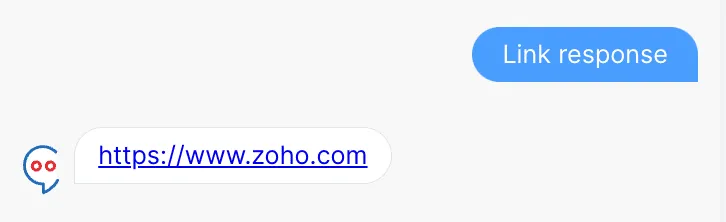
リンク応答
このコードスニペットでは、ConvoKraft応答のカード内にハイパーリンクを送信できます。
JSON
{
 "message": "LINK RESPONSE",
 "card": [
 {
 "type": "link",
 "text": "Click Here to Know about ZOHO",
 "content": "https://www.zoho.com"
 }
 ]
}
Java
public class ExecuteHandler {
public JSONObject handleExecuteRequest(JSONObject reqBody) {
JSONObject jsonResponse = new JSONObject();
jsonResponse.put("card", new JSONArray()
 .put(new JSONObject().put("type", "link").put("text", "Click Here to Know about ZOHO").put("content", "https://www.zoho.com")));
return jsonResponse;
}
Node.js
export default function handleExecute(request) {
let result={};
result.card=[];
 result.card.push({
 "type":"link",
 "text":"Click Here to Know about ZOHO",
 "content":"https://www.zoho.com"
 })
return result;
 }
Python
def handle_execute_request(req_body):
result = {}
result['card'] = [
 {"type": "link", "text": "Click Here to Know about ZOHO", "content": "https://www.zoho.com"}
 ]
return result
Botでの応答は以下のように表示されます:
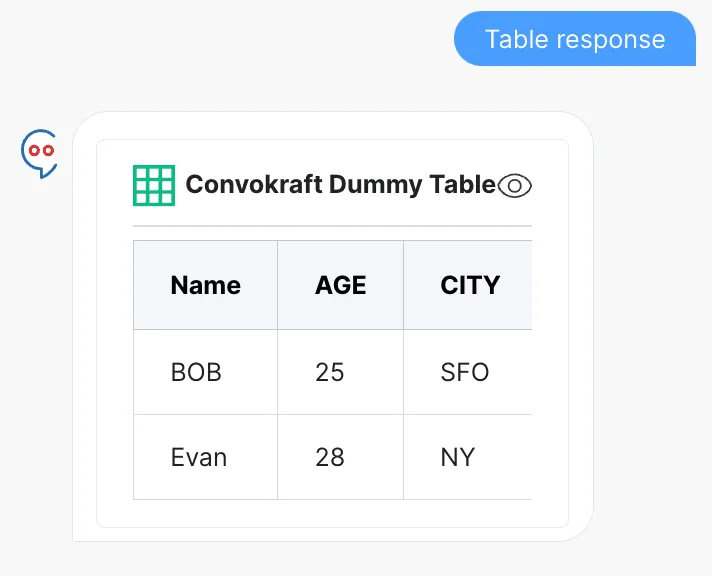
テーブル応答
このコードスニペットでは、ConvoKraft応答のカード内に値が入力されたテーブルを表示できます。
JSON
{
 "message": "TABLE RESPONSE",
 "card": [
 {
 "type": "table",
 "heading": "Convokraft Dummy Table",
 "columns": [
 "Name",
 "AGE",
 "CITY"
 ],
 "rows": [
 [
 "BOB",
 "25",
 "SFO"
 ],
 [
 "Evan",
 "28",
 "NY"
 ]
 ]
 }
 ]
}
Java
public class ExecuteHandler {
public JSONObject handleExecuteRequest(JSONObject reqBody) {
JSONObject jsonResponse = new JSONObject();
jsonResponse.put("card", new JSONArray()
 .put(new JSONObject().put("type", "table").put("heading", "Convokraft Dummy Table").put("columns", new JSONArray()
 .put("Name").put("AGE").put("CITY")).put("rows", new JSONArray()
 .put(new JSONArray().put("BOB").put("25").put("SFO"))
 .put(new JSONArray().put("Evan").put("28").put("NY")))));
return jsonResponse;
}
Node.js
export default function handleExecute(request) {
let result={};
result.card=[];
 result.card.push({
 "type":"table",
 "heading":"Convokraft Dummy Table ",
 "columns":[
 "Name",
 "AGE",
 "CITY"
 ],
 "rows":[
 [
 "BOB",
 "25",
 "SFO"
 ],
 [
 "Evan",
 "28",
 "NY"
 ]
 ]
 })
return result;
 }
Python
def handle_execute_request(req_body):
result = {}
result['card'] = [
 {"type": "table", "heading": "Convokraft Dummy Table", "columns": ["Name", "AGE", "CITY"],
 "rows": [["BOB", "25", "SFO"], ["Evan", "28", "NY"]]}
 ]
return result
Botでの応答は以下のように表示されます:
VCard応答
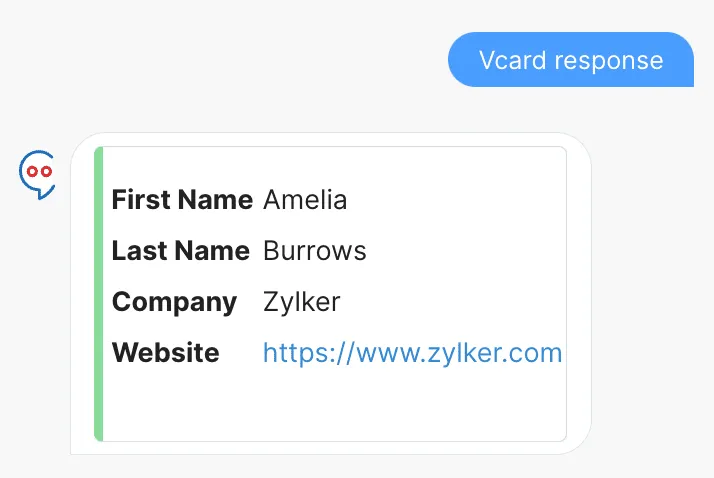
このコードスニペットでは、ConvoKraft応答のカード内に名、姓、会社名、Webサイトを含む連絡先情報を定義できます。
JSON
{
 "message": "VCard Response",
 "card": [
 {
 "type": "vcard",
 "info": {
 "image": "https://contacts.zoho.com/file?ID=53157432",
 "fields": [
 {
 "First Name": "Prashaanth"
 },
 {
 "Last Name": "Ramesh"
 },
 {
 "Company": "Zoho"
 },
 {
 "Website": "https://www.zoho.com"
 }
 ]
 }
 }
 ]
}
Java
public class ExecuteHandler {
public JSONObject handleExecuteRequest(JSONObject reqBody) {
JSONObject jsonResponse = new JSONObject();
jsonResponse.put("card", new JSONArray()
 .put(new JSONObject().put("type", "vcard").put("info", new JSONObject().put("image", "https://contacts.zoho.com/file?ID=53157432").put("fields", new JSONArray()
 .put(new JSONObject().put("First Name", "Prashaanth"))
 .put(new JSONObject().put("Last Name", "Ramesh"))
 .put(new JSONObject().put("Company", "Zoho"))
 .put(new JSONObject().put("Website", "https://www.zoho.com"))))));
return jsonResponse;
}
Node.js
export default function handleExecute(request) {
let result={};
result.card=[];
 result.card.push({
 "type":"vcard",
 "info":{
 "image":"https://contacts.zoho.com/file?ID=53157432",
 "fields":[
 {
 "First Name":"Prashaanth"
 },
 {
 "Last Name":"Ramesh"
 },
 {
 "Company":"Zoho"
 },
 {
 "Website":"https://www.zoho.com"
 }
 ]
 }
 })
return result;
}
Python
def handle_execute_request(req_body):
result = {}
result['card'] = [
 {"type": "vcard", "info": {"image": "https://contacts.zoho.com/file?ID=53157432",
 "fields": [{"First Name": "Prashaanth"}, {"Last Name": "Ramesh"},
 {"Company": "Zoho"}, {"Website": "https://www.zoho.com"}]}}
 ]
return result
Botでの応答は以下のように表示されます:
ファイル応答
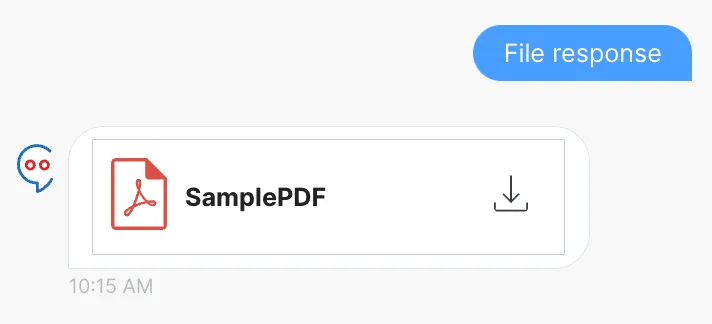
このコードスニペットでは、ConvoKraft応答のカード内にファイルを送信できます。
JSON
{
 "message": "FILE Response",
 "card": [
 {
 "type": "file",
 "name": "SamplePDF",
 "format": "pdf", // ファイル拡張子
 "content": "https://pdfobject.com/pdf/sample.pdf"
 }
 ]
}
Java
public class ExecuteHandler {
public JSONObject handleExecuteRequest(JSONObject reqBody) {
JSONObject jsonResponse = new JSONObject();
jsonResponse.put("card", new JSONArray()
 .put(new JSONObject().put("type", "file").put("name", "SamplePDF").put("format", "pdf").put("content", "https://pdfobject.com/pdf/sample.pdf")));return jsonResponse;
}
Node.js
export default function handleExecute(request) {
let result={};
result.card=[];
 result.card.push({
 "type":"file",
 "name":"SamplePDF",
 "format":"pdf", // ファイル拡張子
 "content":"https://pdfobject.com/pdf/sample.pdf"
 })
return result;
}
Python
def handle_execute_request(req_body):
result = {}
result['card'] = [
 {"type": "file", "name": "SamplePDF", "format": "pdf", "content": "https://pdfobject.com/pdf/sample.pdf"}
 ]
return result
Botでの応答は以下のように表示されます:
最終更新日 2026-08-17 17:46:04 +0530 IST
Yes
No
Send your feedback to us
 Ask ChatGPT
 Ask Claude
 Ask Perplexity