クライアントのコーディング
次に、クライアントコンポーネントを設定しましょう。クライアントには、サインアップページとユーザーからデータを取得してCatalystに渡すバックグラウンドスクリプトが含まれています。
クライアントディレクトリにはデフォルトで以下が含まれています。
- index.htmlファイル:フロントエンドアプリケーションのHTMLコードが含まれます。Embedded Authenticationの実装に必要なWeb SDKも含まれます。
- main.css:CSSコード用
- main.jsファイル:JavaScriptコード用
- client-package.json設定ファイル
- EventApp/client/に2つの新しいファイルを作成します。
- tour.html: エンドユーザーがアカウントを確認した後に表示されるページです。
- redirect.html: エンドユーザーがサインアップ後にリダイレクトされるページです。
このディレクトリに2つの新しいファイルを作成します。
index.html、main.js、main.css、tour.html、redirect.html、および新しいファイルのコーディングを行います。
以下のコードをコピーして、プロジェクトのclient/ディレクトリにある対応するファイルにIDEを使用して貼り付け、ファイルを保存してください。
<!DOCTYPE html>
<html>
<head>
<meta charset="UTF-8">
<title>signup - label</title>
<script src="https://www.zoho.com/crm/js/js-lib-file.js"> </script>
<script src="https://static.zohocdn.com/catalyst/sdk/js/4.6.2/catalystWebSDK.js"> </script>
<script src="/__catalyst/sdk/init.js"> </script>
<script>
catalyst.auth.signIn("login", {});
</script>
<style>
*,
*:before,
*:after {
box-sizing: border-box;
}
html {
overflow-y: scroll;
}
body {
background: #c1bdba;
font-family: 'Titillium Web', sans-serif;
}
a {
text-decoration: none;
color: #1ab188;
transition: .5s ease;
}
a:hover {
color: #179b77;
}
.form {
background: rgba(19, 35, 47, 0.9);
padding: 40px;
max-width: 600px;
margin: 40px auto;
border-radius: 4px;
box-shadow: 0 4px 10px 4px rgba(19, 35, 47, 0.3);
}
.tab-group {
list-style: none;
padding: 0;
margin: 0 0 40px 0;
}
.tab-group:after {
content: "";
display: table;
clear: both;
}
.tab-group li a {
display: block;
text-decoration: none;
padding: 12px;
background: rgba(160, 179, 176, 0.25);
color: #a0b3b0;
font-size: 20px;
float: left;
width: 50%;
text-align: center;
cursor: pointer;
transition: .5s ease;
}
.tab-group li a:hover {
background: #179b77;
color: #ffffff;
}
.tab-group .active a {
background: #1ab188;
color: #ffffff;
}
.tab-content>div:last-child {
display: none;
}
h1 {
text-align: center;
color: #ffffff;
font-weight: 600;
margin: 0 0 30px;
}
label {
position: absolute;
-webkit-transform: translateY(6px);
transform: translateY(6px);
left: 13px;
top: 8px;
color: rgba(255, 255, 255, 0.5);
transition: all 0.25s ease;
-webkit-backface-visibility: hidden;
pointer-events: none;
font-size: 16px;
}
label .req {
margin: 2px;
color: #1ab188;
}
label.active {
-webkit-transform: translateY(50px);
transform: translateY(50px);
left: 2px;
font-size: 14px;
}
label.active .req {
opacity: 0;
}
label.highlight {
color: #ffffff;
}
input,
textarea {
font-size: 16px;
display: block;
width: 100%;
/* height: 100%; */
padding: 12px 10px;
background: none;
background-image: none;
border: 1px solid #a0b3b0;
color: #ffffff;
border-radius: 0;
box-sizing: border-box;
transition: border-color .25s ease, box-shadow .25s ease;
}
input:focus,
textarea:focus {
outline: 0;
border-color: #1ab188;
}
textarea {
border: 2px solid #a0b3b0;
resize: vertical;
}
.field-wrap {
position: relative;
margin-bottom: 40px;
}
.top-row:after {
content: "";
display: table;
clear: both;
}
.top-row>div {
float: left;
width: 48%;
margin-right: 4%;
}
.top-row>div:last-child {
margin: 0;
}
.button {
border: 0;
outline: none;
border-radius: 0;
padding: 14px 0;
font-size: 20px;
font-weight: 600;
text-transform: uppercase;
letter-spacing: .1em;
background: #1ab188;
color: #ffffff;
transition: all 0.5s ease;
-webkit-appearance: none;
}
.button:hover,
.button:focus {
background: #179b77;
}
.button-block {
display: block;
width: 100%;
}
.forgot {
margin-top: -20px;
text-align: right;
}
.h-65 {
height: 65vh;
}
</style>
</head>
<body>
<div class="form">
<ul class="tab-group">
<li class="tab active"> <a href="#signup">Sign Up</a> </li>
<li class="tab"> <a href="#login">Log In</a> </li>
</ul>
<div class="tab-content">
<div id="signup">
<h1>Sign up to Continue to EventApp</h1>
<form>
<div class="top-row">
<div class="field-wrap">
<label> First Name<span class="req">*</span> </label>
<input id="firstname" type="text" required autocomplete="off" />
</div>
<div class="field-wrap">
<label> Last Name<span class="req">*</span> </label>
<input id="lastname" type="text" required autocomplete="off" />
</div>
</div>
<div class="field-wrap">
<label> Email Address<span class="req">*</span> </label>
<input id="email" type="email" required autocomplete="off" />
</div>
<button onclick="signupAction(this)" class="button button-block" />
Get Started
</button>
</form>
</div>
<div id="login" class="h-65">
</div>
</div>
<!-- tab-content -->
</div>
<!-- /form -->
<script src="main.js"> </script>
<script>
$(document).ready(function () {
$('.form').find('input, textarea').on('focus', function (e) {
var $this = $(this),
label = $this.prev('label');
label.addClass('active highlight');
});
$('.form').find('input, textarea').on('blur', function (e) {
var $this = $(this),
label = $this.prev('label');
if ($this.val() == '') {
label.removeClass('active highlight');
} else {
label.removeClass('highlight');
}
});
$('.tab a').on('click', function (e) {
e.preventDefault();
$(this).parent().addClass('active');
$(this).parent().siblings().removeClass('active');
target = $(this).attr('href');
$('.tab-content > div').not(target).hide();
$(target).fadeIn(600);
});
});
</script>
</body>
</html>
function signupAction(ele) {
    var firstName = document.getElementById("firstname").value;
    var lastName = document.getElementById("lastname").value
    var email = document.getElementById("email").value;
    var data = {
        "first_name": firstName,
        "last_name": lastName,
        "email_id": email,
        "platform_type": "web"
    };
    var auth = catalyst.auth;
    var signupPromise = auth.signUp(data);
    signupPromise
        .then((response) => {
            console.log(response.content);
        })
        .catch((err) => {
            console.log(err);
        });
}
html,
body {
    scroll-behavior: smooth;
    -webkit-scroll-behaviour: smooth;
}
.container {
max-width: 960px;
}
.site-header {
background-color: rgba(0, 0, 0, .85);
-webkit-backdrop-filter: saturate(180%) blur(20px);
backdrop-filter: saturate(180%) blur(20px);
}
.site-header a {
color: #999;
transition: ease-in-out color .15s;
}
.site-header a:hover {
color: #fff;
text-decoration: none;
}
.product-device {
position: absolute;
right: 10%;
bottom: -30%;
width: 300px;
height: 540px;
background-color: #333;
border-radius: 21px;
-webkit-transform: rotate(30deg);
transform: rotate(30deg);
}
.product-device::before {
position: absolute;
top: 10%;
right: 10px;
bottom: 10%;
left: 10px;
content: “”;
background-color: rgba(255, 255, 255, .1);
border-radius: 5px;
}
.product-device-2 {
top: -25%;
right: auto;
bottom: 0;
left: 5%;
background-color: #e5e5e5;
}
.border-top {
border-top: 1px solid #e5e5e5;
}
.border-bottom {
border-bottom: 1px solid #e5e5e5;
}
.box-shadow {
box-shadow: 0 .25rem .75rem rgba(0, 0, 0, .05);
}
.flex-equal>* {
-ms-flex: 1;
-webkit-box-flex: 1;
flex: 1;
}
@media (min-width: 768px) {
.flex-md-equal>* {
-ms-flex: 1;
-webkit-box-flex: 1;
flex: 1;
}
}
.overflow-hidden {
overflow: hidden;
}
<!doctype html>
<html lang="en">
<head>
  <meta charset="utf-8">
  <meta name="viewport" content="width=device-width, initial-scale=1, shrink-to-fit=no">
  <meta name="description" content="">
  <meta name="author" content="">
   <title>Welcome to Eventapp</title>
   <!-- Bootstrap core CSS -->
  <link href="https://stackpath.bootstrapcdn.com/bootstrap/4.4.1/css/bootstrap.min.css" rel="stylesheet"
    integrity="sha384-Vkoo8x4CGsO3+Hhxv8T/Q5PaXtkKtu6ug5TOeNV6gBiFeWPGFN9MuhOf23Q9Ifjh" crossorigin="anonymous">
   <!-- カスタムスタイル -->
  <link href="product.css" rel="stylesheet">
</head>
<body>
   <nav class="site-header sticky-top py-1">
      <div class="container d-flex flex-column flex-md-row justify-content-center">
         <a class="py-2 d-none d-md-inline-block" href="#">
        <svg xmlns="http://www.w3.org/2000/svg" width="24" height="24" viewBox="0 0 24 24" fill="none"
          stroke="currentColor" stroke-width="2" stroke-linecap="round" stroke-linejoin="round"
          class="d-inline-block align-self-center">
          <circle cx="12" cy="12" r="10"> </circle>
          <line x1="14.31" y1="8" x2="20.05" y2="17.94"> </line>
          <line x1="9.69" y1="8" x2="21.17" y2="8"> </line>
          <line x1="7.38" y1="12" x2="13.12" y2="2.06"> </line>
          <line x1="9.69" y1="16" x2="3.95" y2="6.06"> </line>
          <line x1="14.31" y1="16" x2="2.83" y2="16"> </line>
          <line x1="16.62" y1="12" x2="10.88" y2="21.94"> </line>
        </svg>
      </a>
        </div>
     </nav>
   <div class="position-relative overflow-hidden p-3 p-md-5 m-md-3 text-center bg-light">
      <div class="col-md-5 p-lg-5 mx-auto my-5">
         <h1 class="display-4 font-weight-normal">Welcome to Event App</h1>
         <p class="lead font-weight-normal">Your one-stop destination to create, organize, and manage events!</p>
         <a class="btn btn-outline-secondary" href="#features">Features</a>
        </div>
      <div class="product-device box-shadow d-none d-md-block"> </div>
      <div class="product-device product-device-2 box-shadow d-none d-md-block"> </div>
     </div>
   <div class="d-md-flex flex-md-equal w-100 my-md-3 pl-md-3" id="features">
      <div class="bg-dark mr-md-3 pt-3 px-3 pt-md-5 px-md-5 text-center text-white overflow-hidden">
         <div class="my-3 py-3">
            <h2 class="display-5">Trouble-free event management experience</h2>
            <p class="lead">Event App makes sure you have a seamless and an experience in organizing events by
          automating your tasks</p>
           </div>
         <div class="bg-light box-shadow mx-auto" style="width: 80%; height: 300px; border-radius: 21px 21px 0 0;">
      </div>
        </div>
      <div class="bg-light mr-md-3 pt-3 px-3 pt-md-5 px-md-5 text-center overflow-hidden">
         <div class="my-3 p-3">
            <h2 class="display-5">Create and manage events of all types</h2>
            <p class="lead">Create events, group them in categories, customize them and add details as you need</p>
           </div>
         <div class="bg-dark box-shadow mx-auto" style="width: 80%; height: 300px; border-radius: 21px 21px 0 0;"> </div>
        </div>
     </div>
   <div class="d-md-flex flex-md-equal w-100 my-md-3 pl-md-3">
      <div class="bg-light mr-md-3 pt-3 px-3 pt-md-5 px-md-5 text-center overflow-hidden">
         <div class="my-3 p-3">
            <h2 class="display-5">Invite people and keep track of their RSVPs</h2>
            <p class="lead">Invite people through various platforms to your events, record their RSVPs and obtain a
          final count of the attendees to your events</p>
           </div>
         <div class="bg-dark box-shadow mx-auto" style="width: 80%; height: 300px; border-radius: 21px 21px 0 0;"> </div>
        </div>
      <div class="bg-dark mr-md-3 pt-3 px-3 pt-md-5 px-md-5 text-center text-white overflow-hidden">
         <div class="my-3 py-3">
            <h2 class="display-5">Customize your event invites in your own creative ways</h2>
            <p class="lead">Embedd images, videos, and links in your event invitations, and customize the designs of the
          event invites based on their contexts</p>
           </div>
         <div class="bg-light box-shadow mx-auto" style="width: 80%; height: 300px; border-radius: 21px 21px 0 0;">
      </div>
        </div>
     </div>
   <div class="d-md-flex flex-md-equal w-100 my-md-3 pl-md-3">
      <div class="bg-dark mr-md-3 pt-3 px-3 pt-md-5 px-md-5 text-center text-white overflow-hidden">
         <div class="my-3 py-3">
            <h2 class="display-5">Integrate Event App with various social media platforms</h2>
            <p class="lead">Share your events on Facebook, Twitter, Instagram, Yelp, LinkedIn and other social media
          platforms</p>
           </div>
         <div class="bg-light box-shadow mx-auto" style="width: 80%; height: 300px; border-radius: 21px 21px 0 0;">
      </div>
        </div>
      <div class="bg-light mr-md-3 pt-3 px-3 pt-md-5 px-md-5 text-center overflow-hidden">
         <div class="my-3 py-3">
            <h2 class="display-5">Track sales analytics and performances of your events</h2>
            <p class="lead">Event App also provides you reports and statistics of your event performances for your
          convenience</p>
           </div>
         <div class="bg-white box-shadow mx-auto" style="width: 80%; height: 300px; border-radius: 21px 21px 0 0;">
      </div>
        </div>
     </div>
   <footer class="container-fluid py-5">
      <div class="row">
         <div class="col-md-7 p-lg-5 mx-auto text-center">
            <h3 class="display-6 font-weight-normal">Get started with Event App today!</h3>
           </div>
        </div>
     </footer>
</body>
</html>
<!doctype html>
<html>
<head>
    <meta charset="UTF-8">
    <title>redirect.html</title>
</head>
<body>
    <h2>Please check your email for a product tour</h2>
</body>
</html>
クライアントファイルについて簡単に説明します。
-
index.html: Embedded Authenticationを実装するためのWeb SDKが含まれています。
-
main.js: サインアップページのスクリプトが含まれています。クライアントページのフォームからデータを取得し、ユーザーサインアップイベントをリッスンするイベントリスナーに渡します。
-
tour.html: ユーザーが受信するオンボーディングメールから遷移するページのコードが含まれています。
-
redirect.html ユーザーがEvent Appへのアクセス用パスワードの設定を完了した後、このページにリダイレクトされます。
次に、デフォルトでredirect.htmlへのリダイレクトを有効にする必要があります。これは、/clientディレクトリにあるclient-package.json設定ファイルで設定できます。
以下のコードをコピーして、client-package.jsonファイルのデフォルトコードを置き換えてください。
{
  "name": "EventAppClient",
  "version": "0.0.1",
  "homepage": "index.html",
  "login_redirect": "redirect.html"
}
Catalystプロジェクトのクライアントコンポーネントの設定が正常に完了しました。
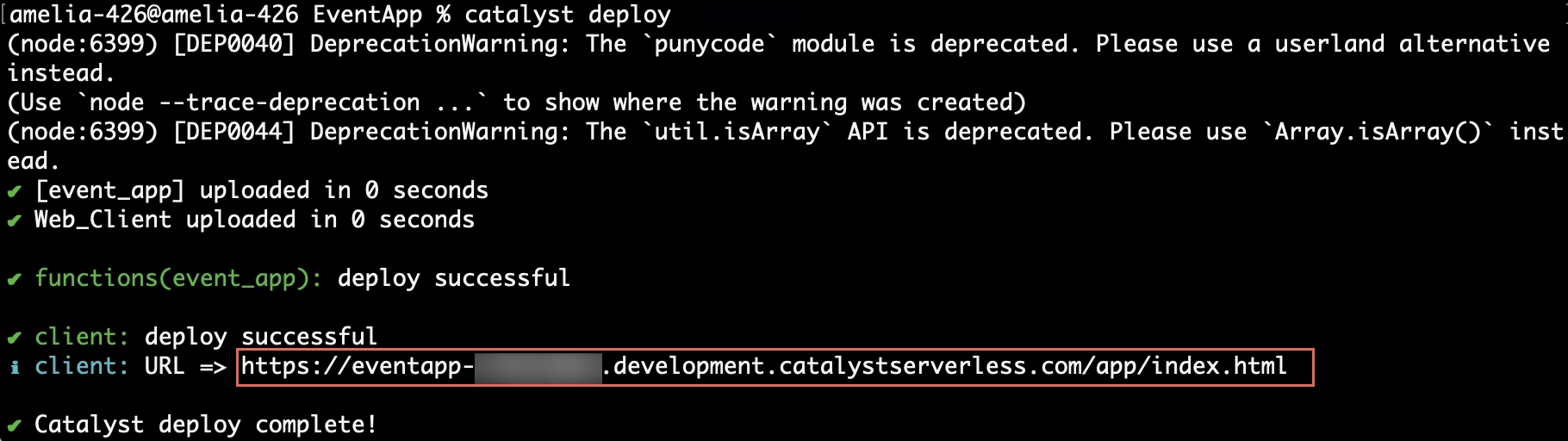
プロジェクトのデプロイ
必要なRuleの設定を正常に行えるよう、コードの変更がCatalystコンソールで利用可能になるようにプロジェクトをもう一度デプロイします。
プロジェクトをコンソールにデプロイするには、CLIで以下のコマンドを入力して実行します。
最終更新日 2026-08-28 13:29:38 +0530 IST