Codificar tu cliente
Ahora configuremos el componente del lado del cliente. El cliente contiene la página de registro y el script en segundo plano que obtiene los datos del usuario y los pasa a Catalyst.
El directorio del cliente contiene por defecto:
- El archivo index.html para el código HTML de la aplicación frontend. También contendrá el Web SDK necesario para implementar Embedded Authentication.
- El archivo main.css para el código CSS
- El archivo main.js para el código JavaScript
- El archivo de configuración client-package.json
- Crearemos dos archivos nuevos en EventApp/client/:
- tour.html: Contendrá la página que se mostrará a los usuarios finales una vez que confirmen su cuenta.
- redirect.html: Contendrá la página a la que serán redirigidos los usuarios finales una vez que se registren.
Crearemos dos archivos nuevos en este directorio.
Codificaremos index.html, main.js, main.css, tour.html y redirect.html, así como los archivos nuevos.
Copia el código a continuación y pégalo en los archivos correspondientes ubicados en el directorio client/ de tu proyecto usando un IDE y guarda los archivos.
<!DOCTYPE html>
<html>
<head>
<meta charset="UTF-8">
<title>signup - label</title>
<script src="https://www.zoho.com/crm/js/js-lib-file.js"> </script>
<script src="https://static.zohocdn.com/catalyst/sdk/js/4.6.2/catalystWebSDK.js"> </script>
<script src="/__catalyst/sdk/init.js"> </script>
<script>
catalyst.auth.signIn("login", {});
</script>
<style>
*,
*:before,
*:after {
box-sizing: border-box;
}
html {
overflow-y: scroll;
}
body {
background: #c1bdba;
font-family: 'Titillium Web', sans-serif;
}
a {
text-decoration: none;
color: #1ab188;
transition: .5s ease;
}
a:hover {
color: #179b77;
}
.form {
background: rgba(19, 35, 47, 0.9);
padding: 40px;
max-width: 600px;
margin: 40px auto;
border-radius: 4px;
box-shadow: 0 4px 10px 4px rgba(19, 35, 47, 0.3);
}
.tab-group {
list-style: none;
padding: 0;
margin: 0 0 40px 0;
}
.tab-group:after {
content: "";
display: table;
clear: both;
}
.tab-group li a {
display: block;
text-decoration: none;
padding: 12px;
background: rgba(160, 179, 176, 0.25);
color: #a0b3b0;
font-size: 20px;
float: left;
width: 50%;
text-align: center;
cursor: pointer;
transition: .5s ease;
}
.tab-group li a:hover {
background: #179b77;
color: #ffffff;
}
.tab-group .active a {
background: #1ab188;
color: #ffffff;
}
.tab-content>div:last-child {
display: none;
}
h1 {
text-align: center;
color: #ffffff;
font-weight: 600;
margin: 0 0 30px;
}
label {
position: absolute;
-webkit-transform: translateY(6px);
transform: translateY(6px);
left: 13px;
top: 8px;
color: rgba(255, 255, 255, 0.5);
transition: all 0.25s ease;
-webkit-backface-visibility: hidden;
pointer-events: none;
font-size: 16px;
}
label .req {
margin: 2px;
color: #1ab188;
}
label.active {
-webkit-transform: translateY(50px);
transform: translateY(50px);
left: 2px;
font-size: 14px;
}
label.active .req {
opacity: 0;
}
label.highlight {
color: #ffffff;
}
input,
textarea {
font-size: 16px;
display: block;
width: 100%;
/* height: 100%; */
padding: 12px 10px;
background: none;
background-image: none;
border: 1px solid #a0b3b0;
color: #ffffff;
border-radius: 0;
box-sizing: border-box;
transition: border-color .25s ease, box-shadow .25s ease;
}
input:focus,
textarea:focus {
outline: 0;
border-color: #1ab188;
}
textarea {
border: 2px solid #a0b3b0;
resize: vertical;
}
.field-wrap {
position: relative;
margin-bottom: 40px;
}
.top-row:after {
content: "";
display: table;
clear: both;
}
.top-row>div {
float: left;
width: 48%;
margin-right: 4%;
}
.top-row>div:last-child {
margin: 0;
}
.button {
border: 0;
outline: none;
border-radius: 0;
padding: 14px 0;
font-size: 20px;
font-weight: 600;
text-transform: uppercase;
letter-spacing: .1em;
background: #1ab188;
color: #ffffff;
transition: all 0.5s ease;
-webkit-appearance: none;
}
.button:hover,
.button:focus {
background: #179b77;
}
.button-block {
display: block;
width: 100%;
}
.forgot {
margin-top: -20px;
text-align: right;
}
.h-65 {
height: 65vh;
}
</style>
</head>
<body>
<div class="form">
<ul class="tab-group">
<li class="tab active"> <a href="#signup">Sign Up</a> </li>
<li class="tab"> <a href="#login">Log In</a> </li>
</ul>
<div class="tab-content">
<div id="signup">
<h1>Sign up to Continue to EventApp</h1>
<form>
<div class="top-row">
<div class="field-wrap">
<label> First Name<span class="req">*</span> </label>
<input id="firstname" type="text" required autocomplete="off" />
</div>
<div class="field-wrap">
<label> Last Name<span class="req">*</span> </label>
<input id="lastname" type="text" required autocomplete="off" />
</div>
</div>
<div class="field-wrap">
<label> Email Address<span class="req">*</span> </label>
<input id="email" type="email" required autocomplete="off" />
</div>
<button onclick="signupAction(this)" class="button button-block" />
Get Started
</button>
</form>
</div>
<div id="login" class="h-65">
</div>
</div>
<!-- tab-content -->
</div>
<!-- /form -->
<script src="main.js"> </script>
<script>
$(document).ready(function () {
$('.form').find('input, textarea').on('focus', function (e) {
var $this = $(this),
label = $this.prev('label');
label.addClass('active highlight');
});
$('.form').find('input, textarea').on('blur', function (e) {
var $this = $(this),
label = $this.prev('label');
if ($this.val() == '') {
label.removeClass('active highlight');
} else {
label.removeClass('highlight');
}
});
$('.tab a').on('click', function (e) {
e.preventDefault();
$(this).parent().addClass('active');
$(this).parent().siblings().removeClass('active');
target = $(this).attr('href');
$('.tab-content > div').not(target).hide();
$(target).fadeIn(600);
});
});
</script>
</body>
</html>
function signupAction(ele) {
    var firstName = document.getElementById("firstname").value;
    var lastName = document.getElementById("lastname").value
    var email = document.getElementById("email").value;
    var data = {
        "first_name": firstName,
        "last_name": lastName,
        "email_id": email,
        "platform_type": "web"
    };
    var auth = catalyst.auth;
    var signupPromise = auth.signUp(data);
    signupPromise
        .then((response) => {
            console.log(response.content);
        })
        .catch((err) => {
            console.log(err);
        });
}
html,
body {
    scroll-behavior: smooth;
    -webkit-scroll-behaviour: smooth;
}
.container {
max-width: 960px;
}
.site-header {
background-color: rgba(0, 0, 0, .85);
-webkit-backdrop-filter: saturate(180%) blur(20px);
backdrop-filter: saturate(180%) blur(20px);
}
.site-header a {
color: #999;
transition: ease-in-out color .15s;
}
.site-header a:hover {
color: #fff;
text-decoration: none;
}
.product-device {
position: absolute;
right: 10%;
bottom: -30%;
width: 300px;
height: 540px;
background-color: #333;
border-radius: 21px;
-webkit-transform: rotate(30deg);
transform: rotate(30deg);
}
.product-device::before {
position: absolute;
top: 10%;
right: 10px;
bottom: 10%;
left: 10px;
content: “”;
background-color: rgba(255, 255, 255, .1);
border-radius: 5px;
}
.product-device-2 {
top: -25%;
right: auto;
bottom: 0;
left: 5%;
background-color: #e5e5e5;
}
.border-top {
border-top: 1px solid #e5e5e5;
}
.border-bottom {
border-bottom: 1px solid #e5e5e5;
}
.box-shadow {
box-shadow: 0 .25rem .75rem rgba(0, 0, 0, .05);
}
.flex-equal>* {
-ms-flex: 1;
-webkit-box-flex: 1;
flex: 1;
}
@media (min-width: 768px) {
.flex-md-equal>* {
-ms-flex: 1;
-webkit-box-flex: 1;
flex: 1;
}
}
.overflow-hidden {
overflow: hidden;
}
<!doctype html>
<html lang="en">
<head>
  <meta charset="utf-8">
  <meta name="viewport" content="width=device-width, initial-scale=1, shrink-to-fit=no">
  <meta name="description" content="">
  <meta name="author" content="">
   <title>Welcome to Eventapp</title>
   <!-- Bootstrap core CSS -->
  <link href="https://stackpath.bootstrapcdn.com/bootstrap/4.4.1/css/bootstrap.min.css" rel="stylesheet"
    integrity="sha384-Vkoo8x4CGsO3+Hhxv8T/Q5PaXtkKtu6ug5TOeNV6gBiFeWPGFN9MuhOf23Q9Ifjh" crossorigin="anonymous">
   <!-- Custom styles -->
  <link href="product.css" rel="stylesheet">
</head>
<body>
   <nav class="site-header sticky-top py-1">
      <div class="container d-flex flex-column flex-md-row justify-content-center">
         <a class="py-2 d-none d-md-inline-block" href="#">
        <svg xmlns="http://www.w3.org/2000/svg" width="24" height="24" viewBox="0 0 24 24" fill="none"
          stroke="currentColor" stroke-width="2" stroke-linecap="round" stroke-linejoin="round"
          class="d-inline-block align-self-center">
          <circle cx="12" cy="12" r="10"> </circle>
          <line x1="14.31" y1="8" x2="20.05" y2="17.94"> </line>
          <line x1="9.69" y1="8" x2="21.17" y2="8"> </line>
          <line x1="7.38" y1="12" x2="13.12" y2="2.06"> </line>
          <line x1="9.69" y1="16" x2="3.95" y2="6.06"> </line>
          <line x1="14.31" y1="16" x2="2.83" y2="16"> </line>
          <line x1="16.62" y1="12" x2="10.88" y2="21.94"> </line>
        </svg>
      </a>
        </div>
     </nav>
   <div class="position-relative overflow-hidden p-3 p-md-5 m-md-3 text-center bg-light">
      <div class="col-md-5 p-lg-5 mx-auto my-5">
         <h1 class="display-4 font-weight-normal">Welcome to Event App</h1>
         <p class="lead font-weight-normal">Your one-stop destination to create, organize, and manage events!</p>
         <a class="btn btn-outline-secondary" href="#features">Features</a>
        </div>
      <div class="product-device box-shadow d-none d-md-block"> </div>
      <div class="product-device product-device-2 box-shadow d-none d-md-block"> </div>
     </div>
   <div class="d-md-flex flex-md-equal w-100 my-md-3 pl-md-3" id="features">
      <div class="bg-dark mr-md-3 pt-3 px-3 pt-md-5 px-md-5 text-center text-white overflow-hidden">
         <div class="my-3 py-3">
            <h2 class="display-5">Trouble-free event management experience</h2>
            <p class="lead">Event App makes sure you have a seamless and an experience in organizing events by
          automating your tasks</p>
           </div>
         <div class="bg-light box-shadow mx-auto" style="width: 80%; height: 300px; border-radius: 21px 21px 0 0;">
      </div>
        </div>
      <div class="bg-light mr-md-3 pt-3 px-3 pt-md-5 px-md-5 text-center overflow-hidden">
         <div class="my-3 p-3">
            <h2 class="display-5">Create and manage events of all types</h2>
            <p class="lead">Create events, group them in categories, customize them and add details as you need</p>
           </div>
         <div class="bg-dark box-shadow mx-auto" style="width: 80%; height: 300px; border-radius: 21px 21px 0 0;"> </div>
        </div>
     </div>
   <div class="d-md-flex flex-md-equal w-100 my-md-3 pl-md-3">
      <div class="bg-light mr-md-3 pt-3 px-3 pt-md-5 px-md-5 text-center overflow-hidden">
         <div class="my-3 p-3">
            <h2 class="display-5">Invite people and keep track of their RSVPs</h2>
            <p class="lead">Invite people through various platforms to your events, record their RSVPs and obtain a
          final count of the attendees to your events</p>
           </div>
         <div class="bg-dark box-shadow mx-auto" style="width: 80%; height: 300px; border-radius: 21px 21px 0 0;"> </div>
        </div>
      <div class="bg-dark mr-md-3 pt-3 px-3 pt-md-5 px-md-5 text-center text-white overflow-hidden">
         <div class="my-3 py-3">
            <h2 class="display-5">Customize your event invites in your own creative ways</h2>
            <p class="lead">Embedd images, videos, and links in your event invitations, and customize the designs of the
          event invites based on their contexts</p>
           </div>
         <div class="bg-light box-shadow mx-auto" style="width: 80%; height: 300px; border-radius: 21px 21px 0 0;">
      </div>
        </div>
     </div>
   <div class="d-md-flex flex-md-equal w-100 my-md-3 pl-md-3">
      <div class="bg-dark mr-md-3 pt-3 px-3 pt-md-5 px-md-5 text-center text-white overflow-hidden">
         <div class="my-3 py-3">
            <h2 class="display-5">Integrate Event App with various social media platforms</h2>
            <p class="lead">Share your events on Facebook, Twitter, Instagram, Yelp, LinkedIn and other social media
          platforms</p>
           </div>
         <div class="bg-light box-shadow mx-auto" style="width: 80%; height: 300px; border-radius: 21px 21px 0 0;">
      </div>
        </div>
      <div class="bg-light mr-md-3 pt-3 px-3 pt-md-5 px-md-5 text-center overflow-hidden">
         <div class="my-3 py-3">
            <h2 class="display-5">Track sales analytics and performances of your events</h2>
            <p class="lead">Event App also provides you reports and statistics of your event performances for your
          convenience</p>
           </div>
         <div class="bg-white box-shadow mx-auto" style="width: 80%; height: 300px; border-radius: 21px 21px 0 0;">
      </div>
        </div>
     </div>
   <footer class="container-fluid py-5">
      <div class="row">
         <div class="col-md-7 p-lg-5 mx-auto text-center">
            <h3 class="display-6 font-weight-normal">Get started with Event App today!</h3>
           </div>
        </div>
     </footer>
</body>
</html>
<!doctype html>
<html>
<head>
    <meta charset="UTF-8">
    <title>redirect.html</title>
</head>
<body>
    <h2>Please check your email for a product tour</h2>
</body>
</html>
Analicemos rápidamente los archivos del cliente:
-
index.html: Incluye el Web SDK para implementar Embedded Authentication.
-
main.js: Contiene el script para la página de registro. Obtiene los datos del formulario en la página del cliente y los pasa al listener de eventos que escucha el evento de registro de usuario.
-
tour.html: Contiene el código de la página a la que el usuario será dirigido desde el correo electrónico de bienvenida que recibe.
-
redirect.html Después de que el usuario complete la configuración de su contraseña para acceder a Event App, será redirigido a esta página.
Ahora debes habilitar esta redirección a redirect.html de forma predeterminada. Puedes hacerlo configurando el archivo de configuración client-package.json en el directorio /client.
Copia el código proporcionado a continuación y reemplázalo con el código predeterminado presente en el archivo client-package.json.
{
  "name": "EventAppClient",
  "version": "0.0.1",
  "homepage": "index.html",
  "login_redirect": "redirect.html"
}
El componente del lado del cliente de tu proyecto de Catalyst se ha configurado correctamente.
Desplegar tu proyecto
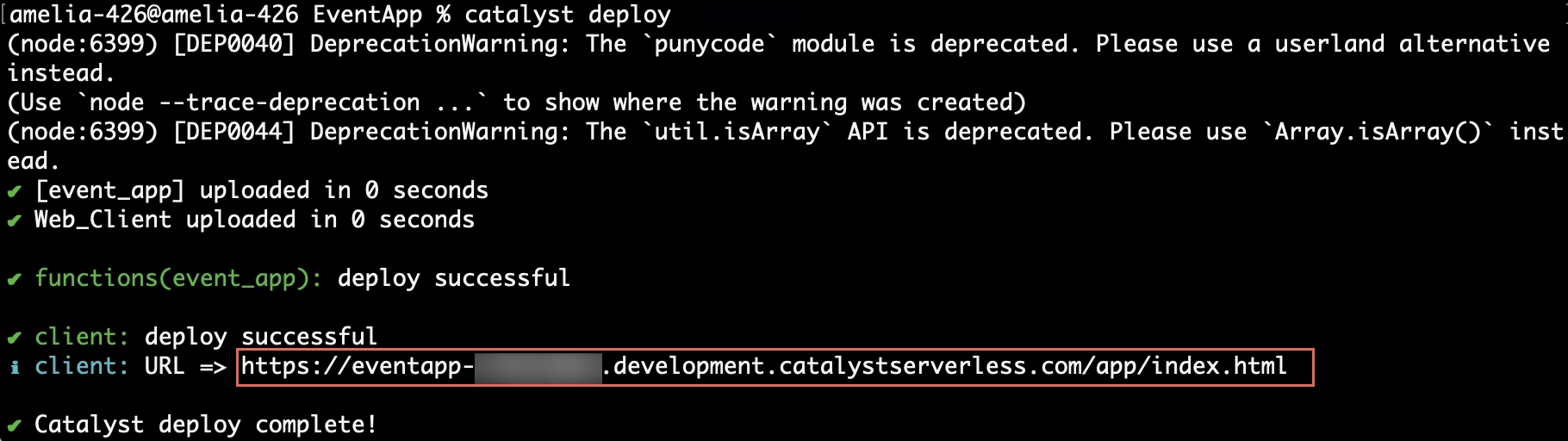
Desplegaremos el proyecto una vez más para asegurarnos de que los cambios en el código estén disponibles en la consola de Catalyst para configurar correctamente la regla requerida.
Para desplegar el proyecto en la consola, ingresa el siguiente comando en tu CLI y ejecútalo.
Última actualización 2026-08-28 13:29:38 +0530 IST