アプリケーションのフロントエンドを設定する
次に、アプリケーションのフロントエンドを設定します。
Tailwind CSSフレームワークのインストールと設定
コードの追加を開始する前に、TailwindフレームワークがHTMLファイルとJSコンポーネントをスキャンし、必要な静的CSSファイルを生成できるビルド済みCSSクラスを実装できるようにする必要があります。
必要なフレームワークをインストールするには:
- PhotoStoreApp/photo-store-app/ディレクトリに移動し、以下のコマンドを実行します

- 以下のコマンドを実行して、PhotoStoreApp/photo-store-app/ディレクトリにtailwind.config.jsファイルを作成します。
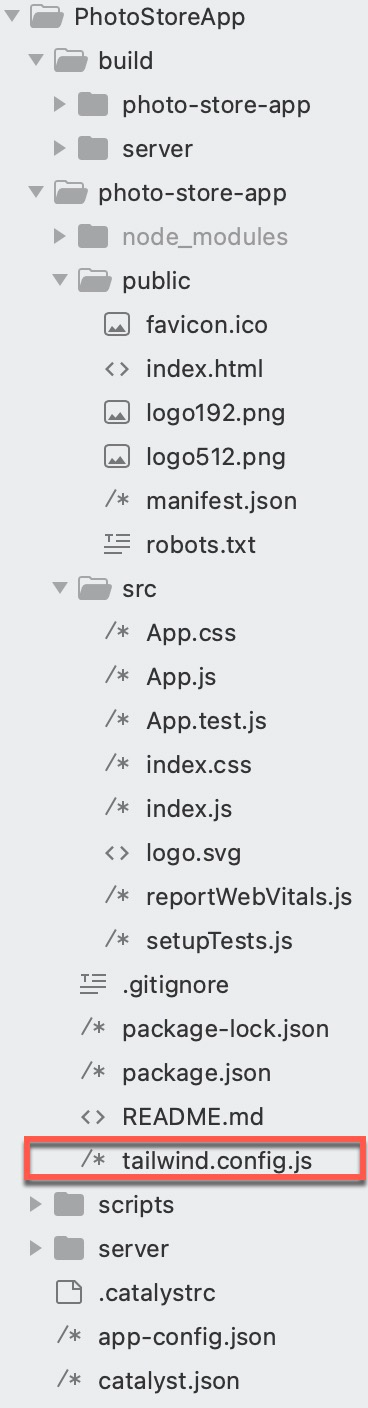
tailwind.config.jsファイルが作成されます。プロジェクトディレクトリは以下の画像のようになります:
- 以下のコードをコピーして、tailwind.config.jsファイルに貼り付けます。
/** @type {import('tailwindcss').Config} */
module.exports = {
  content: [
    "./src/**/*.{js,jsx,ts,tsx}"
  ],
  theme: {
    extend: {},
  },
  plugins: [],
};
tailwind.config.jsファイルがアプリケーション用に設定されました。
必要なパッケージのインストール
すべてのフロントエンド依存関係を満たすために、以下のパッケージをインストールする必要があります:
- axios: このパッケージはHTTPリクエストを処理できます。
- hamburger-react: このパッケージはハンバーガーメニューアイコンを作成できます。
- react-toastify: このパッケージはトースト通知を表示できます。
- react-router-dom: このパッケージはクライアントサイドルーティングを処理できます。
- react-icons: このパッケージは人気のあるアイコンライブラリを処理できます。
PhotoStoreApp/photo-store-app/ディレクトリに移動し、ターミナルで以下のコマンドを実行して必要なパッケージをインストールします。

フロントエンドのコーディング
以下のファイルにコードを追加します:
- PhotoStoreApp/photo-store-app/src/ディレクトリ内:
- App.js: このファイルには、ログインコンポーネントの表示、すべてのアップロード関連操作、共有機能のロジックが含まれます。コードには、レスポンシブナビゲーションバー、トーストメッセージ、ハンバーガーメニューのロジックも含まれています。
- 以下のフォルダとそれぞれのファイルを作成します:
- service
- ImageService.js: 以下の機能を処理するロジックを定義するヘルパー関数が含まれます:
- fetchImages(): 必要な画像を取得します。
- fetchSharedImages(): 必要な共有画像を取得します。
- handleDelete(): アプリケーションとバケットから必要な画像を削除するロジックが含まれます。
- handleDownload(): バケットからローカルシステムに必要な画像をダウンロードするロジックが含まれます。
- handleShareAction(): /shareDetails APIを呼び出して、必要な画像を別の登録ユーザーと共有するロジックが含まれます。
- handleUpdateSharedDetails(): 共有権限と画像の詳細を更新するロジックが含まれます。
- ImageThumbnail.js: アップロードされた画像をサムネイル、フルスケール、またはリストビューで表示するロジックが含まれます。
- ImageService.js: 以下の機能を処理するロジックを定義するヘルパー関数が含まれます:
- pages
- Home.js: 画像のグリッド/リストビューを表示するロジックが含まれます。画像に対するCRUD操作を許可し、バケットにアップロードされたすべての画像を表示するためのページネーションビューをサポートします。
- ImageGrid.js: アップロードされたすべての画像のグリッドを、ダウンロード、プレビュー、共有、削除のオプション付きで表示するロジックが含まれます。
- ImageList.js: アップロードされたすべての画像のリストビューを、ダウンロード、プレビュー、共有、削除のオプション付きで表示するロジックが含まれます。
- Login.js: エンドユーザーをCatalyst Authenticationのログインコンポーネントに誘導するロジックが含まれます。
- Logout.js: エンドユーザーをアプリケーションからサインアウトさせるロジックが含まれます。
- SharedDetails.js: 他のユーザーと共有されている画像をページネーション形式で表示するロジックが含まれます。また、必要に応じて画像のアクセス権限の取り消しや更新を行うロジックも定義されています。
- SharedImageGrid.js: 必要な権限が付与されている場合に、必要な画像をダウンロードするオプション付きのレスポンシブグリッドで画像を表示するロジックが含まれます。
- SharedImageList.js: SharedImageGrid.jsと同じロジックが含まれますが、画像はサムネイルとして表示されるリストビューで表示されます。
- SharedImages.js: 共有画像をページネーションを通じてグリッドビューまたはリストビューで表示するロジックが含まれます。このコードファイルのロジックにより、登録済みで権限を持つエンドユーザーは共有画像に対してCRUD操作を実行できます。
- Upload.js: 画像をアップロードするロジックが含まれます。このコードのロジックは、重複を防ぐために別の画像が存在するかどうかを確認するように定義されています。画像のアップロード中に/convertToThumbnailAndUpload APIが呼び出され、画像がサムネイルに変換され、アップロードが完了します。
- service
- index.js: アプリケーションのエントリーポイントとして機能します。
- index.css: アプリケーションでTailwindを使用するために必要です。
- PhotoStoreApp/photo-store-app/public/ディレクトリ内:
- index.html: このファイルはアプリケーション全体のメインHTMLテンプレートです。
すべてのファイルがアプリケーション用に作成されると、プロジェクトディレクトリは以下のようになります:

ファイルへのコードの追加を開始しましょう。
以下のコードをコピーして、IDEを使用してプロジェクトのそれぞれのファイルに貼り付け、ファイルを保存してください。
import { useEffect, useState } from "react";
import { Route, Routes, useNavigate } from "react-router-dom";
import Upload from "./pages/Upload";
import "./App.css";
import Login from "./pages/Login";
import Logout from "./pages/Logout";
import { ToastContainer } from "react-toastify";
import { Turn as Hamburger } from "hamburger-react";
import SharedDetails from "./pages/SharedDetails";
import Home from "./pages/Home";
import SharedImages from "./pages/SharedImages";
function HeaderClick() {
  const navigate = useNavigate();
  return (
    <h1
      className="text-2xl font-bold px-4 cursor-pointer hover:text-gray-300 transition duration-300"
      onClick={() => navigate("/")}>
      Photo Store App
    </h1>
  );
}
function App() {
  const [isUserAuthenticated, setIsUserAuthenticated] = useState(false);
  const [isFetching, setIsFetching] = useState(true);
  const [userId, setUserId] = useState(null);
  const [isOpen, setOpen] = useState(false);
  const navigate = useNavigate();
  useEffect(() => {
    const authenticateUser = async () => {
      try {
        const result = await window.catalyst.auth.isUserAuthenticated();
        setUserId(result.content.zuid);
        setIsUserAuthenticated(true);
      } catch (err) {
        console.log("UNAUTHENTICATED");
      } finally {
        setIsFetching(false);
      }
    };
    authenticateUser();
  }, []);
  return (
    <div className="bg-black text-white min-h-screen flex flex-col overflow-hidden">
      <nav className="flex justify-between items-center px-6 py-4 shadow-lg relative">
        <div className="flex items-center relative">
          <Hamburger toggled={isOpen} toggle={setOpen} />
          {isOpen && (
            <div className="absolute left-0 top-full mt-2 bg-gray-800 text-white w-64 h-screen shadow-lg p-4 z-50 overflow-y-auto flex flex-col justify-between text-lg">
              <ul className="flex flex-col space-y-4">
                <li
                  className="py-2 px-4 cursor-pointer hover:bg-blue-700"
                  onClick={() => {
                    setOpen(false);
                    navigate("/upload");
                  }}
                >
                  Upload Image
                </li>
                <li
                  className="py-2 px-4 cursor-pointer hover:bg-blue-700"
                  onClick={() => {
                    setOpen(false);
                    navigate("/");
                  }}
                >
                  Your Gallery
                </li>
                <li
                  className="py-2 px-4 cursor-pointer hover:bg-blue-700"
                  onClick={() => {
                    setOpen(false);
                    navigate("/sharedImages");
                  }}
                >
                  Shared Gallery
                </li>
                <li
                  className="py-2 px-4 cursor-pointer hover:bg-blue-700"
                  onClick={() => {
                    setOpen(false);
                    navigate("/sharedDetails");
                  }}
                >
                  Manage Shared Details
                </li>
              </ul>
              <ul className="pb-16 mt-auto">
                <li
                  className="py-2 px-4 cursor-pointer hover:bg-red-700"
                  onClick={() => {
                    setOpen(false);
                    navigate("/logout");
                  }}
                >
                  LogOut
                </li>
              </ul>
            </div>
          )}
          <HeaderClick />
        </div>
        <ul className="flex space-x-32">
          <li>
            <button
              onClick={() => navigate("/upload")}
              className="bg-blue-800 text-white px-4 py-2 rounded-md hover:bg-blue-900 transition duration-300"
            >
              Upload
            </button>
          </li>
        </ul>
      </nav>
      <div className="flex-grow flex justify-center items-center overflow-hidden">
        {isFetching ? (
          <div className="w-10 h-10 border-4 border-gray-300 border-t-transparent rounded-full animate-spin"></div>
        ) : isUserAuthenticated ? (
          <Routes>
            <Route path="/upload" element=<Upload userId={userId} /> />
            <Route path="/sharedDetails" element=<SharedDetails userId={userId} /> />
            <Route path="/logout" element=<Logout /> />
            <Route path="/" element=<Home userId={userId} /> />
            <Route path="/sharedImages" element=<SharedImages userId={userId} /> />
            <Route path="*" element=<Home userId={userId} /> />
          </Routes>
        ) : (
          <Login />
        )}
      </div>
      <ToastContainer />
    </div>
  );
}
export default App;
import { toast } from 'react-toastify';
export const fetchImages = async (userId, setImageDetails, setLoading) => {
    try {
        const response = await fetch(`/fetchAllImages?id=${userId}`);
        if (!response.ok) {
            throw new Error("Failed to fetch data");
        }
        const data = await response.json();
        data.map((image) => {
            image.object_url = image.object_url + "?responseCacheControl=max-age=3600";
        });
        setTimeout(() => {
            setLoading(false);
        }, 1000);
        setImageDetails(data || []);
    } catch (err) {
        console.error(err);
        toast.error("Error Occurred", {
            theme: "colored",
        });
    }
};
export const fetchUsers = async (setUsers) => {
    try {
        const response = await fetch("/getAllUsers");
        const data = await response.json();
        setUsers(data);
    } catch (error) {
        console.error("Error fetching users:", error);
        toast.error("Error Occurred", {
            theme: "colored",
        });
    }
};
export const handleDelete = async (imageKey, setImageDetails, setOpenMenuIndex) => {
    try {
        const stratus = window.catalyst.stratus;
        const bucket = stratus.bucket("YOUR_BUCKET_NAME");
        await bucket.deleteObject(imageKey);
        const pathParts = imageKey.split("/");
        const fileName = pathParts.pop();
        const folderName = pathParts.pop();
        const newFileName = fileName.replace(/\.[^/.]+$/, ".jpeg");
        const thumbnailPath = ["photos", "thumbnails", folderName, newFileName].join("/");
        await bucket.deleteObject(thumbnailPath);
        let zcql = window.catalyst.ZCatalystQL;
        let query = `DELETE FROM ImageShareDetails WHERE BucketPath = '${imageKey}'`;
        console.log("QUERY: " + query);
        await zcql.executeQuery(query)
            .then((response) => {
                console.log("ZCQL Response: " + JSON.stringify(response.content));
            })
            .catch((err) => {
                console.log("ZCQL Error: " + err);
            });
        setImageDetails(prev => prev.filter(image => image.key !== imageKey));
        if (setOpenMenuIndex != null) {
            setOpenMenuIndex(null);
        }
        toast.success("Image Deleted Successfully", {
            theme: "colored",
        });
    } catch (error) {
        console.error("Error deleting image:", error);
        toast.error("Error deleting the file. Please try again.", {
            theme: "colored",
        });
    }
};
export const handleDownload = async (imageKey, setOpenMenuIndex) => {
    try {
        const stratus = window.catalyst.stratus;
        const bucket = stratus.bucket("YOUR_BUCKET_NAME");
        const getObject = await bucket.getObject(imageKey);
        const getObjectStart = getObject.start();
        if (setOpenMenuIndex != null) {
            setOpenMenuIndex(null);
        }
        await getObjectStart.then((blob) => {
            const url = URL.createObjectURL(blob.content);
            const a = document.createElement("a");
            a.href = url;
            a.download = imageKey;
            document.body.appendChild(a);
            a.click();
            document.body.removeChild(a);
            URL.revokeObjectURL(url);
        }).catch((error) => {
            console.error("Error downloading file:", error);
        });
        setTimeout(() => {
            toast.success("File Downloaded Successfully", {
                theme: "colored",
            });
        }, 2000);
    } catch (error) {
        console.error("Error downloading image:", error);
        toast.error("Error in downloading the file", {
            theme: "colored",
        });
    }
};
export const handleShareAction = async (name, id, path, action, userId) => {
    try {
        const response = await fetch(`/shareDetails`, {
            method: "POST",
            headers: {
                "Content-Type": "application/json",
            },
            body: JSON.stringify({ userName: name, imagePath: path, zuid: id, isUpdate: action, sharedBy: userId }),
        });
        const data = await response.json();
        if (data.message === "Access Provided") {
            toast.success("Image Shared Successfully", {
                theme: "colored",
            });
        } else {
            toast.error(data.message, {
                theme: "colored",
            });
        }
        console.log("API Response:", data);
    } catch (error) {
        console.error("Error calling API:", error);
    }
};
export const fetchSharedImages = async (userId, setImageDetails, setLoading) => {
    try {
        const response = await fetch(`/getSharedImages?id=${userId}`);
        if (!response.ok) {
            throw new Error("Failed to fetch data");
        }
        const data = await response.json();
        const flattenedImages = data.flatMap(item => item || []);
        setTimeout(() => {
            setLoading(false);
        }, 1000);
        setImageDetails(flattenedImages || []);
    } catch (err) {
        console.error(err);
        toast.error("Error Occurred", {
            theme: "colored",
        });
    }
};
export const fetchSharedDetails = async (userId, setDetails, setLoading) => {
    try {
        const response = await fetch(`/getSharedDetails?id=${userId}`);
        const data = await response.json();
        setDetails(data);
        setLoading(false);
    } catch (error) {
        console.error("Error fetching details:", error);
        setLoading(false);
    }
};
export const handleUpdateSharedDetails = async (updatedItem, navigate) => {
    try {
        const response = await fetch("/updateSharedDetails", {
            method: "PATCH",
            headers: { "Content-Type": "application/json" },
            body: JSON.stringify(updatedItem),
        });
        await response.json();
        toast.success("Details Updated Successfully", { theme: "colored" });
        navigate(0);
    } catch (error) {
        console.error("Error updating details:", error);
        toast.error("Error updating details", { theme: "colored" });
    }
};
import { useState, useEffect } from "react";
export default function ImageThumbnail({ imageUrl, listStyle }) {
    console.log("Image URL: " + imageUrl);
    const [thumbnail, setThumbnail] = useState(null);
    const bucketUrl = "YOUR_BUCKET_URL";
    const pathParts = imageUrl.split("/");
    const fileName = pathParts.pop();
    const folderName = pathParts.pop();
    const newFileName = fileName.replace(/\.[^/.]+$/, ".jpeg");
    const newFilePath = ["photos", "thumbnails", folderName, newFileName].join("/");
    console.log(newFilePath);
    const thumbnailUrl = bucketUrl + newFilePath;
    console.log("ThumbNail URL: " + thumbnailUrl);
    useEffect(() => {
        setThumbnail(newFilePath);
    }, [imageUrl]);
    return (
        <>
            {thumbnail ? (
                listStyle ? (
                    <img
                        src={thumbnailUrl}
                        alt="Thumbnail"
                        style={{ width: "1rem", height: "1rem" }}
                    />
                ) : (
                    <img
                        src={thumbnailUrl}
                        alt="Thumbnail image"
                        className="w-40 h-40 object-cover rounded-lg transition-all duration-500 ease-in-out"
                    />
                )
            ) : (
                <p>Loading...</p>
            )}
        </>
    );
}
import { useState, useEffect } from 'react';
import { FiX, FiList, FiGrid } from "react-icons/fi";
import { fetchImages, handleDelete, handleDownload, fetchUsers, handleShareAction } from "../service/ImageService";
import ImageGrid from './ImageGrid';
import ImageList from './ImageList';
export default function Home({ userId }) {
    const [imageDetails, setImageDetails] = useState([]);
    const [currentPage, setCurrentPage] = useState(1);
    const [openMenuIndex, setOpenMenuIndex] = useState(null);
    const [loading, setLoading] = useState(true);
    const [users, setUsers] = useState([]);
    const [selectedUserIndex, setSelectedUserIndex] = useState(null);
    const [openShareIndex, setOpenShareIndex] = useState(null);
    const [selectedImage, setSelectedImage] = useState(null);
    const [viewMode, setViewMode] = useState("grid");
    const imagesPerPage = 9;
    useEffect(() => {
        fetchImages(userId, setImageDetails, setLoading);
    }, [userId]);
    useEffect(() => {
        const handleClickOutside = (event) => {
            if (openShareIndex !== null || selectedUserIndex !== null) {
                setOpenShareIndex(null);
                setSelectedUserIndex(null);
            }
            if (openMenuIndex !== null) {
                setOpenMenuIndex(null);
            }
        };
        document.addEventListener("click", handleClickOutside);
        return () => document.removeEventListener("click", handleClickOutside);
    }, [openShareIndex, selectedUserIndex, openMenuIndex]);
    const handleShareClick = async (index, e) => {
        e.preventDefault();
        e.stopPropagation();
        if (openShareIndex === index) {
            setOpenShareIndex(null);
            setSelectedUserIndex(null);
            return;
        }
        await fetchUsers(setUsers);
        setOpenShareIndex(index);
    };
    const toggleUserOptions = (index, e) => {
        e.preventDefault();
        e.stopPropagation();
        setSelectedUserIndex(selectedUserIndex === index ? null : index);
    };
    const openPreview = (imageUrl) => setSelectedImage(imageUrl);
    const closePreview = () => setSelectedImage(null);
    const indexOfLastImage = currentPage * imagesPerPage;
    const indexOfFirstImage = indexOfLastImage - imagesPerPage;
    const currentImages = imageDetails.slice(indexOfFirstImage, indexOfLastImage);
    const nextPage = () => {
        if (indexOfLastImage < imageDetails.length) setCurrentPage(currentPage + 1);
    };
    const prevPage = () => {
        if (currentPage > 1) setCurrentPage(currentPage - 1);
    };
    const toggleMenu = (index, e) => {
        e.preventDefault();
        e.stopPropagation();
        setOpenMenuIndex(openMenuIndex === index ? null : index);
    };
    return (
        <div className="min-h-screen bg-black flex flex-col items-center p-6 relative">
            {loading ? (
                <div className="flex justify-center items-center h-screen">
                    <div className="w-10 h-10 border-4 border-gray-300 border-t-transparent rounded-full animate-spin"></div>
                </div>
            ) : (
                <>
                    {imageDetails.length === 0 ? (
                        <div className="flex items-center justify-center h-screen">
                            <p className="text-white text-lg font-semibold text-center">
                                No files found. Click the Upload button to upload your photos.
                            </p>
                        </div>
                    ) : (
                        <>
                            <button
                                className="absolute top-4 right-4 bg-blue-700 text-white px-4 py-2 rounded shadow-lg flex items-center space-x-2"
                                onClick={() => setViewMode(viewMode === "grid" ? "list" : "grid")}
                            >
                                {viewMode === "grid" ? <FiList size={20} /> : <FiGrid size={20} />}
                            </button>
                            <div className="max-w-screen-lg w-full mt-12">
                                {viewMode === "grid" ? (
                                    <ImageGrid
                                        currentImages={currentImages}
                                        openShareIndex={openShareIndex}
                                        handleShareClick={handleShareClick}
                                        users={users}
                                        selectedUserIndex={selectedUserIndex}
                                        toggleUserOptions={toggleUserOptions}
                                        handleShareAction={handleShareAction}
                                        openPreview={openPreview}
                                        openMenuIndex={openMenuIndex}
                                        toggleMenu={toggleMenu}
                                        handleDelete={handleDelete}
                                        handleDownload={handleDownload}
                                        setImageDetails={setImageDetails}
                                        setOpenMenuIndex={setOpenMenuIndex}
                                        setOpenShareIndex={setOpenShareIndex}
                                        setSelectedUserIndex={setSelectedUserIndex}
                                        userId={userId}
                                    />
                                ) : (
                                    <ImageList
                                        currentImages={currentImages}
                                        openShareIndex={openShareIndex}
                                        handleShareClick={handleShareClick}
                                        users={users}
                                        selectedUserIndex={selectedUserIndex}
                                        toggleUserOptions={toggleUserOptions}
                                        handleShareAction={handleShareAction}
                                        handleDelete={handleDelete}
                                        handleDownload={handleDownload}
                                        setImageDetails={setImageDetails}
                                        openPreview={openPreview}
                                        setOpenShareIndex={setOpenShareIndex}
                                        setSelectedUserIndex={setSelectedUserIndex}
                                        userId={userId}
                                    />
                                )}
                            </div>
                            {imageDetails.length > imagesPerPage && (
                                <div className="flex mt-6 justify-center items-center space-x-4">
                                    <button
                                        onClick={prevPage}
                                        disabled={currentPage === 1}
                                        className="px-4 py-2 bg-blue-700 text-white rounded disabled:opacity-50 disabled:bg-blue-200"
                                    >
                                        Previous
                                    </button>
                                    <span className="text-lg font-semibold text-center w-20">
                                        Page {currentPage}
                                    </span>
                                    <button
                                        onClick={nextPage}
                                        disabled={indexOfLastImage >= imageDetails.length}
                                        className="px-4 py-2 bg-blue-700 text-white rounded disabled:opacity-50 disabled:bg-blue-200"
                                    >
                                        Next
                                    </button>
                                </div>
                            )}
                        </>
                    )}
                </>
            )}
            {selectedImage && (
                <div className="fixed inset-0 flex items-center justify-center bg-black bg-opacity-80 z-50">
                    <div className="relative">
                        <button
                            className="absolute top-2 right-2 bg-white p-2 rounded-full shadow-md hover:bg-gray-100"
                            onClick={closePreview}
                        >
                            <FiX size={20} className="text-gray-600" />
                        </button>
                        <img
                            src={selectedImage}
                            alt="Preview"
                            className="max-w-full max-h-[50vh] rounded-lg shadow-lg"
                        />
                    </div>
                </div>
            )}
        </div>
    );
}
import { FiShare2, FiChevronRight, FiMoreVertical } from "react-icons/fi";
import ImageThumbnail from "../service/ImageThumbnail";
export default function ImageGrid({
  currentImages,
  openShareIndex,
  handleShareClick,
  users,
  selectedUserIndex,
  toggleUserOptions,
  handleShareAction,
  openPreview,
  openMenuIndex,
  toggleMenu,
  handleDelete,
  handleDownload,
  setImageDetails,
  setOpenMenuIndex,
  setOpenShareIndex,
  setSelectedUserIndex,
  userId
}) {
  return (
    <div className="grid grid-cols-1 sm:grid-cols-2 md:grid-cols-3 gap-6 place-items-center">
      {currentImages.map((image, index) => (
        <div
          key={image.key}
          className={`flex flex-col items-center w-full max-w-xs relative cursor-pointer ${
            openShareIndex === index ? "" : "transition-transform hover:scale-110"
          }`}
          onClick={() => openPreview(image.object_url)}
        >
          <div className="max-w-xs h-auto flex items-center justify-center bg-gray-200 rounded-lg shadow-lg relative">
            {/* Share Button */}
            <button
              className="absolute top-2 left-2 bg-white p-2 rounded-full shadow-md hover:bg-gray-100"
              onClick={(e) => handleShareClick(index, e)}
            >
              <FiShare2 size={15} className="text-gray-600" />
            </button>
            {/* Share Dropdown */}
            {openShareIndex === index && users.length > 0 && (
              <div className="absolute top-10 left-2 bg-white text-black border rounded shadow-lg w-40 text-sm z-50">
                {users.map((user, idx) => (
                  <div key={user.id} className="relative">
                    <button
                      className="flex justify-between items-center w-full text-left text-black px-4 py-2 hover:bg-gray-200"
                      onClick={(e) => toggleUserOptions(idx, e)}
                    >
                      {user.name}
                      <FiChevronRight className="text-gray-600" />
                    </button>
                    {selectedUserIndex === idx && (
                      <div
                        className="absolute top-0 left-full ml-2 bg-white text-black border rounded shadow-lg w-32 text-sm z-50"
                        style={{ zIndex: 1000, pointerEvents: "auto" }}
                      >
                        <button
                          className="block w-full px-4 py-2 text-left hover:bg-gray-200"
                          onClick={(e) => {
                            e.preventDefault();
                            e.stopPropagation();
                            handleShareAction(user.name, user.zuid, image.key, false, userId);
                            setSelectedUserIndex(null);
                            setOpenShareIndex(null);
                          }}
                        >
                          View Access
                        </button>
                        <button
                          className="block w-full px-4 py-2 text-left hover:bg-gray-200"
                          onClick={(e) => {
                            e.preventDefault();
                            e.stopPropagation();
                            handleShareAction(user.name, user.zuid, image.key, true, userId);
                            setSelectedUserIndex(null);
                            setOpenShareIndex(null);
                          }}
                        >
                          Edit Access
                        </button>
                      </div>
                    )}
                  </div>
                ))}
              </div>
            )}
            {/* Image Thumbnail */}
            <ImageThumbnail imageUrl={image.object_url} />
            {/* Options Menu Button */}
            <button
              className="absolute bottom-2 right-2 bg-white p-2 rounded-full shadow-md hover:bg-gray-100"
              onClick={(e) => toggleMenu(index, e)}
            >
              <FiMoreVertical size={15} className="text-gray-600" />
            </button>
            {/* Options Menu Dropdown */}
            {openMenuIndex === index && (
              <div className="absolute bottom-10 right-2 text-blue-600 bg-white border rounded shadow-lg w-32 text-sm z-50">
                <button
                  className="block w-full px-4 py-2 text-left hover:bg-gray-100"
                  onClick={(e) => {
                    e.preventDefault();
                    e.stopPropagation();
                    handleDownload(image.key, setOpenMenuIndex);
                  }}
                >
                  Download
                </button>
                <button
                  className="block w-full px-4 py-2 text-left text-red-600 hover:bg-gray-100"
                  onClick={(e) => {
                    e.preventDefault();
                    e.stopPropagation();
                    handleDelete(image.key, setImageDetails, setOpenMenuIndex);
                  }}
                >
                  Delete
                </button>
              </div>
            )}
          </div>
          {/* Image Name */}
          <div className="w-full max-w-xs mt-3">
            <p className="text-xl font-medium text-white text-center break-words">
              {image.key.split("/").pop()}
            </p>
          </div>
        </div>
      ))}
    </div>
  );
};
import ImageThumbnail from '../service/ImageThumbnail';
import { FiDownload, FiTrash2, FiEye, FiChevronRight, FiShare2 } from "react-icons/fi";
export default function ImageList({
  currentImages,
  openShareIndex,
  handleShareClick,
  users,
  selectedUserIndex,
  toggleUserOptions,
  handleShareAction,
  handleDelete,
  handleDownload,
  setImageDetails,
  openPreview,
  setOpenShareIndex,
  setSelectedUserIndex,
  userId
}) {
  return (
    <div className="flex flex-col space-y-2">
      {currentImages.map((image, index) => (
        <div
          key={image.key}
          className={`flex items-center w-full bg-gray-800 p-4 rounded-md ${
            openShareIndex === index ? '' : 'transition-transform hover:scale-110'
          }`}
        >
          <ImageThumbnail imageUrl={image.object_url} listStyle={1} />
          <div className="ml-2 flex-1">
            <p className="text-white text-sm font-medium break-words">
              {image.key.split('/').pop()}
            </p>
          </div>
          <button
            className="bg-white p-1 rounded-full shadow-md hover:bg-gray-100 mx-1"
            onClick={() => openPreview(image.object_url)}
          >
            <FiEye size={16} className="text-gray-600" />
          </button>
          <button
            className="bg-white p-1 rounded-full shadow-md hover:bg-gray-100 mx-1"
            onClick={() => handleDownload(image.key, null)}
          >
            <FiDownload size={16} className="text-gray-600" />
          </button>
          <button
            className="bg-white p-1 rounded-full shadow-md hover:bg-red-100"
            onClick={() => handleDelete(image.key, setImageDetails, null)}
          >
            <FiTrash2 size={16} className="text-red-600" />
          </button>
          <button
            className="bg-white p-1 rounded-full shadow-md hover:bg-gray-100 mx-1"
            onClick={(e) => handleShareClick(index, e)}
          >
            <FiShare2 size={15} className="text-gray-600" />
          </button>
          {openShareIndex === index && users.length > 0 && (
            <div className="block top-10 right-4 bg-white text-black border rounded shadow-lg w-40 text-sm z-50">
              {users.map((user, idx) => (
                <div key={user.id} className="relative">
                  <button
                    className="flex justify-between items-center w-full text-left text-black px-4 py-2 hover:bg-gray-200"
                    onClick={(e) => toggleUserOptions(idx, e)}
                  >
                    {user.name}
                    <FiChevronRight className="text-gray-600" />
                  </button>
                  {selectedUserIndex === idx && (
                    <div
                      className="absolute top-0 left-full ml-2 bg-white text-black border rounded shadow-lg w-32 text-sm z-50"
                      style={{ zIndex: 1000, pointerEvents: "auto" }}
                    >
                      <button
                        className="block w-full px-4 py-2 text-left hover:bg-gray-200"
                        onMouseEnter={() => (document.body.style.pointerEvents = "none")}
                        onMouseLeave={() => (document.body.style.pointerEvents = "auto")}
                        onClick={(e) => {
                          e.preventDefault();
                          e.stopPropagation();
                          handleShareAction(user.name, user.zuid, image.key, false, userId);
                          setSelectedUserIndex(null);
                          setOpenShareIndex(null);
                        }}
                      >
                        View Access
                      </button>
                      <button
                        className="block w-full px-4 py-2 text-left hover:bg-gray-200"
                        onMouseEnter={() => (document.body.style.pointerEvents = "none")}
                        onMouseLeave={() => (document.body.style.pointerEvents = "auto")}
                        onClick={(e) => {
                          e.preventDefault();
                          e.stopPropagation();
                          handleShareAction(user.name, user.zuid, image.key, true, userId);
                          setSelectedUserIndex(null);
                          setOpenShareIndex(null);
                        }}
                      >
                        Edit Access
                      </button>
                    </div>
                  )}
                </div>
              ))}
            </div>
          )}
        </div>
      ))}
    </div>
  );
}
import { useEffect } from "react";
function Login() {
  useEffect(() => {
    window.location.href = `${window.origin}/__catalyst/auth/login`;
  }, []);
  return null;
}
export default Login;
import { useEffect } from "react";
export default function Logout() {
  useEffect(() => {
    const redirectURL = `${window.origin}/__catalyst/auth/login`;
    const auth = window.catalyst.auth;
    auth.signOut(redirectURL);
  }, []);
  return null;
}
import React, { useState, useEffect } from "react";
import { useNavigate } from "react-router-dom";
import { fetchSharedDetails, handleUpdateSharedDetails } from "../service/ImageService";
export default function SharedDetails({ userId }) {
    const [details, setDetails] = useState([]);
    const [loading, setLoading] = useState(true);
    const [currentPage, setCurrentPage] = useState(1);
    const rowsPerPage = 10;
    const navigate = useNavigate();
    useEffect(() => {
        fetchSharedDetails(userId, setDetails, setLoading);
    }, [userId]);
    const handleChange = (index, key, value) => {
        const updatedData = [...details];
        updatedData[index][key] = value;
        setDetails(updatedData);
    };
    const indexOfLastRow = currentPage * rowsPerPage;
    const indexOfFirstRow = indexOfLastRow - rowsPerPage;
    const currentRows = details.slice(indexOfFirstRow, indexOfLastRow);
    const totalPages = Math.ceil(details.length / rowsPerPage);
    return (
        <div className="p-6">
            {loading ? (
                <div className="w-10 h-10 border-4 border-gray-300 border-t-transparent rounded-full animate-spin"></div>
            ) : details.length === 0 ? (
                <p className="text-white text-center text-lg font-bold">Nothing Shared</p>
            ) : (
                <>
                    <table className="w-full border-collapse border border-red-400">
                        <thead>
                            <tr className="bg-purple-700">
                                <th className="border text-white border-white px-4 py-2">Username</th>
                                <th className="border text-white border-white px-4 py-2">Image Name</th>
                                <th className="border text-white border-white px-4 py-2">Access Type</th>
                                <th className="border text-white border-white px-4 py-2">Revoke Access</th>
                                <th className="border text-white border-white px-4 py-2">Action</th>
                            </tr>
                        </thead>
                        <tbody>
                            {currentRows.map((item, index) => (
                                <tr key={index} className="text-center">
                                    <td className="border text-white border-white px-4 py-2">{item.UserName}</td>
                                    <td className="border text-white border-white px-4 py-2">
                                        {item.BucketPath.split("/").pop()}
                                    </td>
                                    <td className="border text-white border-white px-4 py-2">
                                        <select
                                            value={item.IsUpdate}
                                            onChange={(e) =>
                                                handleChange(index, "IsUpdate", e.target.value === "true")
                                            }
                                            className="border bg-green-700 rounded px-2 py-1"
                                        >
                                            <option value="true">Edit Access</option>
                                            <option value="false">View Access</option>
                                        </select>
                                    </td>
                                    <td className="border p-2">
                                        <label className="flex items-center justify-center cursor-pointer">
                                            <input
                                                type="checkbox"
                                                className="sr-only"
                                                checked={item.RevokeAccess === "yes"}
                                                onChange={() =>
                                                    handleChange(index, "RevokeAccess", item.RevokeAccess === "yes" ? "no" : "yes")
                                                }
                                            />
                                            <div
                                                className={`relative w-12 h-6 rounded-full transition ${
                                                    item.RevokeAccess === "yes" ? "bg-red-500" : "bg-gray-300"
                                                }`}
                                            >
                                                <div
                                                    className={`absolute left-1 top-1 w-4 h-4 bg-white rounded-full shadow-md transition-transform ${
                                                        item.RevokeAccess === "yes" ? "translate-x-6" : "translate-x-0"
                                                    }`}
                                                ></div>
                                            </div>
                                            <span className="ml-2 text-sm font-medium">
                                                {item.RevokeAccess === "yes" ? "Yes" : "No"}
                                            </span>
                                        </label>
                                    </td>
                                    <td className="border border-white px-4 py-2">
                                        <button
                                            onClick={() => handleUpdateSharedDetails(details[index], navigate)}
                                            className="bg-blue-700 text-white px-4 py-1 rounded hover:bg-blue-900"
                                        >
                                            Update
                                        </button>
                                    </td>
                                </tr>
                            ))}
                        </tbody>
                    </table>
                    {details.length > rowsPerPage && (
                        <div className="flex justify-center mt-4">
                            <button
                                onClick={() => setCurrentPage((prev) => Math.max(prev - 1, 1))}
                                disabled={currentPage === 1}
                                className="bg-gray-600 text-white px-3 py-1 mx-2 rounded disabled:opacity-50"
                            >
                                Previous
                            </button>
                            <span className="text-white mx-2">
                                Page {currentPage} of {totalPages}
                            </span>
                            <button
                                onClick={() => setCurrentPage((prev) => Math.min(prev + 1, totalPages))}
                                disabled={currentPage === totalPages}
                                className="bg-gray-600 text-white px-3 py-1 mx-2 rounded disabled:opacity-50"
                            >
                                Next
                            </button>
                        </div>
                    )}
                </>
            )}
        </div>
    );
}
import ImageThumbnail from "../service/ImageThumbnail";
import { FiMoreVertical } from "react-icons/fi";
export default function SharedImageGrid({
  currentImages,
  toggleMenu,
  handleDelete,
  handleDownload,
  setImageDetails,
  setOpenMenuIndex,
  openMenuIndex,
  openPreview
}) {
  return (
    <div className="grid grid-cols-1 sm:grid-cols-2 md:grid-cols-3 gap-6 place-items-center">
      {currentImages.map((image, index) => (
        <div
          key={image.key}
          className="flex flex-col items-center w-full max-w-xs relative cursor-pointer transition-transform hover:scale-110"
          onClick={() => openPreview(image.object_url)}
        >
          <div className="max-w-xs h-auto flex items-center justify-center bg-gray-200 rounded-lg shadow-lg relative">
            <ImageThumbnail imageUrl={image.object_url} />
            <button
              className="absolute bottom-2 right-2 bg-white p-2 rounded-full shadow-md hover:bg-gray-100"
              onClick={(e) => toggleMenu(index, e)}
            >
              <FiMoreVertical size={15} className="text-gray-600" />
            </button>
            {openMenuIndex === index && (
              <div className="absolute bottom-10 right-2 text-blue-600 bg-white border rounded shadow-lg w-32 text-sm z-50">
                {image.isEditAccess && (
                  <button
                    className="block w-full px-4 py-2 text-left text-red-600 hover:bg-gray-100"
                    onClick={(e) => {
                      e.preventDefault();
                      e.stopPropagation();
                      handleDelete(image.key, setImageDetails, setOpenMenuIndex);
                    }}
                  >
                    Delete
                  </button>
                )}
                <button
                  className="block w-full px-4 py-2 text-left hover:bg-gray-100"
                  onClick={(e) => {
                    e.preventDefault();
                    e.stopPropagation();
                    handleDownload(image.key, setOpenMenuIndex);
                  }}
                >
                  Download
                </button>
              </div>
            )}
          </div>
          <div className="w-full max-w-xs mt-3">
            <p className="text-xl font-medium text-white text-center break-words">
              {image.key.split("/").pop()}
            </p>
          </div>
        </div>
      ))}
    </div>
  );
}
import ImageThumbnail from '../service/ImageThumbnail';
import { FiDownload, FiTrash2, FiEye } from "react-icons/fi";
export default function SharedImageList({
  currentImages,
  handleDelete,
  handleDownload,
  setImageDetails,
  openPreview
}) {
  return (
    <div className="flex flex-col space-y-2">
      {currentImages.map((image) => (
        <div
          key={image.key}
          className="flex items-center w-full bg-gray-800 p-4 rounded-md transition-transform hover:scale-110"
        >
          <ImageThumbnail imageUrl={image.object_url} listStyle={1} />
          <div className="ml-2 flex-1">
            <p className="text-white text-sm font-medium break-words">
              {image.key.split('/').pop()}
            </p>
          </div>
          <button
            className="bg-white p-1 rounded-full shadow-md hover:bg-gray-100 mx-1"
            onClick={() => openPreview(image.object_url)}
          >
            <FiEye size={16} className="text-gray-600" />
          </button>
          <button
            className="bg-white p-1 rounded-full shadow-md hover:bg-gray-100 mx-1"
            onClick={() => handleDownload(image.key, null)}
          >
            <FiDownload size={16} className="text-gray-600" />
          </button>
          {image.isEditAccess && (
            <button
              className="bg-white p-1 rounded-full shadow-md hover:bg-red-100"
              onClick={() => handleDelete(image.key, setImageDetails, null)}
            >
              <FiTrash2 size={16} className="text-red-600" />
            </button>
          )}
        </div>
      ))}
    </div>
  );
}
import { useState, useEffect } from 'react';
import { FiList, FiGrid, FiX } from "react-icons/fi";
import { fetchSharedImages, handleDelete, handleDownload } from "../service/ImageService";
import SharedImageGrid from './SharedImageGrid';
import SharedImageList from './SharedImageList';
export default function SharedImages({ userId }) {
  const [imageDetails, setImageDetails] = useState([]);
  const [currentPage, setCurrentPage] = useState(1);
  const [openMenuIndex, setOpenMenuIndex] = useState(null);
  const [loading, setLoading] = useState(true);
  const [selectedImage, setSelectedImage] = useState(null);
  const [viewMode, setViewMode] = useState("grid");
  const imagesPerPage = 9;
  useEffect(() => {
    fetchSharedImages(userId, setImageDetails, setLoading);
  }, [userId]);
  const indexOfLastImage = currentPage * imagesPerPage;
  const indexOfFirstImage = indexOfLastImage - imagesPerPage;
  const currentImages = imageDetails.slice(indexOfFirstImage, indexOfLastImage);
  const nextPage = () => {
    if (indexOfLastImage < imageDetails.length) setCurrentPage(currentPage + 1);
  };
  const prevPage = () => {
    if (currentPage > 1) setCurrentPage(currentPage - 1);
  };
  const toggleMenu = (index, e) => {
    e.preventDefault();
    e.stopPropagation();
    setOpenMenuIndex(openMenuIndex === index ? null : index);
  };
  const openPreview = (imageUrl) => setSelectedImage(imageUrl);
  const closePreview = () => setSelectedImage(null);
  return (
    <div className="min-h-screen bg-black flex flex-col items-center p-6 relative">
      {loading ? (
        <div className="flex justify-center items-center h-screen">
          <div className="w-10 h-10 border-4 border-gray-300 border-t-transparent rounded-full animate-spin"></div>
        </div>
      ) : (
        <>
          {imageDetails.length === 0 ? (
            <div className="flex items-center justify-center h-screen">
              <p className="text-white text-lg font-semibold text-center">
                No Shared files found.
              </p>
            </div>
          ) : (
            <>
              <button
                className="absolute top-4 right-4 bg-blue-700 text-white px-4 py-2 rounded shadow-lg flex items-center space-x-2"
                onClick={() => setViewMode(viewMode === "grid" ? "list" : "grid")}
              >
                {viewMode === "grid" ? <FiList size={20} /> : <FiGrid size={20} />}
              </button>
              <div className="max-w-screen-lg w-full mt-12">
                {viewMode === "grid" ? (
                  <SharedImageGrid
                    currentImages={currentImages}
                    toggleMenu={toggleMenu}
                    handleDelete={handleDelete}
                    handleDownload={handleDownload}
                    setImageDetails={setImageDetails}
                    setOpenMenuIndex={setOpenMenuIndex}
                    openMenuIndex={openMenuIndex}
                    openPreview={openPreview}
                  />
                ) : (
                  <SharedImageList
                    currentImages={currentImages}
                    handleDelete={handleDelete}
                    handleDownload={handleDownload}
                    setImageDetails={setImageDetails}
                    openPreview={openPreview}
                  />
                )}
              </div>
              {imageDetails.length > imagesPerPage && (
                <div className="flex mt-6 justify-center items-center space-x-4">
                  <button
                    onClick={prevPage}
                    disabled={currentPage === 1}
                    className="px-4 py-2 bg-blue-700 text-white rounded disabled:opacity-50 disabled:bg-blue-200"
                  >
                    Previous
                  </button>
                  <span className="text-lg font-semibold text-center w-20">
                    Page {currentPage}
                  </span>
                  <button
                    onClick={nextPage}
                    disabled={indexOfLastImage >= imageDetails.length}
                    className="px-4 py-2 bg-blue-700 text-white rounded disabled:opacity-50 disabled:bg-blue-200"
                  >
                    Next
                  </button>
                </div>
              )}
            </>
          )}
        </>
      )}
      {selectedImage && (
        <div className="fixed inset-0 flex items-center justify-center bg-black bg-opacity-80 z-50">
          <div className="relative">
            <button
              className="absolute top-2 right-2 bg-white p-2 rounded-full shadow-md hover:bg-gray-100"
              onClick={closePreview}
            >
              <FiX size={20} className="text-gray-600" />
            </button>
            <img
              src={selectedImage}
              alt="Preview"
              className="max-w-full max-h-[50vh] rounded-lg shadow-lg"
            />
          </div>
        </div>
      )}
    </div>
  );
}
import React, { useState } from "react";
import { useNavigate } from "react-router-dom";
import axios from "axios";
import { toast } from 'react-toastify';
export default function Upload({ userId }) {
  const [file, setFile] = useState(null);
  const [isUploading, setIsUploading] = useState(false);
  const navigate = useNavigate();
  const zuid = userId;
  const handleFileChange = (e) => {
    const selectedFile = e.target.files[0];
    setFile(selectedFile);
  };
  const handleSubmit = async (e) => {
    e.preventDefault();
    try {
      setIsUploading(true);
      const stratus = window.catalyst.stratus;
      const bucket = stratus.bucket("YOUR_BUCKET_NAME");
      const checkObjectAvailability = await bucket.headObject(`photos/${zuid}/${file.name}`);
      console.log("Availability: " + JSON.stringify(checkObjectAvailability));
      if (checkObjectAvailability.content === true) {
        toast.error(`File named ${file.name} already exists`, { theme: "colored" });
        setIsUploading(false);
        setFile(null);
        return;
      }
      const putObject = await bucket.putObject(`photos/${zuid}/${file.name}`, file);
      const response = await putObject.start();
      console.log(JSON.stringify(response));
      const formData = new FormData();
      formData.append("image", file);
      formData.append("id", zuid);
      try {
        console.log("Thumbnail API Started");
        const response = await axios.post("/convertToThumbnailAndUpload", formData);
        console.log("Response: " + JSON.stringify(response));
      } catch (error) {
        console.error("Thumbnail Upload failed", error);
      }
      toast.success(`File uploaded: ${file.name}`, { theme: "colored" });
      navigate("/");
    } catch (error) {
      console.error("Error during upload:", error);
      toast.error("Error uploading the file. Please try again.", { theme: "colored" });
    } finally {
      setIsUploading(false);
      setFile(null);
    }
  };
  return (
    <div className="flex items-center justify-center min-h-screen bg-black">
      <div className="bg-white p-8 rounded-lg shadow-lg w-96 text-center flex flex-col items-center text-black">
        <h1 className="text-2xl font-semibold mb-4 text-black">Upload Image</h1>
        <p className="text-sm text-black mb-4">
          NOTE: Only .png, .jpg, and .jpeg files are allowed.
        </p>
        <form onSubmit={handleSubmit} className="flex flex-col items-center space-y-4 w-full">
          <div className="flex justify-center w-full">
            <input
              type="file"
              onChange={handleFileChange}
              className="border p-2 rounded w-full text-center"
              accept="image/png, image/jpg, image/jpeg"
            />
          </div>
          <button
            type="submit"
            disabled={isUploading}
            className={`px-4 py-2 text-white rounded w-full ${
              isUploading ? "bg-gray-400 cursor-not-allowed" : "bg-blue-500 hover:bg-blue-600"
            }`}
          >
            {isUploading ? "Uploading..." : "Upload"}
          </button>
        </form>
      </div>
    </div>
  );
}
import React from 'react';
import ReactDOM from 'react-dom/client';
import './index.css';
import App from './App';
import reportWebVitals from './reportWebVitals';
import { HashRouter as Router } from "react-router-dom";  // Routerをここに移動
const root = ReactDOM.createRoot(document.getElementById('root'));
root.render(
  <React.StrictMode>
    <Router>
      <App />
    </Router>
  </React.StrictMode>
);
// アプリのパフォーマンスを計測するには、結果をログに記録する関数を渡してください
// (例:reportWebVitals(console.log))
// または分析エンドポイントに送信してください。詳細:https://bit.ly/CRA-vitals
reportWebVitals();
@tailwind base;
@tailwind components;
@tailwind utilities;
<!DOCTYPE html>
<html lang="en">
  <head>
    <meta charset="utf-8" />
    <link rel="icon" href="%PUBLIC_URL%/favicon.ico" />
    <meta name="viewport" content="width=device-width, initial-scale=1" />
    <meta name="theme-color" content="#000000" />
    <meta
      name="description"
      content="Web site created using create-react-app"
    />
    <link rel="apple-touch-icon" href="%PUBLIC_URL%/logo192.png" />
    <!--
      manifest.json provides metadata used when your web app is installed on a
      user's mobile device or desktop. See https://developers.google.com/web/fundamentals/web-app-manifest/
    -->
    <link rel="manifest" href="%PUBLIC_URL%/manifest.json" />
    <!--
      Notice the use of %PUBLIC_URL% in the tags above.
      It will be replaced with the URL of the `public` folder during the build.
      Only files inside the `public` folder can be referenced from the HTML.
      Unlike "/favicon.ico" or "favicon.ico", "%PUBLIC_URL%/favicon.ico" will
      work correctly both with client-side routing and a non-root public URL.
      Learn how to configure a non-root public URL by running `npm run build`.
    -->
    <title>PhotoStore App</title>
    <script src="https://static.zohocdn.com/catalyst/sdk/js/4.6.2/catalystWebSDK.js"></script>
    <script src="/__catalyst/sdk/init.js"></script>
  </head>
  <body>
    <noscript>You need to enable JavaScript to run this app.</noscript>
    <div id="root"></div>
    <!--
      This HTML file is a template.
      If you open it directly in the browser, you will see an empty page.
      You can add webfonts, meta tags, or analytics to this file.
      The build step will place the bundled scripts into the <body> tag.
      To begin the development, run `npm start` or `yarn start`.
      To create a production bundle, use `npm run build` or `yarn build`.
    -->
  </body>
</html>
アプリケーションのフロントエンドコンポーネントが設定されました。
アプリケーションのファンクションとクライアントコンポーネントの動作を簡単に確認しましょう:
-
アプリケーションURLがトリガーされると、ユーザーをLoginページに誘導します。認証要件とすべてのログイン機能は、CatalystのHosted Authenticationによって処理されます。エンドユーザーが正常に認証されると、アプリケーションのメインページにリダイレクトされます。
-
エンドユーザーがアプリケーションのメインページに移動すると、/fetchAllImages APIエンドポイントが呼び出されます。このAPIはバケットに保存されているすべての画像を返し、クライアントにサムネイルとして表示します。
-
エンドユーザーがアプリケーションに画像をアップロードしようとすると、アップロードWeb SDKメソッドを使用して画像のアップロードアクションが完了します。画像のアップロード中に/convertToThumbnailAndUpload APIエンドポイントが呼び出され、画像がサムネイルに変換されてクライアントに表示され、アップロードされた画像は「YOUR_BUCKET_NAME/photos/thumbnails/ログインしたエンドユーザーのzuid」のパスに保存されます。
-
削除およびダウンロード操作を処理するロジックは、handleDownload()およびhandleDelete()関数で定義されています。エンドユーザーがダウンロード操作を開始すると、ダウンロードWeb SDKメソッドを使用して画像がローカルシステムにダウンロードされます。画像がアプリケーションから削除された場合、削除Web SDKメソッドを使用してStratusからも削除されます。
-
共有機能を処理するロジックはhandleShareAction()で定義されており、/shareDetails APIを呼び出して必要な画像を別の登録ユーザーと共有します。エンドユーザーが共有機能を開始すると、/getAllUsers APIエンドポイントが呼び出され、アプリケーションのすべての登録エンドユーザーのリストが返されます。登録ユーザーのリストを使用して、エンドユーザーは必要な画像をViewまたはEditアクセスで共有することを選択できます。Viewアクセスでは共有メンバーは画像のダウンロードのみが許可され、Editアクセスでは更新、ダウンロード、または画像の削除が許可されます。
最終更新日 2026-08-28 13:29:38 +0530 IST