アクションの設定
ボットを作成した後、アクションを作成し、必要に応じてアクションのレスポンスを設定する必要があります。一般的に、アクションのレスポンスは、ビジネスロジックに基づくもの、または操作を伴わない静的な直接レスポンスのいずれかに設定できます。このチュートリアルでは、すべてのアクションのレスポンスをビジネスロジックの実行に基づいて設定します。
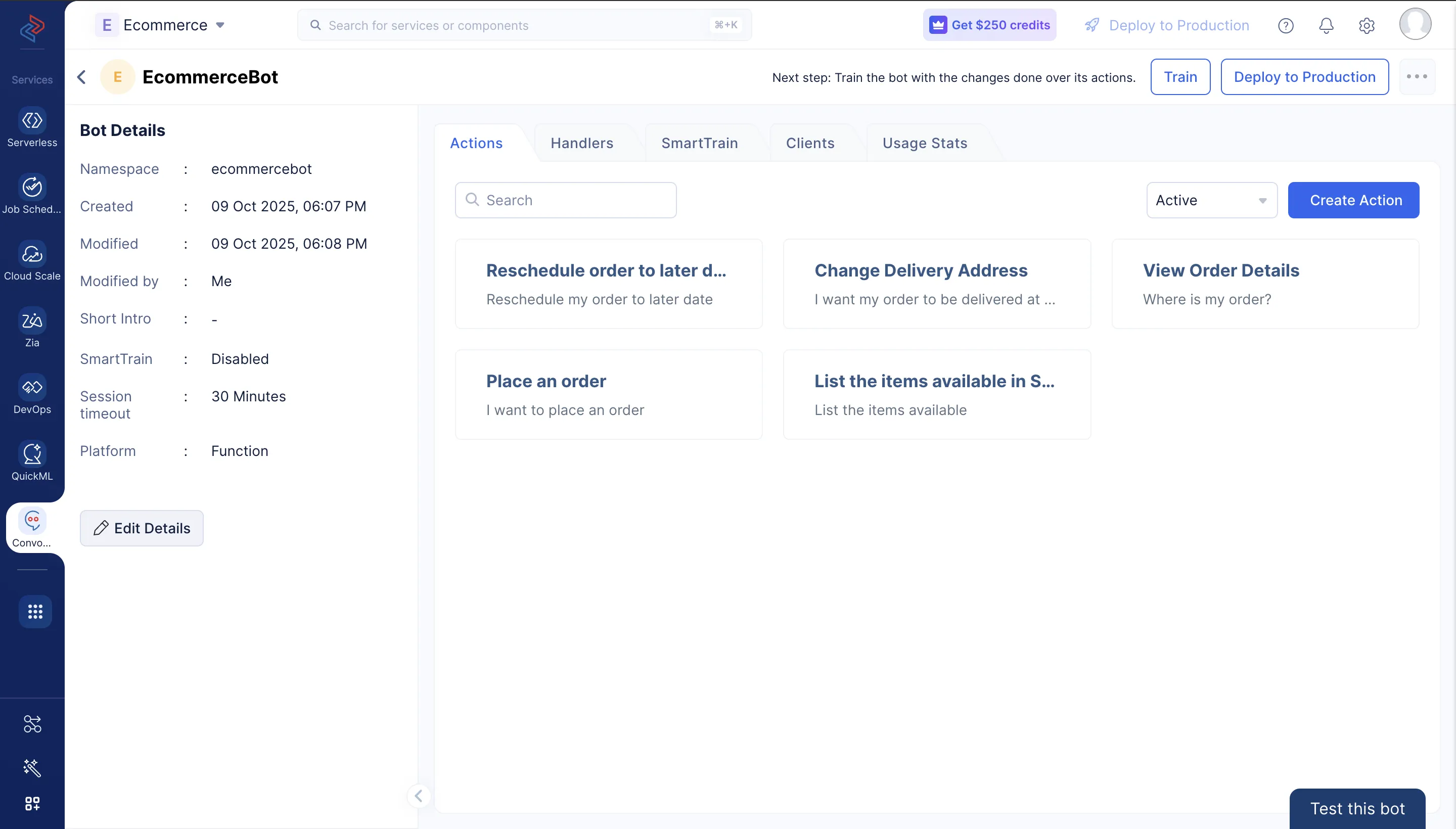
Eコマースボットには以下のアクションを作成し、ユーザーが必要な時にボットと直接対話して操作を実行できるようにします。
- Eコマースストアの商品リストを表示する
- 新規注文を行う
- 注文の詳細を確認する
- 配送先住所を変更する
- 注文を後日に変更する
アプリケーションの特定のニーズに基づいてアクションを設定するには、適切なサンプル文とパラメータを定義する必要があります。このセクションでは、Eコマースボットの上記アクションに設定するサンプル文とパラメータについて詳しく説明します。
ConvoKraftボットを作成し、ビジネスロジックを構築するための適切な開発プラットフォームを選択すると、ボットの詳細ページが表示されます。
以下の手順に従って、Eコマースボットのアクションを作成・設定してください:
-
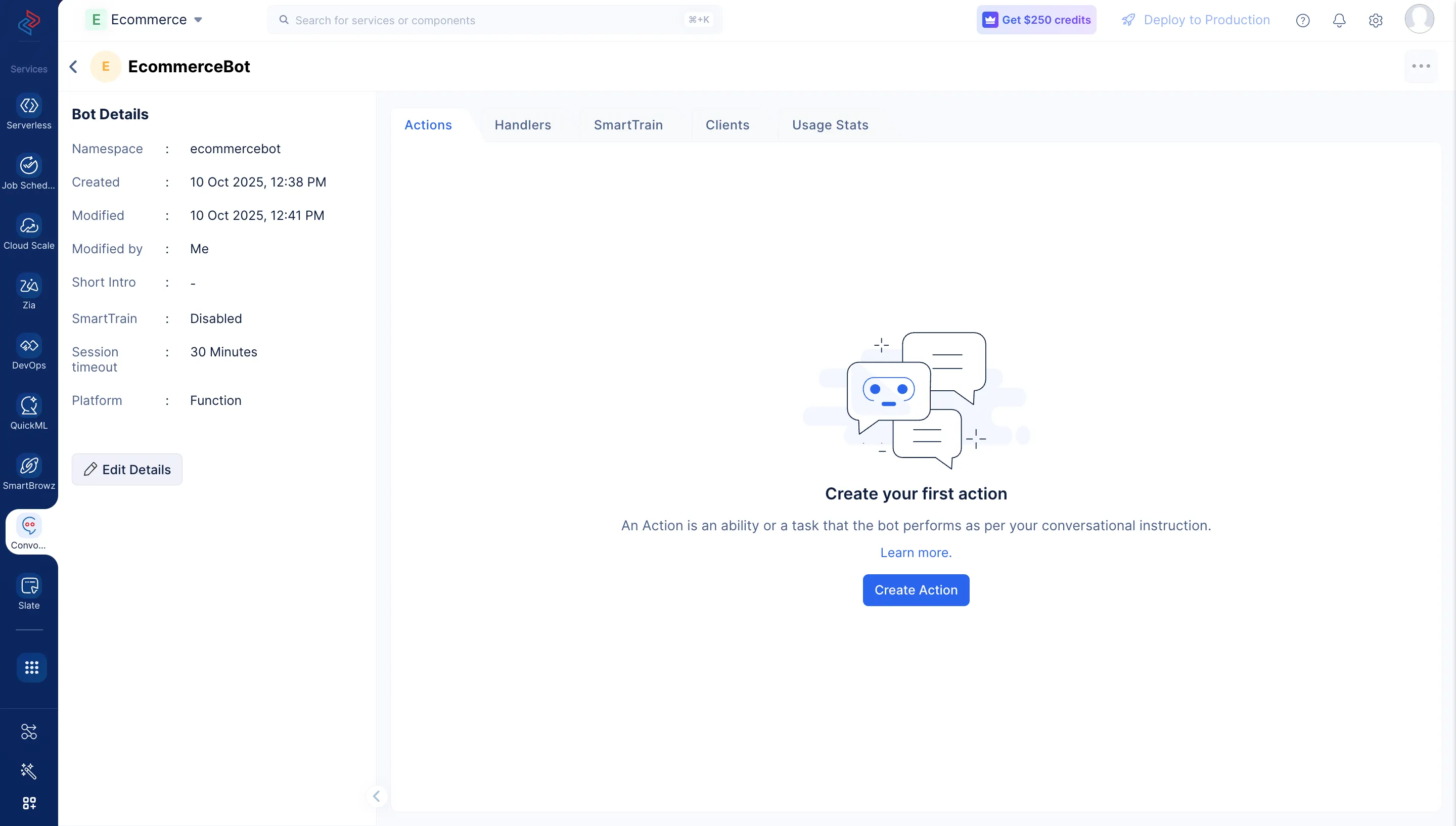
ボットを開いた後、Create Actionをクリックして新しいアクションを追加します。
-
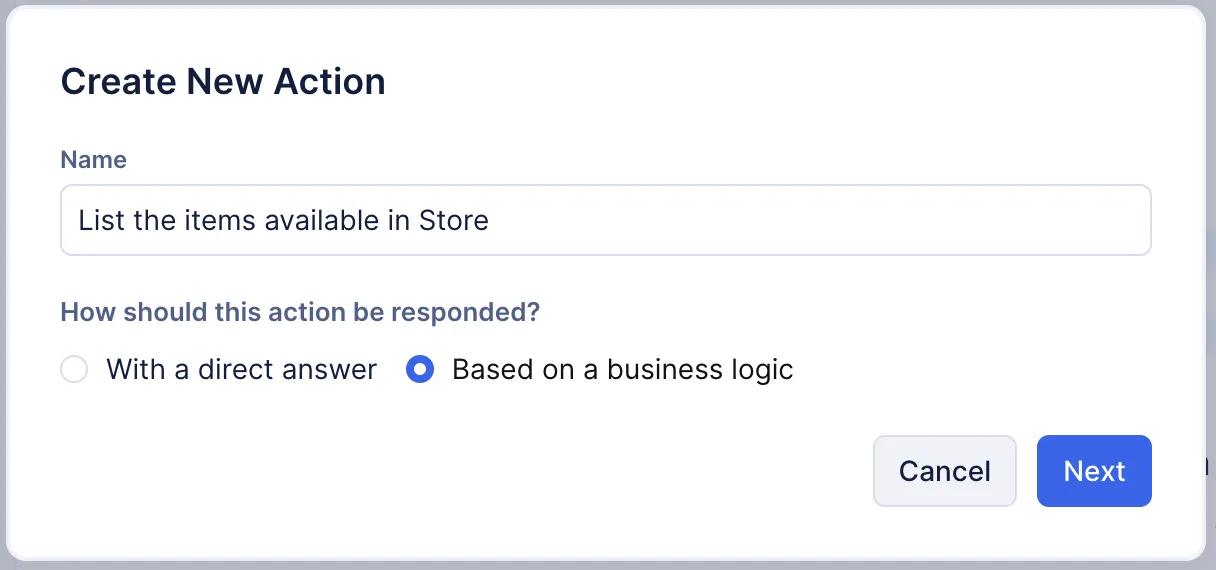
Eコマースボットの最初のアクションとして、ストアで利用可能な商品を一覧表示するアクションを作成します。 表示されるポップアップウィンドウで、アクション名に「List the items available in Store」と入力します。レスポンスをBased on a business logicに選択し、Nextをクリックします。
-
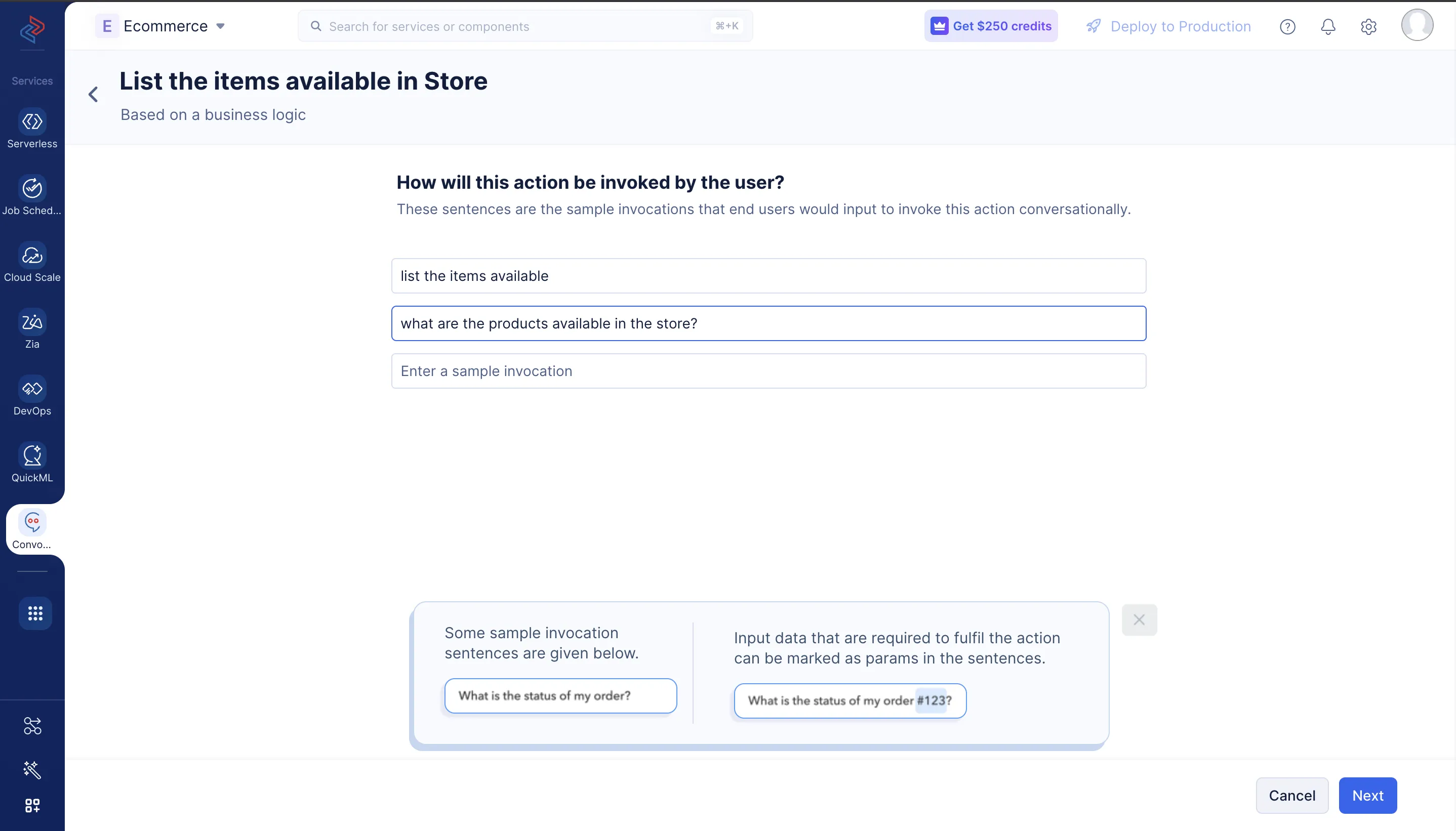
該当するサンプル文を設定します。会話形式では、ユーザーはさまざまな方法でこのアクションを呼び出す可能性があります。例えば、「list the items available」や「what are the products available in the store?」などです。
-
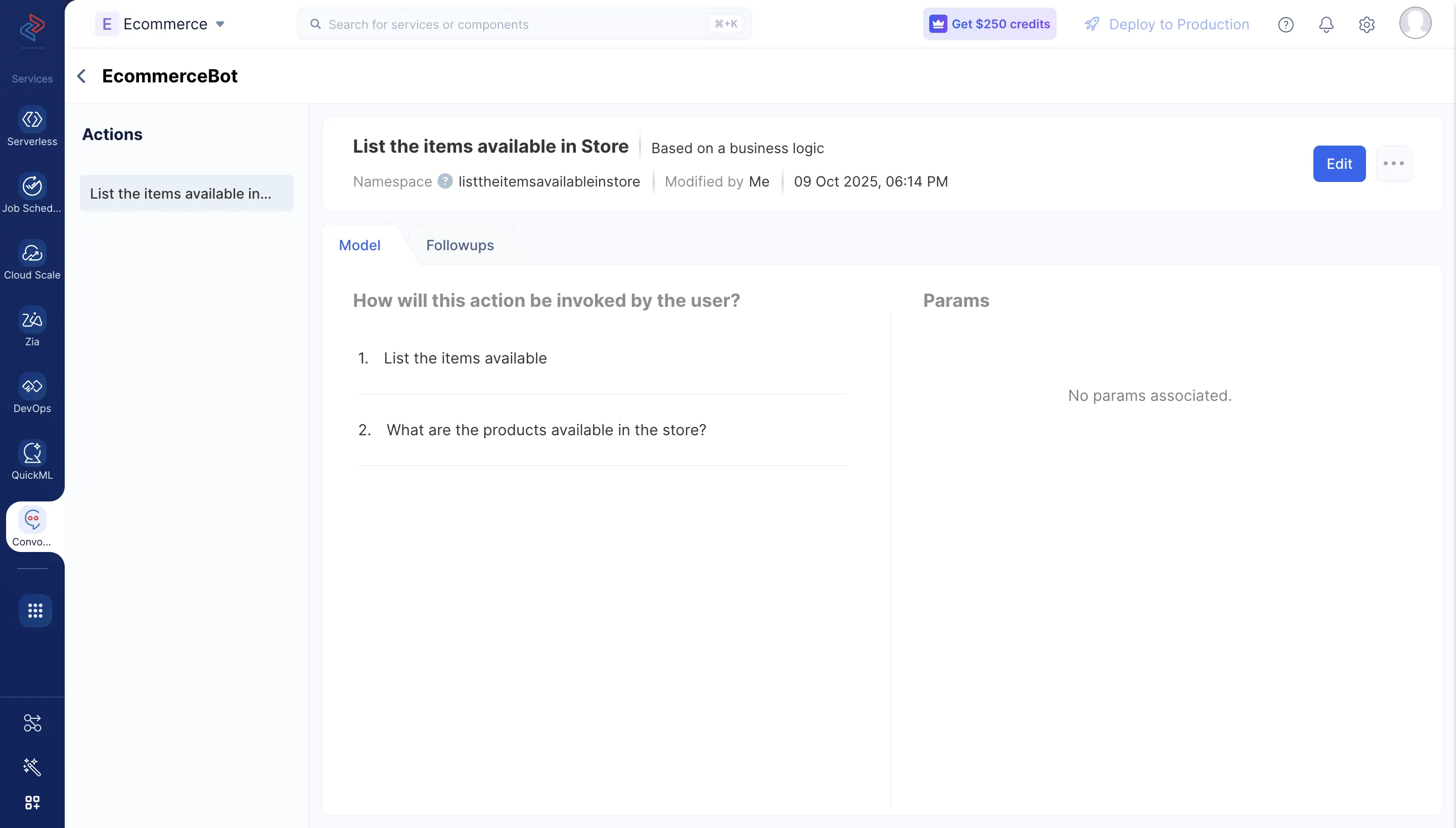
このアクションにはパラメータを設定しません。このステップをスキップしてSaveをクリックしてください。
同様に、Eコマースボットの残りのアクションを作成する手順を以下に示します。上記の手順はすべてのアクションに適用されますが、追加で特定のアクションに対してパラメータの作成が必要になる場合があります。
注文の発注
-
前のステップで説明したように、ボットの詳細ページからビジネスロジックに基づいてレスポンスを返す新しいアクションを作成し、「Place an order」と名付けます。このアクションのサンプル文は以下のように定義できます:
-
“I want to place an order”
-
“Need to place order”
-
“I have an account amelia.burrows@zylker.com and I would like to place an order of the product id : 18392188283 to be delivered on 11-Dec-2025”
-
-
文を設定したらNextをクリックします。
-
New Paramをクリックし、以下の指示に従ってパラメータタイプを選択します。 Stringをクリックすると、New Paramダイアログボックスが開きます。
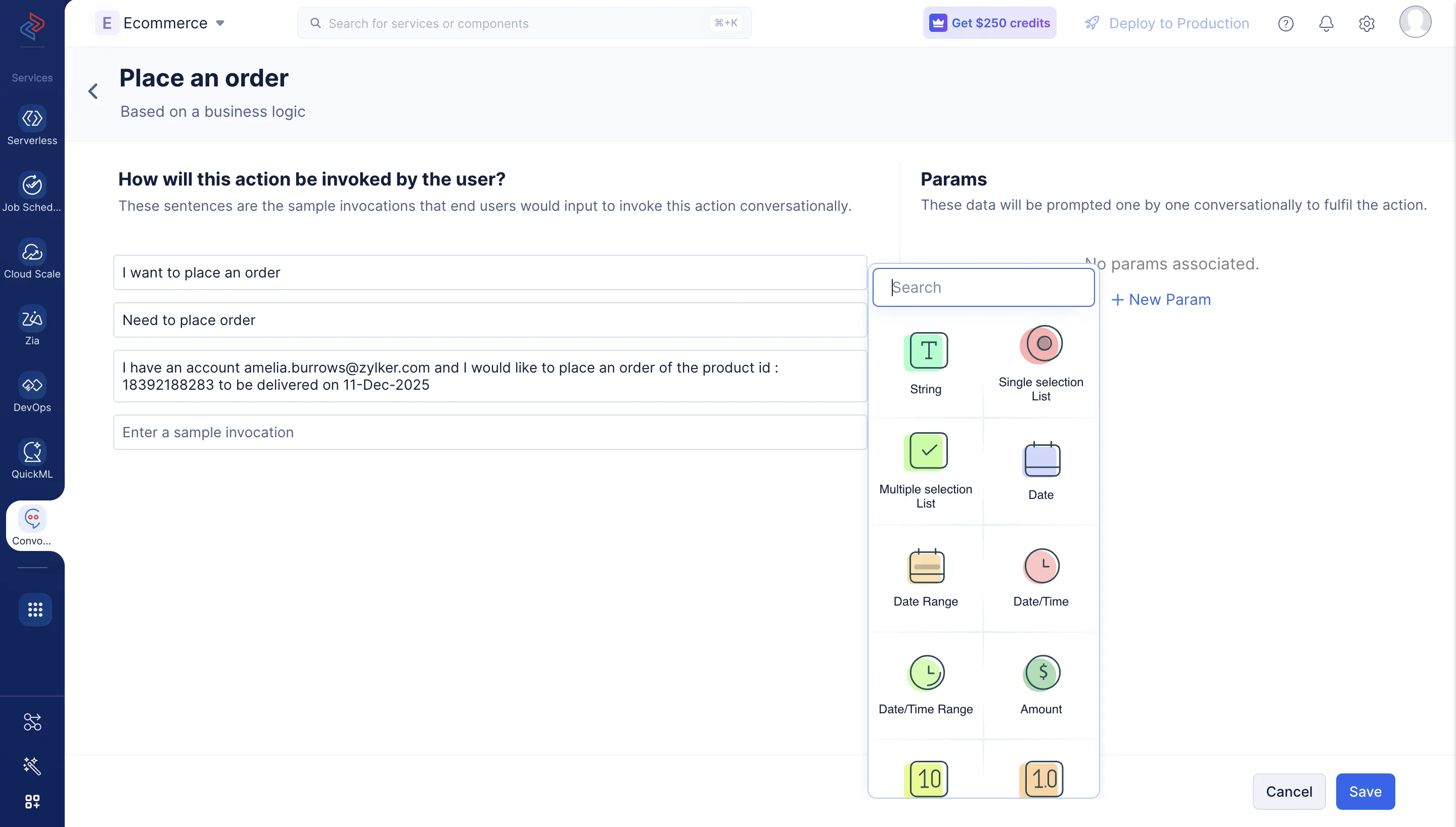
パラメータ名に「productid」と入力し、以下の表を参考にプロンプトメッセージを追加します。各パラメータタイプの属性の詳細については、このページを参照してください。
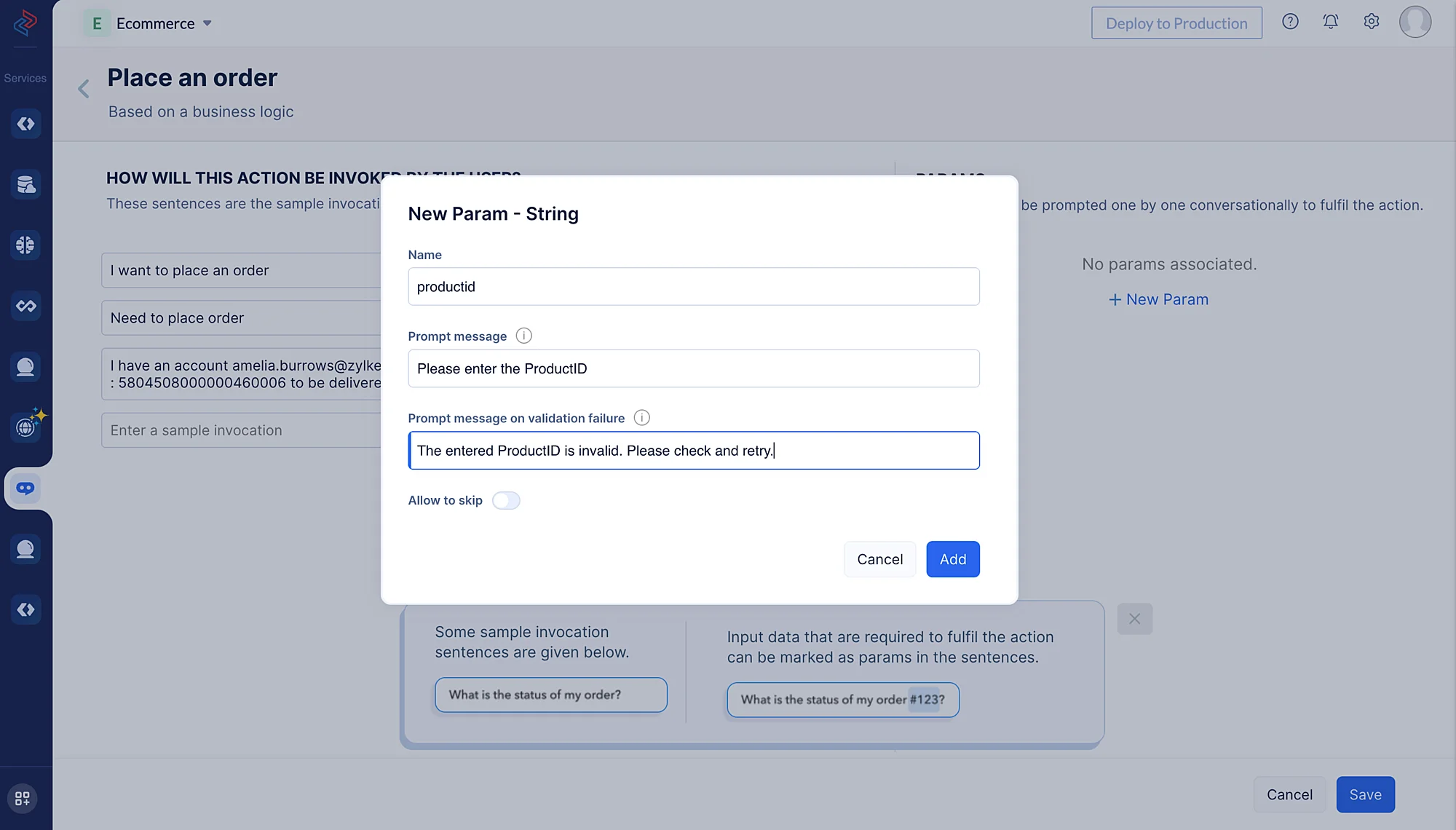
このアクションには以下のパラメータを作成します:
| パラメータタイプ | 名前 | プロンプトメッセージ | バリデーション失敗時のプロンプトメッセージ |
|---|---|---|---|
| String | productid | Please enter the Product ID | The entered ProductID is invalid. Please check and retry. |
| cxemail | Please enter your Email Address | The entered email address is invalid. Please check and retry. | |
| Date | cxdate | Please enter the date on which you expect the delivery | The entered date is invalid. Please check and retry. |
| String | cxaddr | Please enter the address where you want the order to be delivered | The entered address is invalid. Please check and retry. |
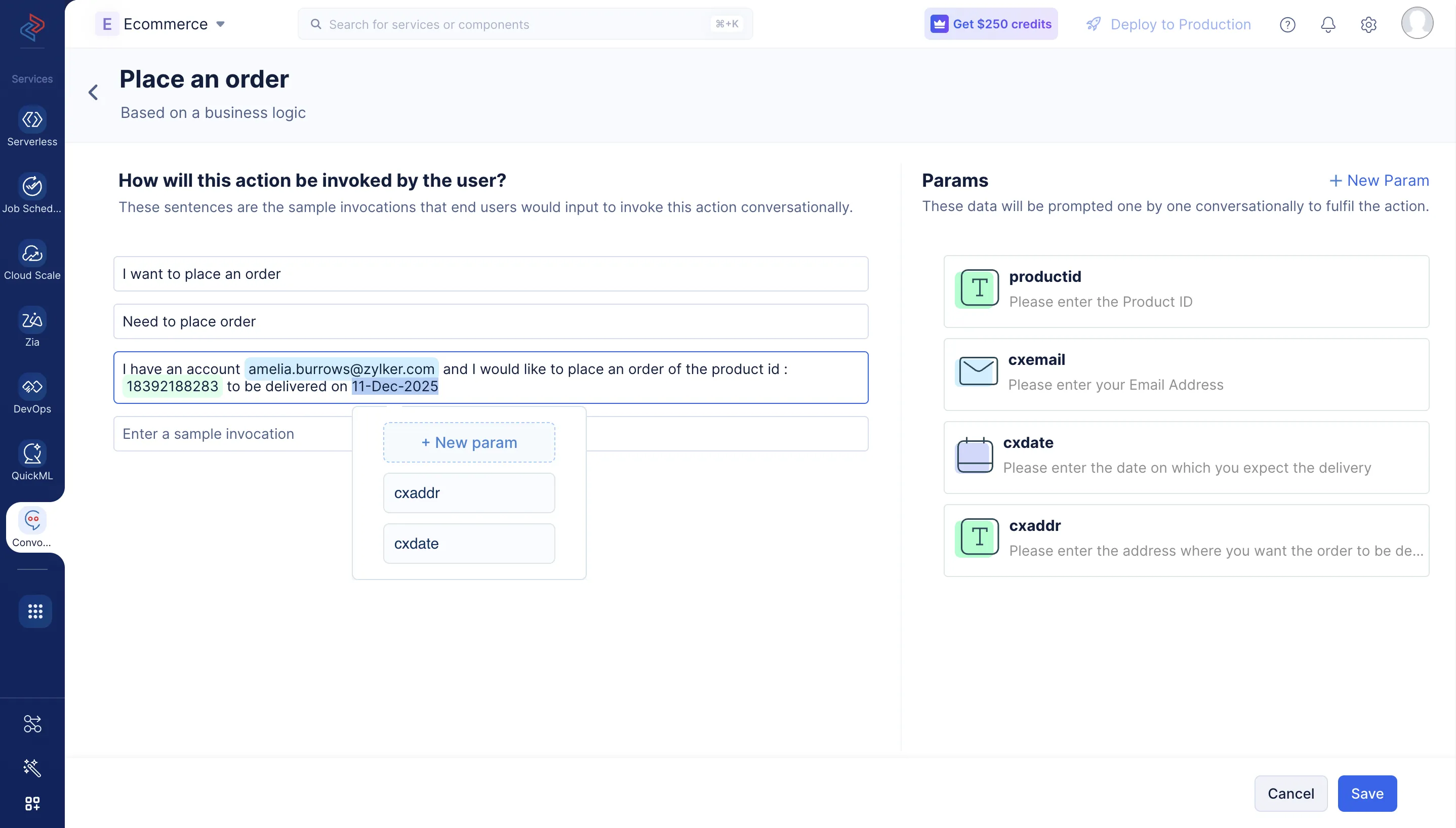
同様に、上記の表に記載されたパラメータタイプとプロンプトメッセージで、残りの3つのパラメータ「cxemail」、「cxdate」、「cxaddr」を作成します。
-
パラメータをサンプル文内の対応するテキストにマッピングし、ボットが会話中にユーザーから入力を順次取得するよう指示できます。 サンプル文のテキストにカーソルを合わせ、対応するパラメータを選択して関連付けます。
-
アクションのサンプル文とパラメータを設定したら、Saveをクリックします。
注文詳細の確認
-
新しいアクションを作成し、ビジネスロジックに基づくレスポンスを設定します。「View Order Details」と名付けます。
-
アクションに以下のサンプル文を追加します:
-
“Where is my order?”
-
“I want to view my order details of email id amelia.burrows@zylker.com”
-
“I want to check my order details”
-
-
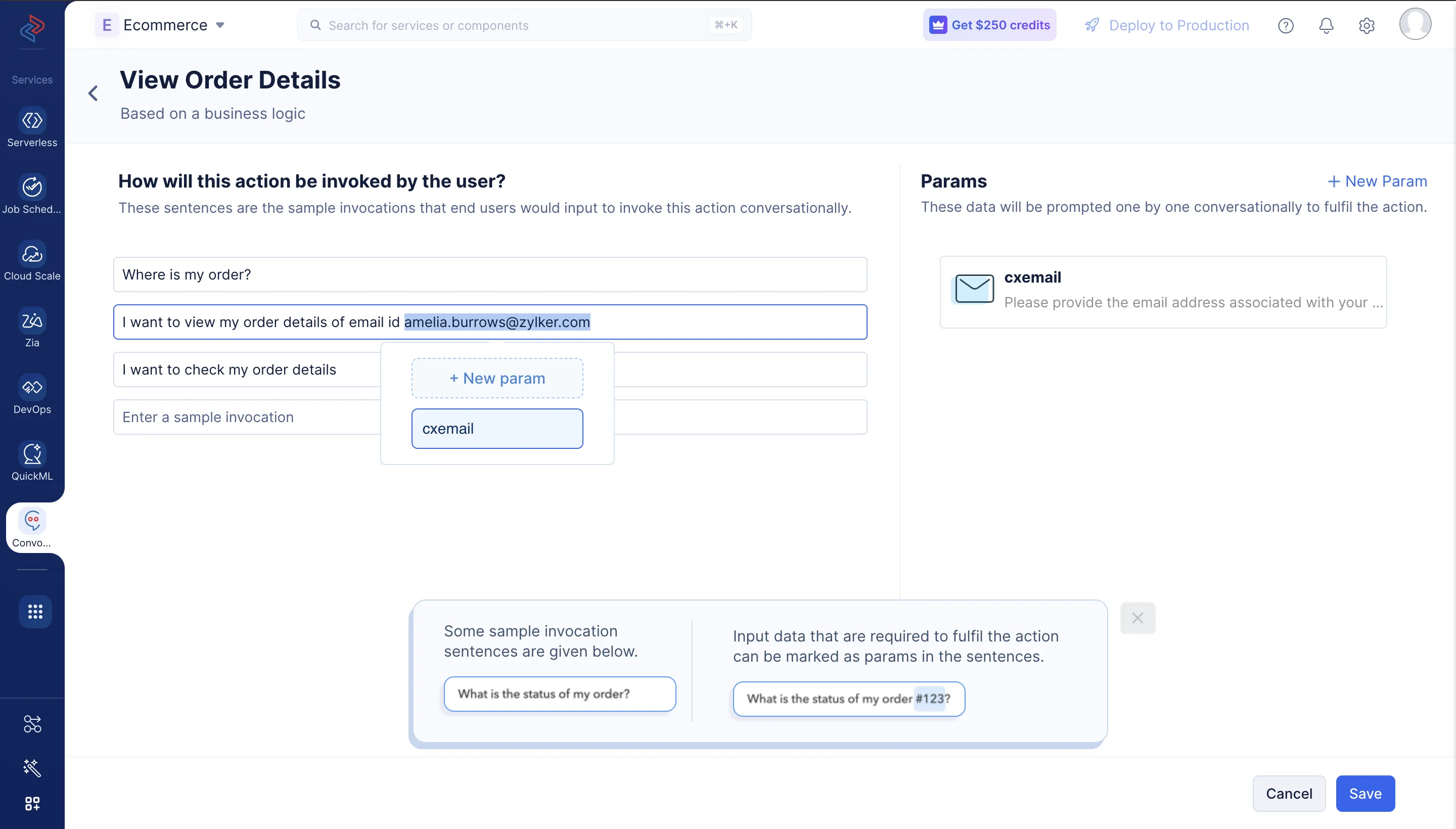
前のセクションで説明したように、アクションに以下のパラメータを定義します。上記のスクリーンショットに示すようにパラメータをサンプル文に関連付け、Saveをクリックします。
| パラメータタイプ | 名前 | プロンプトメッセージ | バリデーション失敗時のプロンプトメッセージ |
|---|---|---|---|
| cxemail | Please provide the email address associated with your order | The entered email address is invalid. Please check and retry. |
配送先住所の変更
-
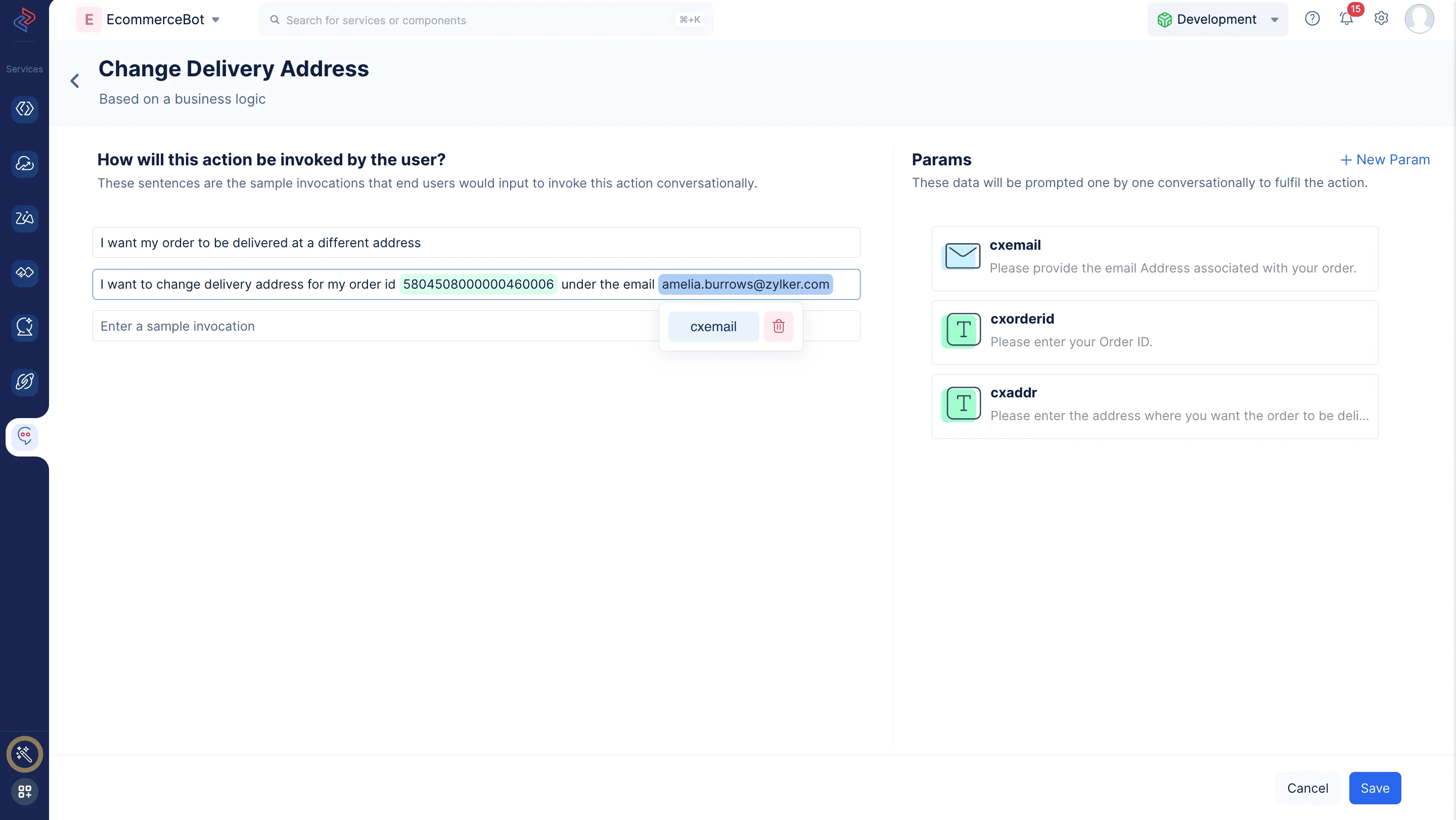
上記で作成したアクションと同様に、このアクションのレスポンスもビジネスロジックに基づいて設定します。アクション名に「Change Delivery Address」と入力します。このアクションには、以下のサンプル文を定義できます:
- “I want my order to be delivered at a different address”
- “I want to change delivery address for my order id 5804508000000460006 under the email amelia.burrows@zylker.com”
-
アクションに以下のパラメータを追加します:
| パラメータタイプ | 名前 | プロンプトメッセージ | バリデーション失敗時のプロンプトメッセージ |
|---|---|---|---|
| cxemail | Please provide the email Address associated with your order. | The entered email address is invalid. Please check and retry. | |
| String | cxorderid | Please enter your Order ID. | The entered OrderID is invalid. Please check and retry. |
| String | cxaddr | Please enter the address where you want the order to be delivered. | The entered address is invalid. Please check and retry. |
注文日のリスケジュール
-
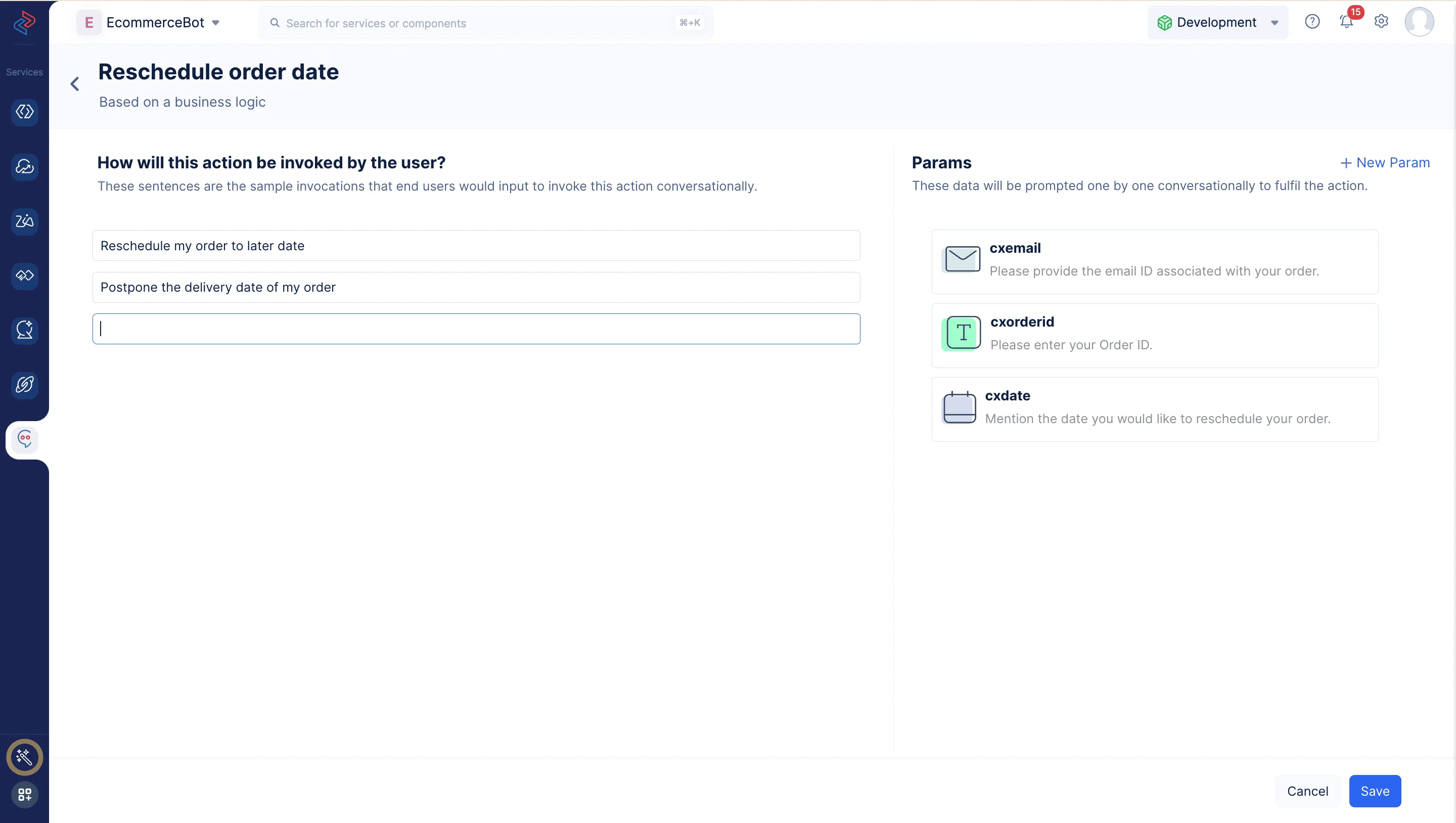
アクション名に「Reschedule order date」と入力します。このアクションには、以下のサンプル文を定義できます:
- “Reschedule my order to later date”
- “Postpone the delivery date of my order”
- “I want to change my orders delivery date as 19/07/2023 for my order id 5804508000000460006 of my email amelia.burrows@zylker.com”
-
アクションに以下のパラメータを追加します:
| パラメータタイプ | 名前 | プロンプトメッセージ | バリデーション失敗時のプロンプトメッセージ |
|---|---|---|---|
| cxemail | Please provide the email ID associated with your order. | The entered email ID is invalid. Please check and retry. | |
| String | cxorderid | Please enter your Order ID. | The entered OrderID is invalid. Please check and retry. |
| Date | cxdate | Mention the date you would like to reschedule your order | The entered date is invalid. Please check and retry. |
これでボットのアクションが設定されました。
最終更新日 2026-08-17 17:46:04 +0530 IST