Code Your Application
Let’s begin coding the application.
The backend logic of your application will be coded in the main.py file present in the LeadManager/ directory.
The front end of your code will be stored in the following manner:
-
In the LeadManager/templates/ directory, create the following files:
- index.html: Contains the HTML code for the front-end of the application.
- login.html: Contains the HTML code to enable Embedded Authentication for the application.
-
In the LeadManager/static/ directory, create the following files:
- main.css: Contains the styling elements required for the app
- main.js: Contains the JavaScript code that connects the front-end and backend.
This is the final folder structure of the LeadManager project:
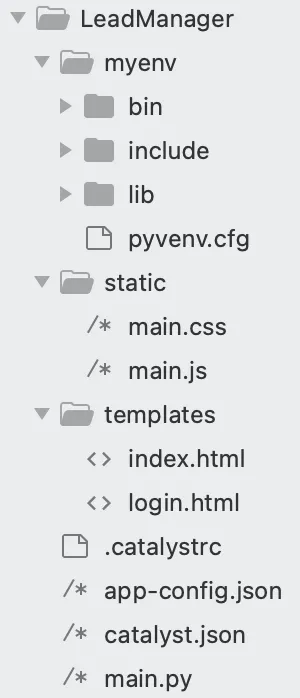
You will be coding the main.py, index.html, login.html, main.css, and main.js files. You will also be updating the app-config.json file.
Copy the code below and paste it into the respective files of your project using an IDE and save the files.
import sys
sys.path.insert(0, './myenv/lib/python3.9/site-packages')
from flask import Flask, request, jsonify, make_response, redirect
import os
import json
import logging
import requests
from flask.templating import render_template
import zcatalyst_sdk
app = Flask(name, static_url_path=’/’, static_folder=‘static’, template_folder=‘templates’)
API_BASE = “https://www.zohoapis.com/crm/v2"
LEADS_URL = f”{API_BASE}/Leads"
TOKEN_URL = “https://accounts.zoho.com/oauth/v2/token"

CLIENT_ID = os.environ.get(‘ZOHO_CLIENT_ID’)
CLIENT_SECRET = os.environ.get(‘ZOHO_CLIENT_SECRET’)
logger = logging.getLogger()
def is_valid_record_id(record_id):
return isinstance(record_id, str) and record_id.isdigit()
@app.route(’/’)
def index():
return render_template(‘index.html’)
@app.route(’/index.html’)
def indexhtml():
return render_template(‘index.html’)
@app.route(’/login.html’)
def login():
return render_template(’login.html’)
@app.route(’/generateToken’, methods=[‘GET’])
def generateToken():
try:
catalyst_app = zcatalyst_sdk.initialize(req=request)
user_management_service = catalyst_app.authentication()
datastore = catalyst_app.datastore()
code = request.args.get(‘code’)
user_details = user_management_service.get_current_user()
user_id = user_details[“user_id”]
is_local = os.getenv(‘X_ZOHO_CATALYST_IS_LOCAL’) == ’true’
protocol = ‘http’ if is_local else ‘https’
host = request.headers[‘host’] if is_local else request.headers[‘host’].split(’:’)[0]
domain = f”{protocol}://{host}"
logger.info(f’domain:{domain}’)
tab = datastore.table(‘2113000000078743’)  # replace with your Table ID
refresh_token = getRefreshToken(code, domain)
logger.info(‘refresh_token retrieved successfully’)  # never log the token value
row = {“refresh_token”: refresh_token, “userId”: user_id}
tab.insert_row(row)
redirect_uri = f"{domain}/index.html"
return redirect(redirect_uri)
except Exception as err:
logger.error(f’Error on generateToken: {err}’)
return make_response({
“message”: “Internal Server Error. Please try again after sometime.”
}, 500)
@app.route(’/getUserDetails’, methods=[‘GET’])
def userDetails():
try:
catalyst_app = zcatalyst_sdk.initialize(req=request)
user_details = getUserId(catalyst_app)
if len(user_details) != 0:
user_id = user_details[0][“Token”][“userId”]
else:
user_id = None
return make_response({“userId”: user_id}, 200)
except Exception as err:
logger.error(f’Error on getUserDetails: {err}’)
return make_response({
“message”: “Internal Server Error in getting user details. Please try again after sometime.”
}, 500)
@app.route(’/crmData’, methods=[‘GET’])
def crmData():
try:
catalyst_app = zcatalyst_sdk.initialize(req=request)
user_details = getUserId(catalyst_app)
access_token = getAccessToken(user_details, catalyst_app)
headers = {
‘Authorization’: f’Zoho-oauthtoken {access_token}’,
“Content-Type”: “application/json”
}
api_response = requests.get(LEADS_URL, headers=headers)
return make_response(jsonify(api_response.json()), 200)
except Exception as err:
logger.error(err)
return make_response({
“message”: “Internal Server Error. Please try again after sometime.”
}, 500)
@app.route(’/crmData’, methods=[‘POST’])
def postcrmData():
try:
catalyst_app = zcatalyst_sdk.initialize(req=request)
data = {“data”: [json.loads(request.data)]}
user_details = getUserId(catalyst_app)
access_token = getAccessToken(user_details, catalyst_app)
headers = {
‘Authorization’: f’Zoho-oauthtoken {access_token}’,
“Content-Type”: “application/json”
}
api_response = requests.post(LEADS_URL, headers=headers, json=data)
if api_response.status_code in (200, 201):
return make_response(api_response.json(), 200)
logger.error(api_response.json())
return make_response(api_response.json(), 500)
except Exception as err:
logger.error(err)
return make_response({
“message”: “Internal Server Error. Please try again after sometime.”
}, 500)
@app.route(’/crmData/<id>’, methods=[‘GET’])
def getCRMData(id):
if not is_valid_record_id(id):
return make_response({“message”: “Invalid record ID”}, 400)
try:
catalyst_app = zcatalyst_sdk.initialize(req=request)
user_details = getUserId(catalyst_app)
access_token = getAccessToken(user_details, catalyst_app)
headers = {
‘Authorization’: f’Zoho-oauthtoken {access_token}’,
“Content-Type”: “application/json”
}
api_response = requests.get(f"{LEADS_URL}/{id}", headers=headers)
return make_response(api_response.json(), 200)
except Exception as err:
logger.error(err)
return make_response({
“message”: “Internal Server Error. Please try again after sometime.”
}, 500)
@app.route(’/crmData/<id>’, methods=[‘PUT’])
def putcrmData(id):
if not is_valid_record_id(id):
return make_response({“message”: “Invalid record ID”}, 400)
try:
catalyst_app = zcatalyst_sdk.initialize(req=request)
req_data = request.get_json()
if req_data is None:
return make_response({“message”: “Update data not found”}, 400)
data = {“data”: [req_data]}
user_details = getUserId(catalyst_app)
access_token = getAccessToken(user_details, catalyst_app)
headers = {
‘Authorization’: f’Zoho-oauthtoken {access_token}’,
“Content-Type”: “application/json”
}
api_response = requests.put(f"{LEADS_URL}/{id}", headers=headers, json=data)
return make_response(api_response.json(), 200)
except Exception as err:
logger.error(err)
return make_response({
“message”: “Internal Server Error. Please try again after sometime.”
}, 500)
@app.route(’/crmData/<id>’, methods=[‘DELETE’])
def deletelead(id):
if not is_valid_record_id(id):
return make_response({“message”: “Invalid record ID”}, 400)
try:
catalyst_app = zcatalyst_sdk.initialize(req=request)
user_details = getUserId(catalyst_app)
access_token = getAccessToken(user_details, catalyst_app)
headers = {
‘Authorization’: f’Zoho-oauthtoken {access_token}’,
“Content-Type”: “application/json”
}
api_response = requests.delete(f"{LEADS_URL}/{id}", headers=headers)
return make_response(api_response.json(), 200)
except Exception as err:
logger.error(err)
return make_response({
“message”: “Internal Server Error. Please try again after sometime.”
}, 500)
def getRefreshToken(code, domain):
if not code:
raise ValueError(“Authorization ‘code’ is missing from the request”)
if not CLIENT_ID or not CLIENT_SECRET:
raise ValueError(“ZOHO_CLIENT_ID / ZOHO_CLIENT_SECRET environment variables are not set”)
params = {
‘code’: code,
‘client_id’: CLIENT_ID,
‘client_secret’: CLIENT_SECRET,
‘grant_type’: ‘authorization_code’,
‘redirect_uri’: f"{domain}/generateToken"
}
response = requests.post(TOKEN_URL, params=params)
try:
data = response.json()
except ValueError:
logger.error(f’Token endpoint returned non-JSON (status {response.status_code}): {response.text}’)
raise
if ‘refresh_token’ not in data:
logger.error(f’Token exchange failed: {data}’)
raise ValueError(data.get(’error’, ‘refresh_token not returned by token endpoint’))
return data[‘refresh_token’]
def getAccessToken(userdetails, catalyst_app):
user_id = userdetails[0][‘Token’][‘userId’]
zcql = catalyst_app.zcql()
query = f"Select refresh_token FROM Token where userId={user_id}"
response = zcql.execute_query(query)
refresh_token = response[0][‘Token’][‘refresh_token’]
args = {
“client_id”: CLIENT_ID,
“client_secret”: CLIENT_SECRET,
“auth_url”: TOKEN_URL,
“refresh_url”: TOKEN_URL,
“refresh_token”: refresh_token,
}
connector_service = catalyst_app.connection({user_id: args})
access_token = connector_service.get_connector(user_id).get_access_token()
return access_token
def getUserId(catalyst_app):
user = catalyst_app.authentication().get_current_user()
user_id = user[“user_id”]
return catalyst_app.zcql().execute_query(
f"Select * from Token where userId = {user_id}"
)
if name == ‘main’:
port = int(os.environ.get(‘X_ZOHO_CATALYST_LISTEN_PORT’, 9000))
app.run(host=‘0.0.0.0’, port=port)
-
The Client ID and Client Secret values obtained after you registered the client in the Zoho API console are read from the ZOHO_CLIENT_ID and ZOHO_CLIENT_SECRET environment variables. Set these as environment variables for your AppSail application in the Catalyst console, instead of hardcoding them in the source file.
-
Add the Table ID of the table you created in the Data Store in line 57.
<!DOCTYPE html>
<html>
<head>
<meta charset="utf-8" />
<meta http-equiv="X-UA-Compatible" content="IE=edge">
<title>CRM Lead Manager</title>
<meta name="viewport" content="width=device-width, initial-scale=1">
<link rel="stylesheet" type="text/css" media="screen" href="main.css" />
<link rel="stylesheet" href="https://stackpath.bootstrapcdn.com/bootstrap/4.3.1/css/bootstrap.min.css"
integrity="sha384-ggOyR0iXCbMQv3Xipma34MD+dH/1fQ784/j6cY/iJTQUOhcWr7x9JvoRxT2MZw1T" crossorigin="anonymous">
<link href="https://cdnjs.cloudflare.com/ajax/libs/twitter-bootstrap/4.5.0/css/bootstrap.min.css" rel="stylesheet">
<link href="https://cdnjs.cloudflare.com/ajax/libs/mdbootstrap/4.19.1/css/mdb.min.css" rel="stylesheet">
<script src="https://code.jquery.com/jquery-3.4.1.min.js"
integrity="sha256-CSXorXvZcTkaix6Yvo6HppcZGetbYMGWSFlBw8HfCJo=" crossorigin="anonymous"> </script>
<script src="https://cdnjs.cloudflare.com/ajax/libs/popper.js/1.14.7/umd/popper.min.js"
integrity="sha384-UO2eT0CpHqdSJQ6hJty5KVphtPhzWj9WO1clHTMGa3JDZwrnQq4sF86dIHNDz0W1" crossorigin="anonymous">
</script>
<script src="https://stackpath.bootstrapcdn.com/bootstrap/4.3.1/js/bootstrap.min.js"
integrity="sha384-JjSmVgyd0p3pXB1rRibZUAYoIIy6OrQ6VrjIEaFf/nJGzIxFDsf4x0xIM+B07jRM" crossorigin="anonymous">
</script>
<script src="main.js"> </script>
<script src="https://static.zohocdn.com/catalyst/sdk/js/4.6.2/catalystWebSDK.js"> </script>
<script src="/__catalyst/sdk/init.js"> </script>
<link href="//maxcdn.bootstrapcdn.com/bootstrap/4.0.0/css/bootstrap.min.css" rel="stylesheet" id="bootstrap-css">
<style>
#connect {
height: 260px;
width: 500px;
position: absolute;
top: 0;
bottom: 0;
left: 0;
right: 0;
margin: auto;
}
</style>
</head>
<body onload="getUserDetails()">
<br>
<center>
<h1>CRM Lead Manager</h1> <br>
</center>
<div id="connect">
<center>
<p>Click here to connect to Zoho CRM</p>
<button onclick='navigate()'>
<img src="https://www.zohowebstatic.com/sites/default/files/styles/product-home-page/public/icon-crm_blue.png"
style="width: 180px;height: 130px;">
</button>
</center>
</div>
<div style="width: 200px;float: right; margin-right: 30px;"> <label for="logoutbtn"
class="btn btn-success btn-block btn-outlined">Logout</label>
<button id="logoutbtn" onclick="logout()" style="display: none;"> </button>
</div>
<div id="main">
<div class="container">
<ul class="nav nav-tabs nav-justified mb-3" id="myTab" role="tablist">
<li class="nav-item">
<a class="nav-link active" id="check-tab" data-toggle="tab" href="#check" role="tab"
aria-controls="check" aria-selected="true">Add a Lead</a>
</li>
<li class="nav-item">
<a class="nav-link" id="report-tab" data-toggle="tab" href="#report" onclick="getLeads()" role="tab"
aria-controls="report" aria-selected="false">Manage Leads</a>
</li>
</ul> <br>
<div class="tab-content" id="myTabContent">
<div class="tab-pane fade show active" id="check" role="tabpanel" aria-labelledby="check-tab">
<div class="tab-pane fade show active" id="ex3-tabs-1" role="tabpanel" aria-labelledby="ex3-tab-1">
<div style="margin-left: 100px; margin-right:100px;">
<form id="leads">
<!-- 2 column grid layout with text inputs for the first and last names -->
<div class="row mb-4">
<div class="col">
<div class="form-outline">
<label class="form-label" for="form6Example1">First name</label>
<input type="text" id="firstName" class="form-control" />
</div>
</div>
<div class="col">
<div class="form-outline">
<label class="form-label" for="form6Example2">Last name</label>
<input type="text" id="lastName" class="form-control" required />
</div>
</div>
</div>
<!-- Text input -->
<div class="form-outline mb-4">
<label class="form-label" for="form6Example3">Company name</label>
<input type="text" id="companyName" class="form-control" />
</div>
<!-- Email input -->
<div class="form-outline mb-4">
<label class="form-label" for="form6Example5">Email</label>
<input type="email" id="email" class="form-control" />
</div>
<!-- Text input -->
<div class="form-outline mb-4">
<label class="form-label" for="form6Example4">State</label>
<input type="text" id="state" class="form-control" />
</div>
<!-- Number input -->
<div class="form-outline mb-4">
<label class="form-label" for="form6Example6">Phone</label>
<input type="number" id="phone" class="form-control" />
</div>
<!-- Number input -->
<div class="form-outline mb-4">
<label class="form-label" for="form6Example6">Lead Source</label>
<input type="text" id="leadSource" class="form-control" />
</div>
<!-- Submit button -->
<center> <button type="submit" onclick="createLead();return false;"
class="btn btn-primary btn-block mb-4" style="width: 100px;">Add Lead</button>
<div id="loader" style="display: none;">
<div class="spinner-border" role="status">
<span class="sr-only">Loading...</span>
</div>
</div>
</center>
</form>
</div>
</div>
</div>
<div class="tab-pane fade" id="report" role="tabpanel" aria-labelledby="report-tab">
<center>
<div id="loaders" style="display: none; padding-top: 200px;">
<div class="spinner-border" role="status">
<span class="sr-only">Loading...</span>
</div>
</div>
</center>
<p id="showData"> </p>
</div>
</div>
</div>
<!-- Modal -->
<div class="modal fade" id="myModal" tabindex="-1" role="dialog" aria-labelledby="myModalLabel"
aria-hidden="true">
<div class="vertical-alignment-helper">
<div class="modal-dialog vertical-align-center">
<div class="modal-content">
<center>
<h4 class="modal-title" id="myModalLabel"> </h4>
<div class="modal-body" id="message"> </div>
<div class="modal-footer">
<button type="button" style="background-color: #007bff;color: white;"
class="btn btn-default" data-dismiss="modal">Close</button>
</div>
</center>
</div>
</div>
</div>
</div>
<div class="modal fade" id="editForm" tabindex="-1" role="dialog" aria-labelledby="myModalLabel"
aria-hidden="true">
<div class="vertical-alignment-helper">
<div class="modal-dialog vertical-align-center">
<div class="modal-content">
<div style="margin-left: 80px; margin-right:80px;">
<br>
<center>
<h2>Edit Lead</h2>
</center>
<br>
<form id="editLeads">
<!-- 2 column grid layout with text inputs for the first and last names -->
<div class="row mb-4">
<div class="col">
<div class="form-outline">
<label class="form-label" for="form6Example1">First name</label>
<input type="text" id="editfirstName" class="form-control" />
</div>
</div>
<div class="col">
<div class="form-outline">
<label class="form-label" for="form6Example2">Last name</label>
<input type="text" id="editlastName" class="form-control" required />
</div>
</div>
</div>
<!-- Text input -->
<div class="form-outline mb-4">
<label class="form-label" for="form6Example3">Company name</label>
<input type="text" id="editcompanyName" class="form-control" />
</div>
<!-- Email input -->
<div class="form-outline mb-4">
<label class="form-label" for="form6Example5">Email</label>
<input type="email" id="editemail" class="form-control" />
</div>
<!-- Text input -->
<div class="form-outline mb-4">
<label class="form-label" for="form6Example4">State</label>
<input type="text" id="editstate" class="form-control" />
</div>
<!-- Number input -->
<div class="form-outline mb-4">
<label class="form-label" for="form6Example6">Phone</label>
<input type="number" id="editphone" class="form-control" />
</div>
<!-- Submit button -->
<center> <button type="submit" id="editBtn" onclick="editLead();return false;"
class="btn btn-primary btn-block mb-4" style="width: 100px;">Edit</button>
<div id="loader" style="display: none;">
<div class="spinner-border" role="status">
<span class="sr-only">Loading...</span>
</div>
</div>
</center>
</form>
</div>
</div>
</div>
</div>
</div>
<div class="modal fade right" id="ModalDanger" tabindex="-1" role="dialog" aria-labelledby="myModalLabel"
aria-hidden="true">
<div class="modal-dialog modal-notify modal-danger modal-side modal-top-right" role="document">
<!--Content-->
<div class="modal-content">
<!--Header-->
<div class="modal-header">
<p class="heading">Lead Deletion</p>
<button type="button" class="close" data-dismiss="modal" aria-label="Close">
<span aria-hidden="true" class="white-text">×</span>
</button>
</div>
<!--Body-->
<div class="modal-body">
<div class="row">
<div class="col-9">
<p>Are you sure you want to delete the Lead?</p>
</div>
</div>
</div>
<!--Footer-->
<div class="modal-footer justify-content-center">
<a type="button" class="btn btn-danger" id="delete-btn" onclick="deleteLead()">Delete</a>
<a type="button" class="btn btn-outline-danger waves-effect" data-dismiss="modal">Cancel</a>
</div>
</div>
<!--/.Content-->
</div>
</div>
</div>
</body>
<script>
//Add Your Client ID
function navigate() {
window.location.href = "https://accounts.zoho.com/oauth/v2/auth?scope=ZohoCRM.modules.ALL&client_id={{client_id}}&response_type=code&access_type=offline&redirect_uri=" + location.protocol + '//' + location.host + "/generateToken";
}
</script>
</html>
<html>
</html>
<meta charset="utf-8" />
<meta http-equiv="X-UA-Compatible" content="IE=edge">
<title>CRM Lead Manager</title>
<meta name="viewport" content="width=device-width, initial-scale=1">
<link rel="stylesheet" type="text/css" media="screen" href="main.css" />
<script src="main.js"> </script>
<link rel="stylesheet" type="text/css" media="screen" href="main.css" />
<link rel="stylesheet" href="https://stackpath.bootstrapcdn.com/bootstrap/4.3.1/css/bootstrap.min.css"
    integrity="sha384-ggOyR0iXCbMQv3Xipma34MD+dH/1fQ784/j6cY/iJTQUOhcWr7x9JvoRxT2MZw1T" crossorigin="anonymous">
<script src="https://static.zohocdn.com/catalyst/sdk/js/4.6.2/catalystWebSDK.js"> </script>
<script src="https://code.jquery.com/jquery-3.4.1.min.js"
    integrity="sha256-CSXorXvZcTkaix6Yvo6HppcZGetbYMGWSFlBw8HfCJo=" crossorigin="anonymous"> </script>
<script src="https://cdnjs.cloudflare.com/ajax/libs/popper.js/1.14.7/umd/popper.min.js"
    integrity="sha384-UO2eT0CpHqdSJQ6hJty5KVphtPhzWj9WO1clHTMGa3JDZwrnQq4sF86dIHNDz0W1" crossorigin="anonymous">
    </script>
<script src="https://stackpath.bootstrapcdn.com/bootstrap/4.3.1/js/bootstrap.min.js"
    integrity="sha384-JjSmVgyd0p3pXB1rRibZUAYoIIy6OrQ6VrjIEaFf/nJGzIxFDsf4x0xIM+B07jRM" crossorigin="anonymous">
    </script>
<script src="https://static.zohocdn.com/catalyst/sdk/js/4.6.2/catalystWebSDK.js"> </script>
<script src="/__catalyst/sdk/init.js"> </script>
<script>
    catalyst.auth.signIn("login");
</script>
<link href="//maxcdn.bootstrapcdn.com/bootstrap/4.0.0/css/bootstrap.min.css" rel="stylesheet" id="bootstrap-css">
<style>
    #login {
        height: 100%;
        width: 100%;
        position: absolute;
        top: 0;
        bottom: 0;
        left: 0;
        right: 0;
        margin: auto;
    }
</style>
<body>
    <br>
    <center>
        <h1>CRM Lead Manager</h1>
    </center>
    <div id="login"> </div>
</body>
</html>
#dataTable {
    font-family: Arial, Helvetica, sans-serif;
    border-collapse: collapse;
    width: 100%;
  }
#dataTable td, #dataTable th {
border: 1px solid #ddd;
padding: 8px;
}
#dataTable tr:nth-child(even){background-color: #f2f2f2;}
#dataTable tr:hover {background-color: #ddd;}
#dataTable th {
padding-top: 12px;
padding-bottom: 12px;
text-align: left;
background-color: #007bff;
color: white;
}
.vertical-alignment-helper {
display: table;
height: 100%;
width: 100%;
pointer-events: none;
}
.vertical-align-center {
display: table-cell;
vertical-align: middle;
pointer-events: none;
}
.modal-content {
width: inherit;
max-width: inherit;
height: inherit;
margin: 0 auto;
pointer-events: all;
}
function createLead() {
    debugger;
    $("#loader").show();
    var firstName = $("#firstName").val();
    var lastName = $("#lastName").val();
    if (lastName == "") {
      alert("Kindly Enter the Last Name");
      $("#loader").hide();
      return;
    }
    var companyName = $("#companyName").val();
    var email = $("#email").val();
    var state = $("#state").val();
    var phone = $("#phone").val();
    var leadSource = $("#leadSource").val();
    $.ajax({
      url: "/crmData",
      type: "post",
      contentType: "application/json",
      data: JSON.stringify({
        "First_Name": firstName,
        "Last_Name": lastName,
        "Company": companyName,
        "Email": email,
        "State": state,
        "Phone": phone,
        "Lead_Source": leadSource,
      }),
      success: function (data) {
        debugger;
        $('#leads').trigger("reset");
        $("#myModalLabel").html("Success");
        $("#message").html("Lead Created Successfully");
        $("#loader").hide();
        $('#myModal').modal('show');
      },
      error: function (error) {
        $('#leads').trigger("reset");
        $("#myModalLabel").html("Failure");
        $("#message").html("Please try again after Sometime");
        $("#loader").hide();
        $('#myModal').modal('show');
      }
    });
  }
  function logout() {
    var redirectURL = "/login.html"; //Add your app domain
    var auth = catalyst.auth;
    auth.signOut(redirectURL);
  }
  function getUserDetails() {
    $("#main").hide();
    $("#connect").hide();
    catalyst.auth.isUserAuthenticated().then(result => {
      console.log(result)
      $("#loader").show();
      $.ajax({
        url: "/getUserDetails",
        type: "get",
        success: function (data) {
          $("#loader").hide();
          if (data.userId) {
            $("#main").show();
            $("#connect").hide();
          } else {
            $("#connect").show();
            $("#main").hide();
          }
        },
        error: function (error) {
          $("#myModalLabel").html("Failure");
          $("#message").html("Please try again after Sometime");
          $("#loader").hide();
          $('#myModal').modal('show');
        }
      });
    }).catch(err => {
      document.body.innerHTML = 'You are not logged in. Please log in to continue. Redirecting you to the login page..';
      setTimeout(function () {
        window.location.href = "login.html";
      }, 3000);
    });
  }
  function getLeads() {
    debugger;
    var tableContainer = document.getElementById("showData");
    tableContainer.innerHTML = "";
    $("#loaders").show();
    $.ajax({
      url: "/crmData",
      type: "get",
      success: function (data) {
        debugger;
        var reqData = getRequiredData(data.data);
        $("#loaders").hide();
        renderTable(reqData);
      },
      error: function (error) {
        $("#myModalLabel").html("Failure");
        $("#message").html("Please try again after Sometime");
        $("#loader").hide();
        $('#myModal').modal('show');
      }
    });
  }
  function showDeletePopup(leadID) {
    $('#ModalDanger').modal('show');
    var deleteBtn = document.getElementById("delete-btn");
    deleteBtn.value = leadID;
  }
  function deleteLead() {
    var leadID = document.getElementById('delete-btn').value;
    $.ajax({
      url: "/crmData/" + leadID,
      type: "delete",
      success: function (data) {
        debugger;
        $('#ModalDanger').modal('toggle');
        $("#myModalLabel").html("Success");
        $("#message").html("Lead Deleted Successfully");
        $('#myModal').modal('show');
        setTimeout(function () {
          location.reload();
        }, 3000);
      },
      error: function (error) {
        $("#myModalLabel").html("Failure");
        $("#message").html("Please try again after Sometime");
        $("#loader").hide();
        $('#myModal').modal('show');
      }
    });
  }
  function showEditPopup(leadID) {
    $.ajax({
      url: "/crmData/" + leadID,
      type: "get",
      success: function (data) {
        debugger;
        var respData = data.data;
        $('#editfirstName').val(respData[0].First_Name);
        $('#editlastName').val(respData[0].Last_Name);
        $('#editcompanyName').val(respData[0].Company);
        $('#editemail').val(respData[0].Email);
        $('#editstate').val(respData[0].State);
        $('#editphone').val(respData[0].Phone);
        $('#editleadSource').val(respData[0].Lead_Source);
        $('#editBtn').val(respData[0].id);
        $('#editfirstName').html(respData[0].First_Name);
        $('#editlastName').html(respData[0].Last_Name);
        $('#editcompanyName').html(respData[0].Company);
        $('#editemail').html(respData[0].Email);
        $('#editstate').html(respData[0].State);
        $('#editphone').html(respData[0].Phone);
        $('#editleadSource').html(respData[0].Lead_Source);
        $('#editForm').modal('show');
      },
      error: function (error) {
        $("#myModalLabel").html("Failure");
        $("#message").html("Please try again after Sometime");
        $("#loader").hide();
        $('#myModal').modal('show');
      }
    });
  }
  function editLead() {
    var firstName = $("#editfirstName").val();
    var lastName = $("#editlastName").val();
    if (lastName == "") {
      alert("Kindly Enter the Last Name");
      return;
    }
    var companyName = $("#editcompanyName").val();
    var email = $("#editemail").val();
    var state = $("#editstate").val();
    var phone = $("#editphone").val();
    var leadSource = $("#editleadSource").val();
    var leadID = $("#editBtn").val();
    $.ajax({
      url: "/crmData/" + leadID,
      type: "put",
      contentType: "application/json",
      data: JSON.stringify({
        "First_Name": firstName,
        "Last_Name": lastName,
        "Company": companyName,
        "Email": email,
        "State": state,
        "Phone": phone,
        "Lead_Source": leadSource
      }),
      success: function (data) {
        debugger;
        $('#editForm').modal('toggle');
        $("#myModalLabel").html("Success");
        $("#message").html("Lead Edited Successfully");
        $('#myModal').modal('show');
        setTimeout(function () {
          location.reload();
        }, 3000);
      },
      error: function (error) {
        $('#leads').trigger("reset");
        $("#myModalLabel").html("Failure");
        $("#message").html("Please try again after Sometime");
        $("#loader").hide();
        $('#myModal').modal('show');
      }
    });
  }
  function getRequiredData(data) {
    var i;
    var resp = [];
    for (i = 0; i < data.length; i++) {
      var gulp = {
        "First Name": data[i].First_Name,
        "Last Name": data[i].Last_Name,
        "Phone": data[i].Phone,
        "Email": data[i].Email,
        "Company": data[i].Company,
        "Edit": '<center><a href="javascript:showEditPopup(\'' + data[i].id + '\')">✎︎</a></center>',
        "Delete": '<center><a href="javascript:showDeletePopup(\'' + data[i].id + '\')">🗑︎</a></center>'
      }
      resp.push(gulp);
    }
    console.log(resp);
    return resp;
  }
  function renderTable(respData) {
    var col = [];
    for (var i = 0; i < respData.length; i++) {
      for (var key in respData[i]) {
        if (col.indexOf(key) === -1) {
          col.push(key);
        }
      }
    }
    var table = document.createElement("table");
    table.id = "dataTable";
    var tr = table.insertRow(-1);
    for (var i = 0; i < col.length; i++) {
      var th = document.createElement("th");
      th.innerHTML = col[i];
      tr.appendChild(th);
    }
    for (var i = 0; i < respData.length; i++) {
      tr = table.insertRow(-1);
      for (var j = 0; j < col.length; j++) {
        var tabCell = tr.insertCell(-1);
        tabCell.innerHTML = respData[i][col[j]];
      }
    }
    var divContainer = document.getElementById("showData");
    divContainer.innerHTML = "";
    divContainer.appendChild(table);
  }
{
	"command": "python3 -u main.py",
	"build_path": "/",
	"stack": "python_3_9",
	"env_variables": {},
	"memory": 256,
	"scripts": {},
	"raw": {},
	"catalyst_auth": true,
	"login_redirect": "/index.html"
}
Now let’s go over the logic and functionality of the application code.
-
The login.html file in the client component enables Catalyst Embedded Authentication login, allowing you to log in using the Zoho social login.
-
The index.html file contains the code for the front-end of the client. It defines a function navigate() that enables the connection to the CRM account by passing the required authorization information such as the Client ID and the scope.
-
The backend logic of the application defines the following APIs that perform various actions:
- /generateToken: Obtains the Refresh Token by calling the getRefreshToken() function, and inserts it along with the userID of the current user in the Token table in the Data Store. It then redirects to the index page of the client.
- /getUserDetails: Fetches the user details by calling the getUserDetails() function. If there is no record in the table, a JSON response with the userID alone is sent. If the record exists in the table, it is sent along with the userID.
- /crmData: This route defines the path of all leads in the Leads module. The Node function executes the HTTP GET and POST operations to fetch all leads or create a new lead using this route, respectively.
- /crmData/:id: This route defines the path of a particular lead in the Leads module. The id represents the unique ID of the lead in CRM. The function executes the HTTP PUT and DELETE operations to edit or delete a lead, respectively, using this route.
-
The backend logic is implemented using the following functions that are called by the APIs:
- getRefreshToken(): Fetches the Refresh Token by passing the Client ID, Client Secret, Redirect URI and other required values as query string parameters.
- getAccessToken(): Fetches the Access Token by passing the Refresh Token queried from the Token table using ZCQL, and other required parameters. The Access Token is fetched each time an operation needs to be performed on the CRM module, such as adding a lead or editing a lead.
- getResponse(): Passes the Access Token fetched to obtain the authorization needed to perform each action on the CRM module. This function is called with each /crmData and /crmData/:id API to authorize the request.
- getUserDetails(): Fetches the record from the Token table that contains the Refresh Token, by passing the userID.
-
main.js: It is the JavaScript function in the client component that parses the JSON responses obtained from the function and renders them in the index.html page. This function defines the actions for all the UI elements in the client application. For example, getLeads() obtains all leads from the function response and renders them in the client, and showEditPopup() defines the actions for editing a lead.
Last Updated 2026-09-02 11:52:26 +0530 IST