Configure the Client
Let’s configure the client component.
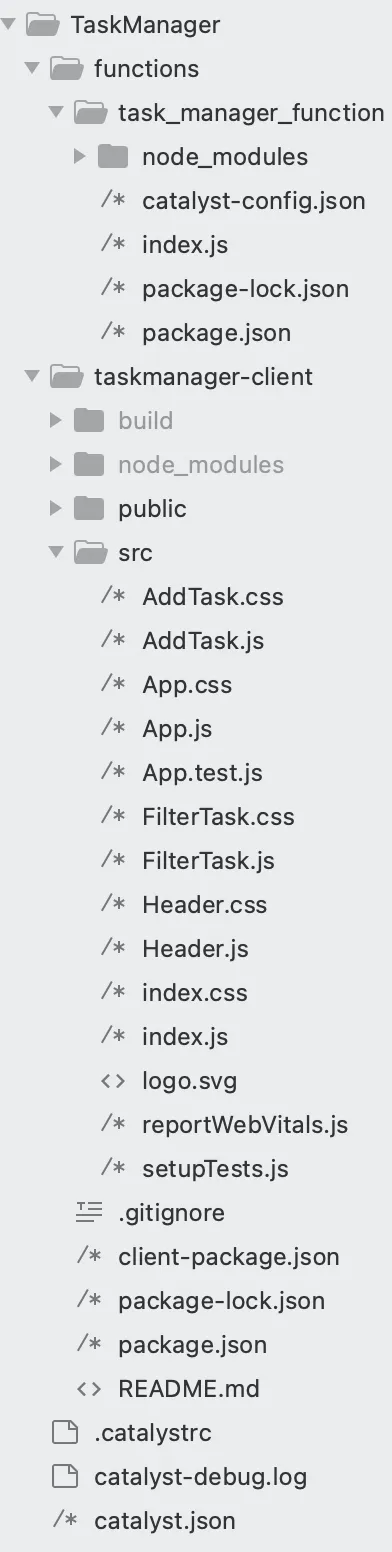
The React web client directory contains the following files:
- The root directory of the client contains a client-package.json file, which is a configuration file defining the name, version, default home page, and redirect page of the client component.
- The task-manager-client client directory contains two subfolders, as per the default project structure of a React app:
- The public folder is generally used to hold files that can be openly accessed by browsers through public URLs, such as icon files of the web app, the index.html file, and the 404.html file.
- The src folder contains the application’s source files that will be included in the build folder when we compile the React app.
- The client directory also contains the package.json dependency file and a hidden .gitignore file.
- The files present in the src folder include:
- Native React files such as index.js, index.css, setupTests.js, reportWebVitals.js, logo.svg, and App.test.js.
- App.css: Contains the required styling elements for the applications interface.
- App.js: Contains the hash routing logic to define routes for AddTask and FilterTask files.
- You need to add the following files to the src/ folder:
- AddTask.css: Contains the required styling elements for the task creation action.
- AddTask.js: To collect task details using form inputs.
- FilterTask.css: Contains the required styling for the filter functionality.
- FilterTask.js: To contain the logic of filtering the tasks based on UserID, TaskName, and Status. Also contains the logic to perform edit and delete operations.
- Header.css: Contains the styling elements of the application
- Header.js: Contains the logic that defines the primary aspects of the application such as, application title, navigation buttons, and more.
Install Additional React Packages
To allow our application to behave as a multi-page application, we need to install the react-router-dom package.
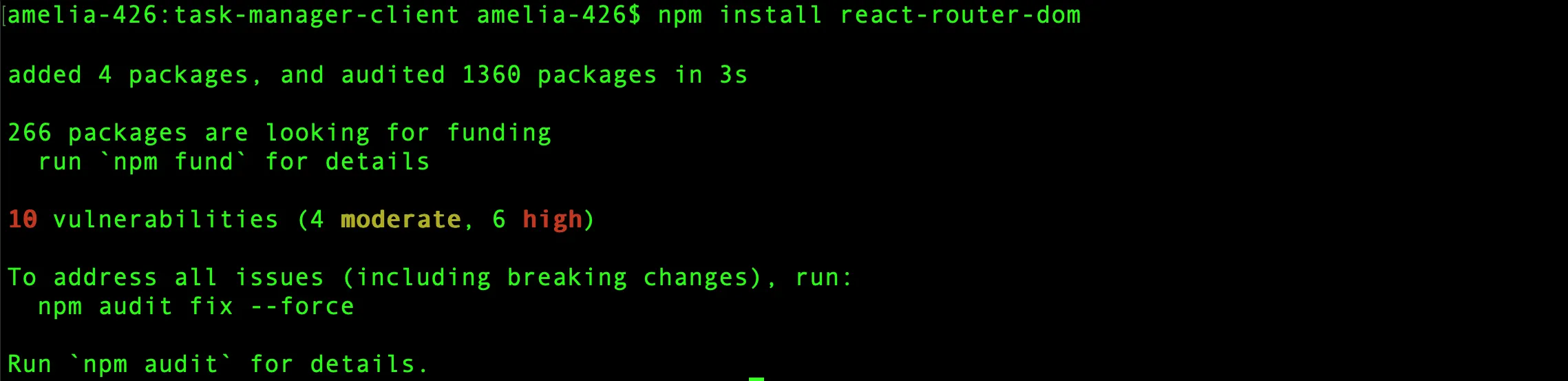
To install the react-router-dom package, navigate to the TaskManager/task-manager-client/ directory and execute the CLI command given below:
This command will install the react-router-dom module, save the dependencies, and allow us to perform the required hash routing in our application.
This is the client directory after you have created the required files.
Copy the code given below and paste it in the respective files.
.App{
  text-align:center;
}
.App-logo{
  height:40vmin;
  pointer-events:none;
}
@media(prefers-reduced-motion:no-preference){
  .App-logo{
    animation:App-logo-spin infinite 20s linear;
  }
}
.App-header{
  background-color:#282c34;
  min-height:100vh;
  display:flex;
  flex-direction:column;
  align-items:center;
  justify-content:center;
  font-size:calc(10px+2vmin);
  color:white;
}
.App-link{
  color:#61dafb;
}
@keyframes App-logo-spin{
  from{
    transform:rotate(0deg);
  }
  to{
    transform:rotate(360deg);
  }
}
import React from 'react'
import {HashRouter,Route,Routes,Navigate} from 'react-router-dom'
import AddTask from './AddTask'
import FilterTask from './FilterTask'
import Header from './Header'
export default function App() {
  return (
    <div>
      <HashRouter>
        <Header />
        <div className='router'>
          <Routes>
            <Route path='' element={<Navigate to='/AddTask' />} />
            <Route path='/AddTask' element={<AddTask />} />
            <Route path='/FilterTask' element={<FilterTask />} />
          </Routes>
        </div>
      </HashRouter>
    </div>
  )
}
body {
  font-family: Arial, sans-serif;
  background-color: #f8f9fa;
  margin: 0;
  padding: 0;
}
.container {
  max-width: 800px;
  margin: 20px auto;
  padding: 20px;
  background: #ffffff;
  box-shadow: 0px 4px 6px rgba(0,0,0,0.1);
  border-radius: 10px;
}
h1 {
  color: #121111;
  font-size: 2.5rem;
  font-weight: bold;
  margin-bottom: 20px;
  text-align: center;
}
.card {
  border: none;
  background-color: #fdfdfd;
  box-shadow: 0 2px 5px rgba(0,0,0,0.1);
  border-radius: 8px;
  overflow: hidden;
}
.card-header {
  background-color: #439600;
  color: white;
  padding: 15px;
  font-size: 1.25rem;
  font-weight: bold;
  text-align: center;
}
.card-body {
  padding: 20px;
}
.form-row {
  display: flex;
  flex-wrap: wrap;
  gap: 15px;
  margin-bottom: 15px;
}
.col-md-6,.col-md-4 {
  flex: 1 1 calc(50% - 15px);
  min-width: 200px;
}
label {
  display: block;
  font-weight: 600;
  margin-bottom: 5px;
  color: #495057;
}
input,select {
  width: 93%;
  padding: 10px;
  font-size: 1rem;
  border: 1px solid #ced4da;
  border-radius: 5px;
  transition: border-color 0.2s;
}
input:focus,select:focus {
  border-color: #007bff;
  outline: none;
  box-shadow: 0 0 4px rgba(0,123,255,0.25);
}
.buttons {
  display: flex;
  justify-content: space-between;
  gap: 10px;
}
button {
  padding: 10px 20px;
  font-size: 1rem;
  border: none;
  border-radius: 5px;
  transition: background-color 0.2s;
}
button.btn-primary {
  width: 16%;
  background-color: #000000;
  color: white;
}
button.btn-primary:hover {
  background-color: #34de19;
}
button.btn-secondary {
  background-color: #000000;
  width: 14%;
  color: white;
  font-size: 1rem;
  font-weight: 600;
}
button.btn-secondary:hover {
  background-color: #f00000;
}
#status.form-control {
  width: 387%;
}
.card-header h2 {
  color: white;
}
import React, { useState } from 'react'
import './AddTask.css'
import axios from 'axios'
export default function AddTask() {
  const [userID, setUserID] = useState('')
  const [taskName, setTaskName] = useState('')
  const [dueDate, setDueDate] = useState('')
  const [priority, setPriority] = useState('High')
  const [status, setStatus] = useState('Pending')
  const today = new Date().toISOString().split('T')[0]
  const addTask = async (event) => {
    event.preventDefault()
    const newTask = { userID, taskName, dueDate, priority, status }
    await axios.post('/server/task_manager_function/addtask', newTask).then(() => {
      window.confirm('Task added successfully')
      clearForm()
    }).catch((error) => {
      alert(error.message)
    })
  }
  const clearForm = () => {
    setUserID('')
    setTaskName('')
    setDueDate('')
    setPriority('High')
    setStatus('Pending')
  }
  return (
    <div className="container my-4">
      <div className="card my-4">
        <div className="card-header">
          <h2>Add New Task</h2>
        </div>
        <div className="card-body">
          <form onSubmit={addTask}>
            <div className="form-row">
              <div className="col-md-6 mb-3">
                <label htmlFor="userID" className="userID">User ID</label>
                <input type="text" className="form-control" id="userID" value={userID} onChange={(e) => setUserID(e.target.value)} required />
              </div>
              <div className="col-md-6 mb-3">
                <label htmlFor="taskName">Task Name</label>
                <input type="text" className="form-control" id="taskName" value={taskName} onChange={(e) => setTaskName(e.target.value)} required />
              </div>
            </div>
            <div className="form-row align-items-center">
              <div className="col-md-4 mb-3">
                <label htmlFor="dueDate">Due Date</label>
                <input type="date" className="form-control" id="dueDate" value={dueDate} onChange={(e) => setDueDate(e.target.value)} min={today} required />
              </div>
              <div className="col-md-4 mb-3">
                <label htmlFor="priority">Priority</label>
                <select className="form-control" id="priority" value={priority} onChange={(e) => setPriority(e.target.value)} required>
                  <option value="High">High</option>
                  <option value="Medium">Medium</option>
                  <option value="Low">Low</option>
                </select>
              </div>
              <div className="status-cls">
                <label htmlFor="status">Status</label>
                <select className="form-control" id="status" value={status} onChange={(e) => setStatus(e.target.value)} required>
                  <option value="Pending">Pending</option>
                  <option value="Completed">Completed</option>
                </select>
              </div>
            </div>
            <div className="buttons mt-4">
              <button type="submit" className="btn btn-primary">Add Task</button>
              <button type="button" className="btn btn-secondary" onClick={clearForm}>Clear</button>
            </div>
          </form>
        </div>
      </div>
    </div>
  )
}
@import url("https://fonts.googleapis.com/css2?family=Inter:wght@100..900&display=swap");
* {
  font-family: "Inter", sans-serif;
  box-sizing: border-box;
  margin: 0;
  padding: 0;
}
h2 {
  font-size: 38px;
  font-weight: bold;
  margin-bottom: 20px;
  text-align: center;
  padding: 10px;
  border-bottom: 1px dashed #ccc;
  color: #000;
}
.btn1 {
  color: white;
  padding: 8px 10px;
  border: none;
  border-radius: 4px;
  cursor: pointer;
  background-color: #ccc;
}
.green {
  background-color: green;
}
.container {
  margin: 30px auto;
  padding: 20px;
  max-width: 900px;
  background-color: #f9f9f9;
  border-radius: 8px;
  box-shadow: 0 4px 8px rgba(0,0,0,0.1);
}
h3 {
  text-align: center;
  color: #333;
  font-family: Arial, sans-serif;
}
.table {
  width: 100%;
  border-collapse: collapse;
  margin-top: 20px;
  font-family: Arial, sans-serif;
}
.table th, .table td {
  padding: 12px 15px;
  text-align: left;
  border-bottom: 1px solid #ddd;
}
.table th {
  background-color: #439600;
  color: white;
}
.table tbody tr:nth-child(even) {
  background-color: #f4f4f4;
}
.table tbody tr:hover {
  background-color: #e9e9e9;
}
.btn {
  padding: 6px 12px;
  border: none;
  border-radius: 4px;
  cursor: pointer;
  font-size: 14px;
  font-weight: bold;
  background-color: #1100ec;
  color: white;
}
.btn:hover {
  background-color: rgb(32,239,0);
}
.btn:focus {
  outline: none;
}
.btn.green {
  background-color: #28a745;
  color: white;
}
.btn.green:hover {
  background-color: #218838;
}
td button {
  margin-right: 8px;
}
table tr:hover {
  background-color: #ddd;
}
.filter-tasks-container {
  background-color: #ffffff;
  padding: 25px 30px;
  border-radius: 10px;
  box-shadow: 0 8px 15px rgba(0,0,0,0.15);
  max-width: 650px;
  margin: 30px auto 59px;
}
.filter-tasks-header {
  font-size: 2rem;
  font-weight: 700;
  color: #ffffff;
  text-align: center;
  padding: 15px;
  background: #439600;
  border-radius: 8px 8px 0 0;
  margin: -30px -30px 20px -30px;
  position: relative;
}
.filter-tasks-header::after {
  content: '';
  display: block;
  width: 50px;
  height: 4px;
  margin: 10px auto 0;
  border-radius: 2px;
}
.form-row {
  display: flex;
  gap: 20px;
  margin-bottom: 15px;
}
.filter-label {
  font-weight: 600;
  margin-bottom: 5px;
  display: block;
  color: #333;
  font-size: 0.9rem;
}
.form-control {
  border: 1px solid #ddd;
  border-radius: 6px;
  font-size: 1rem;
  padding: 3px;
  transition: all 0.3s ease;
  color: black;
}
.form-control:focus {
  border-color: #007bff;
  box-shadow: 0 0 8px rgba(0,123,255,0.2);
  outline: none;
}
.btn-primary {
  color: #ffffff;
  border: none;
  padding: 12px 24px;
  font-size: 1rem;
  font-weight: 600;
  border-radius: 6px;
  width: 26%;
  background-color: black;
}
.btn-wraper {
  display: flex;
  align-items: center;
  justify-content: space-between;
}
.cleartask-btn {
  width: 22%;
  color: #ffffff;
  border: none;
  padding: 12px 24px;
  font-size: 1rem;
  font-weight: 600;
  border-radius: 6px;
  background-color: black;
}
.cleartask-btn:hover {
  background-color: #e80000;
  transform: translateY(-2px);
}
.btn-primary:hover {
  background-color: #60f389;
  transform: translateY(-2px);
}
.btn-primary:active {
  background-color: #141517;
  transform: translateY(0);
}
@media (max-width: 768px) {
  .form-row {
    flex-direction: column;
    gap: 15px;
  }
  .btn-primary {
    width: 100%;
  }
}
.task-list-container {
  width: 59%;
  padding: 5px;
  background-color: #f9f9f9;
  border-radius: 8px;
  box-shadow: 0 4px 12px rgba(0,0,0,0.1);
  margin-left: 20%;
}
.task-list-table {
  width: 100%;
  border-collapse: collapse;
}
.task-list-table-striped thead {
  background-color: #69f086;
  color: #ffffff;
}
.task-list-table-striped th, .task-list-table-striped td {
  padding: 12px 15px;
  text-align: left;
}
.task-list-table-striped tbody tr:nth-child(even) {
  background-color: #f2f2f2;
}
.task-list-table-striped tbody tr:hover {
  background-color: #e0e0e0;
}
.task-list-table-striped th {
  font-weight: bold;
  font-size: 16px;
}
.task-list-table-striped td {
  font-size: 14px;
}
.task-list-table-striped td[data-priority="High"] {
  color: #dc3545;
  font-weight: bold;
}
.task-list-table-striped td[data-priority="Medium"] {
  color: #ffc107;
}
.task-list-table-striped td[data-priority="Low"] {
  color: #28a745;
}
.task-list-table-striped td[data-status="Completed"] {
  color: #28a745;
  font-weight: bold;
}
.task-list-table-striped td[data-status="Pending"] {
  color: #ffc107;
  font-weight: bold;
}
.task-list-table-striped td[data-status="Overdue"] {
  color: #dc3545;
  font-weight: bold;
  text-decoration: underline;
}
@media (max-width: 768px) {
  .task-list-table-striped th, .task-list-table-striped td {
    padding: 10px;
  }
}
.modal {
  display: block;
  position: fixed;
  z-index: 1;
  left: 0;
  top: 0;
  width: 100%;
  height: 100%;
  background-color: rgba(0,0,0,0.5);
  overflow: auto;
}
.modal-content {
  background-color: white;
  margin: 10% auto;
  padding: 20px;
  text-align: left;
  width: 56%;
  height: 62%;
  border: 1px solid black;
}
.close {
  color: #aaa;
  float: right;
  font-size: 28px;
  font-weight: bold;
}
.close:hover, .close:focus {
  color: rgb(245,0,0);
  cursor: pointer;
}
.updateContent {
  margin-bottom: 10%;
}
.modal-content h2 {
  font-size: 20px;
  margin-bottom: 20px;
  text-align: center;
}
.modal-content div {
  margin-bottom: 15px;
}
.modal-content label {
  display: block;
  font-weight: bold;
  margin-bottom: 5px;
}
.modal-content input[type="text"], .modal-content input[type="date"], .modal-content select {
  width: 100%;
  padding: 8px;
  border: 1px solid #ccc;
  border-radius: 4px;
  box-sizing: border-box;
}
.modal-content select {
  cursor: pointer;
}
.modal-content button {
  display: inline-block;
  width: 19%;
  padding: 10px;
  background-color: #2c2d2e;
  color: white;
  font-size: 16px;
  font-weight: bold;
  border: none;
  border-radius: 4px;
  cursor: pointer;
}
.modal-content button:hover {
  background-color: #43c265;
}
.head {
  display: flex;
}
.applyfilter {
  font-weight: bold;
  background-color: black;
  color: white;
}
.applyfilter:hover {
  background-color: #00fe19;
  transform: translateY(-2px);
}
.btnDelete {
  padding: 6px 12px;
  border: none;
  border-radius: 4px;
  cursor: pointer;
  font-size: 14px;
  font-weight: bold;
  background-color: rgb(200,26,17);
  color: white;
}
.btnDelete:hover {
  background-color: rgb(255,0,0);
}
.btnDelete.green {
  background-color: #ba2929;
  color: white;
}
.btnDelete.green:hover {
  background-color: #218838;
}
.btnDelete:focus {
  outline: none;
}
.placeholder {
  color: gray;
}
import React from 'react'
import { useState } from 'react'
import axios from "axios"
import './FilterTask.css'
export default function FilterTask() {
  const [tasks,setTasks]=useState([])
  const [isModelopen,setModal]=useState(false)
  const [userData,setUserdata]=useState({UserID:"",TaskName:"",DueDate:"",Status:""})
  const [userID,setUserID]=useState('')
  const [taskName,setTaskName]=useState('')
  const [status,setStatus]=useState('')
  const filterTasks=async()=>{try{const response=await axios.get('/server/task_manager_function/filtertask',{params:{userID,taskName,status}});setTasks(response.data)}catch(error){if(error.response&&error.response.data&&error.response.data.error){console.error('Backend Error:',error.response.data.error);alert(error.response.data.error)}else{alert('Something went wrong. Please try again.')}}}
  const handleDelete=async(taskData)=>{const isConfirmed=window.confirm("Are you sure you want to delete this task!");const userID=taskData.UserID;const taskName=taskData.TaskName;if(isConfirmed){await axios.delete(`/server/task_manager_function/deleteTask`,{params:{userID,taskName}}).then((response)=>{if(window.confirm(response.data.message)){window.location.reload()}}).catch(function(error){alert(error.message)})}}
  const handleEdit=async(data)=>{setUserdata(data);setModal(true)}
  const closeModal=async()=>{setModal(false)}
  const clearTask=()=>{setUserID('');setTaskName('');setStatus('')}
  const handleChange=(e)=>{const{name,value}=e.target;setUserdata(prevData=>({...prevData,[name]:value}))}
  const handleSubmit=async(e)=>{e.preventDefault();await axios.post("/server/task_manager_function/updatetask",userData).then((response)=>{if(window.confirm(response.data.message)){window.location.reload()}}).catch(function(error){alert(error.message)})}
  return(
    <>
      <div className="filter-tasks-container">
        <h4 className="filter-tasks-header">Filter Tasks</h4>
        <div className="form-row">
          <div className="col-md-4">
            <label htmlFor="filterUserID" className="filter-label">User ID</label>
            <input type="text" className="form-control" id="filterUserID" placeholder="Enter User ID" value={userID} onChange={(e)=>setUserID(e.target.value)}/>
          </div>
          <div className="col-md-4">
            <label htmlFor="filterTaskName" className="filter-label">Task Name</label>
            <input type="text" className="form-control" id="filterTaskName" placeholder="Enter Task Name" value={taskName} onChange={(e)=>setTaskName(e.target.value)}/>
          </div>
          <div className="col-md-4">
            <label htmlFor="filterStatus" className="filter-label">Status</label>
            <select className="form-control" id="filterStatus" value={status} onChange={(e)=>setStatus(e.target.value)}>
              <option value="" disabled hidden className="placeholder">Status</option>
              <option value="Pending">Pending</option>
              <option value="Completed">Completed</option>
            </select>
          </div>
        </div>
        <div className="btn-wraper mt-3">
          <button className="applyfilter" onClick={filterTasks}>Apply Filters</button>
          <button className="cleartask-btn" onClick={clearTask}>Clear</button>
        </div>
      </div>
      {tasks.length>0&&(
        <div className='container'>
          <h2>Task List</h2>
          <table className='table'>
            <thead>
              <tr>
                <th>S. No</th>
                <th>User ID</th>
                <th>Task Name</th>
                <th>Due Date</th>
                <th>Status</th>
                <th>Update</th>
                <th>Delete</th>
              </tr>
            </thead>
            <tbody>
              {tasks.map((task,index)=>(
                <tr key={index+1}>
                  <td>{index+1}</td>
                  <td>{task.UserID}</td>
                  <td>{task.TaskName}</td>
                  <td>{task.DueDate}</td>
                  <td>{task.Status}</td>
                  <td><button className='btn' onClick={()=>handleEdit(task)}>Edit</button></td>
                  <td><button className='btnDelete' onClick={()=>handleDelete(task)}>Delete</button></td>
                </tr>
              ))}
            </tbody>
          </table>
          {isModelopen&&(
            <div className='modal'>
              <div className='modal-content'>
                <span className='close' onClick={closeModal}>×</span>
                <h2>User Details</h2>
                <div>
                  <label htmlFor="userID">UserID:</label>
                  <input type="text" id="userID" name="UserID" value={userData.UserID} onChange={handleChange} required/>
                </div>
                <div>
                  <label htmlFor="taskName">TaskName:</label>
                  <input type="text" id="taskName" name="TaskName" value={userData.TaskName} onChange={handleChange} required/>
                </div>
                <div>
                  <label htmlFor="dueDate">DueDate:</label>
                  <input type="date" id="dueDate" name="DueDate" value={userData.DueDate} onChange={handleChange} min={new Date().toISOString().split('T')[0]} required/>
                </div>
                <div>
                  <label htmlFor="status">Status:</label>
                  <select id="status" name="Status" value={userData.Status} onChange={handleChange} required>
                    <option value="">Select Status</option>
                    <option value="Pending">Pending</option>
                    <option value="Completed">Completed</option>
                  </select>
                </div>
                <div>
                  <button onClick={handleSubmit}>Submit</button>
                </div>
              </div>
            </div>
          )}
        </div>
      )}
    </>
  )
}
#root{
  display:flex;
  flex-direction:column;
  height:100vh;
}
.heading{
  align-items:center;
  background-color:black;
  box-shadow:0 2px 4px #0000001a;
  color:#fff;
  display:flex;
  justify-content:space-between;
  padding:10px 20px;
}
.heading span{
  font-size:1.5rem;
  font-weight:bold;
}
.heading ul{
  list-style:none;
  display:flex;
  gap:20px;
  margin:0;
  padding:0;
}
.heading li{
  font-size:1rem;
}
.heading a{
  text-decoration:none;
  color:#ffffff;
  transition:color 0.3s ease;
  font-weight:bold;
}
.heading a:hover{
  color:#007bff;
}
.naviagtion-btn{
  height:36px;
  background-color:white;
  border:none;
  border-radius:7px;
  font-size:13px;
  font-weight:bold;
}
.naviagtion-btn:hover{
  background-color:blue;
  color:white;
}
import React from 'react'
import { Link } from 'react-router-dom'
import './Header.css'
export default function Header() {
  return (
    <div className='heading'>
      <span>Task Manager</span>
      <ul>
        <li>
          <Link to='/AddTask'>
            <button className='naviagtion-btn'>Add task</button>
          </Link>
        </li>
        <li>
          <Link to='/FilterTask'>
            <button className='naviagtion-btn'>Filter task</button>
          </Link>
        </li>
      </ul>
    </div>
  )
}
The client directory is now configured.
Let’s go over the working of the application:
-
Create a Task
- After an end-user submits a new task by entering the UserID, Task Name, deadline date, and Status from the Add Task page, a task creation action is initiated.
- The details are sent to the backend via an Axios POST call to the /server/task_manager_function/addtask API endpoint.
- This API will validate and store the new task in the NoSQL storage. This action will trigger a confirmation message.
- Now, the task will be available for retrieval through the operations.
-
Filter a Task
- In the Filter Task page, the filtering operations are handled entirely through the /filtertask API endpoint.
- An end-user can choose to filter the created tasks by UserID, Task Name, or Status. The tasks that satisfy the filtered requirement is fetched using an Axios GET call to the /server/task_manager_function/filtertask API endpoint. This call will fetch the required details from the NoSQL table.
-
Edit or Delete a Task
- Along with the filtered task, each of the tasks listed will provide the end-user with the option to edit or delete the listed tasks.
- The logic of the edit and delete operations is defined in the handleEdit() and handleDelete() functions.
- If the end-user chooses to delete a task, then:
- the /deleteTask API endpoint is invoked using an Axios DELETE request.
- this will remove the corresponding entry from the NoSQL table.
- a success message is displayed in the client once the required task is successfully deleted.
- If the end-user chooses to update a task, then:
- the existing task details are populated into a modal using the handleEdit() function.
- when the end-user updates and submits the modified task information, the /updatetask API endpoint is invoked via an Axios POST request.
- this API updates the task record in the NoSQL table with the newly provided values.
- after the update operation is complete, the page will reload to reflect the latest data in the filtered task list.
Last Updated 2025-11-26 15:38:32 +0530 IST