フロントエンドロジックのコーディング
プロジェクトのルートディレクトリにフォルダを作成し、「public」と名前を付けます。このフォルダにはフロントエンドロジックのファイルが格納されます。
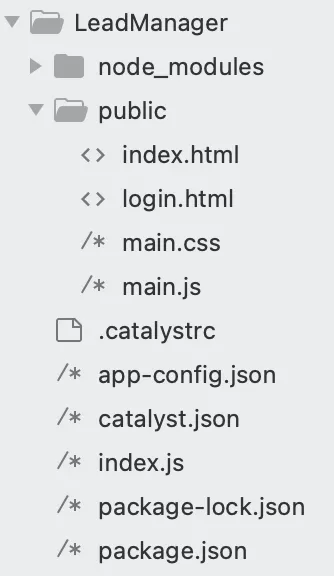
publicフォルダ(LeadManager/public/)内に以下のファイルを作成します:
- index.html: アプリケーションのフロントエンドのHTMLコードを格納します。
- login.html: Embedded AuthenticationロジックのHTMLコードを格納します。
- main.js: フロントエンドとバックエンドを接続するJavaScriptコードを格納します。
- main.css: アプリケーションのスタイリングを格納します。
以下は、LeadManagerプロジェクトの最終的なフォルダ構造です。
index.html、login.html、main.jsファイルのコーディングを行います。また、app-config.jsonファイルも更新します。
以下のコードをコピーして、IDEを使用してプロジェクトのそれぞれのファイルに貼り付けて保存してください。
<!DOCTYPE html>
<html>
<head>
<meta charset="utf-8" />
<meta http-equiv="X-UA-Compatible" content="IE=edge">
<title>CRM Lead Manager</title>
<meta name="viewport" content="width=device-width, initial-scale=1">
<link rel="stylesheet" type="text/css" media="screen" href="main.css" />
<link rel="stylesheet" href="https://stackpath.bootstrapcdn.com/bootstrap/4.3.1/css/bootstrap.min.css"
integrity="sha384-ggOyR0iXCbMQv3Xipma34MD+dH/1fQ784/j6cY/iJTQUOhcWr7x9JvoRxT2MZw1T" crossorigin="anonymous">
<link href="https://cdnjs.cloudflare.com/ajax/libs/twitter-bootstrap/4.5.0/css/bootstrap.min.css" rel="stylesheet">
<link href="https://cdnjs.cloudflare.com/ajax/libs/mdbootstrap/4.19.1/css/mdb.min.css" rel="stylesheet">
<script src="https://code.jquery.com/jquery-3.4.1.min.js"
integrity="sha256-CSXorXvZcTkaix6Yvo6HppcZGetbYMGWSFlBw8HfCJo=" crossorigin="anonymous"> </script>
<script src="https://cdnjs.cloudflare.com/ajax/libs/popper.js/1.14.7/umd/popper.min.js"
integrity="sha384-UO2eT0CpHqdSJQ6hJty5KVphtPhzWj9WO1clHTMGa3JDZwrnQq4sF86dIHNDz0W1" crossorigin="anonymous">
</script>
<script src="https://stackpath.bootstrapcdn.com/bootstrap/4.3.1/js/bootstrap.min.js"
integrity="sha384-JjSmVgyd0p3pXB1rRibZUAYoIIy6OrQ6VrjIEaFf/nJGzIxFDsf4x0xIM+B07jRM" crossorigin="anonymous">
</script>
<script src="main.js"> </script>
<script src="https://static.zohocdn.com/catalyst/sdk/js/4.6.2/catalystWebSDK.js"> </script>
<script src="/__catalyst/sdk/init.js"> </script>
<link href="//maxcdn.bootstrapcdn.com/bootstrap/4.0.0/css/bootstrap.min.css" rel="stylesheet" id="bootstrap-css">
<style>
#connect {
height: 260px;
width: 500px;
position: absolute;
top: 0;
bottom: 0;
left: 0;
right: 0;
margin: auto;
}
</style>
</head>
<body onload="getUserDetails()">
<br>
<center>
<h1>CRM Lead Manager</h1> <br>
</center>
<div id="connect">
<center>
<p>Click here to connect to Zoho CRM</p>
<button onclick='navigate()'>
<img src="https://www.zohowebstatic.com/sites/default/files/styles/product-home-page/public/icon-crm_blue.png"
style="width: 180px;height: 130px;">
</button>
</center>
</div>
<div style="width: 200px;float: right; margin-right: 30px;"> <label for="logoutbtn"
class="btn btn-success btn-block btn-outlined">Logout</label>
<button id="logoutbtn" onclick="logout()" style="display: none;"> </button>
</div>
<div id="main">
<div class="container">
<ul class="nav nav-tabs nav-justified mb-3" id="myTab" role="tablist">
<li class="nav-item">
<a class="nav-link active" id="check-tab" data-toggle="tab" href="#check" role="tab"
aria-controls="check" aria-selected="true">Add a Lead</a>
</li>
<li class="nav-item">
<a class="nav-link" id="report-tab" data-toggle="tab" href="#report" onclick="getLeads()" role="tab"
aria-controls="report" aria-selected="false">Manage Leads</a>
</li>
</ul> <br>
<div class="tab-content" id="myTabContent">
<div class="tab-pane fade show active" id="check" role="tabpanel" aria-labelledby="check-tab">
<div class="tab-pane fade show active" id="ex3-tabs-1" role="tabpanel" aria-labelledby="ex3-tab-1">
<div style="margin-left: 100px; margin-right:100px;">
<form id="leads">
<!-- 2 column grid layout with text inputs for the first and last names -->
<div class="row mb-4">
<div class="col">
<div class="form-outline">
<label class="form-label" for="form6Example1">First name</label>
<input type="text" id="firstName" class="form-control" />
</div>
</div>
<div class="col">
<div class="form-outline">
<label class="form-label" for="form6Example2">Last name</label>
<input type="text" id="lastName" class="form-control" required />
</div>
</div>
</div>
<!-- Text input -->
<div class="form-outline mb-4">
<label class="form-label" for="form6Example3">Company name</label>
<input type="text" id="companyName" class="form-control" />
</div>
<!-- Email input -->
<div class="form-outline mb-4">
<label class="form-label" for="form6Example5">Email</label>
<input type="email" id="email" class="form-control" />
</div>
<!-- Text input -->
<div class="form-outline mb-4">
<label class="form-label" for="form6Example4">State</label>
<input type="text" id="state" class="form-control" />
</div>
<!-- Number input -->
<div class="form-outline mb-4">
<label class="form-label" for="form6Example6">Phone</label>
<input type="number" id="phone" class="form-control" />
</div>
<!-- Number input -->
<div class="form-outline mb-4">
<label class="form-label" for="form6Example6">Lead Source</label>
<input type="text" id="leadSource" class="form-control" />
</div>
<!-- Submit button -->
<center> <button type="submit" onclick="createLead();return false;"
class="btn btn-primary btn-block mb-4" style="width: 100px;">Add Lead</button>
<div id="loader" style="display: none;">
<div class="spinner-border" role="status">
<span class="sr-only">Loading...</span>
</div>
</div>
</center>
</form>
</div>
</div>
</div>
<div class="tab-pane fade" id="report" role="tabpanel" aria-labelledby="report-tab">
<center>
<div id="loaders" style="display: none; padding-top: 200px;">
<div class="spinner-border" role="status">
<span class="sr-only">Loading...</span>
</div>
</div>
</center>
<p id="showData"> </p>
</div>
</div>
</div>
<!-- Modal -->
<div class="modal fade" id="myModal" tabindex="-1" role="dialog" aria-labelledby="myModalLabel"
aria-hidden="true">
<div class="vertical-alignment-helper">
<div class="modal-dialog vertical-align-center">
<div class="modal-content">
<center>
<h4 class="modal-title" id="myModalLabel"> </h4>
<div class="modal-body" id="message"> </div>
<div class="modal-footer">
<button type="button" style="background-color: #007bff;color: white;"
class="btn btn-default" data-dismiss="modal">Close</button>
</div>
</center>
</div>
</div>
</div>
</div>
<div class="modal fade" id="editForm" tabindex="-1" role="dialog" aria-labelledby="myModalLabel"
aria-hidden="true">
<div class="vertical-alignment-helper">
<div class="modal-dialog vertical-align-center">
<div class="modal-content">
<div style="margin-left: 80px; margin-right:80px;">
<br>
<center>
<h2>Edit Lead</h2>
</center>
<br>
<form id="editLeads">
<!-- 2 column grid layout with text inputs for the first and last names -->
<div class="row mb-4">
<div class="col">
<div class="form-outline">
<label class="form-label" for="form6Example1">First name</label>
<input type="text" id="editfirstName" class="form-control" />
</div>
</div>
<div class="col">
<div class="form-outline">
<label class="form-label" for="form6Example2">Last name</label>
<input type="text" id="editlastName" class="form-control" required />
</div>
</div>
</div>
<!-- Text input -->
<div class="form-outline mb-4">
<label class="form-label" for="form6Example3">Company name</label>
<input type="text" id="editcompanyName" class="form-control" />
</div>
<!-- Email input -->
<div class="form-outline mb-4">
<label class="form-label" for="form6Example5">Email</label>
<input type="email" id="editemail" class="form-control" />
</div>
<!-- Text input -->
<div class="form-outline mb-4">
<label class="form-label" for="form6Example4">State</label>
<input type="text" id="editstate" class="form-control" />
</div>
<!-- Number input -->
<div class="form-outline mb-4">
<label class="form-label" for="form6Example6">Phone</label>
<input type="number" id="editphone" class="form-control" />
</div>
<!-- Submit button -->
<center> <button type="submit" id="editBtn" onclick="editLead();return false;"
class="btn btn-primary btn-block mb-4" style="width: 100px;">Edit</button>
<div id="loader" style="display: none;">
<div class="spinner-border" role="status">
<span class="sr-only">Loading...</span>
</div>
</div>
</center>
</form>
</div>
</div>
</div>
</div>
</div>
<div class="modal fade right" id="ModalDanger" tabindex="-1" role="dialog" aria-labelledby="myModalLabel"
aria-hidden="true">
<div class="modal-dialog modal-notify modal-danger modal-side modal-top-right" role="document">
<!--Content-->
<div class="modal-content">
<!--Header-->
<div class="modal-header">
<p class="heading">Lead Deletion</p>
<button type="button" class="close" data-dismiss="modal" aria-label="Close">
<span aria-hidden="true" class="white-text">×</span>
</button>
</div>
<!--Body-->
<div class="modal-body">
<div class="row">
<div class="col-9">
<p>Are you sure you want to delete the Lead?</p>
</div>
</div>
</div>
<!--Footer-->
<div class="modal-footer justify-content-center">
<a type="button" class="btn btn-danger" id="delete-btn" onclick="deleteLead()">Delete</a>
<a type="button" class="btn btn-outline-danger waves-effect" data-dismiss="modal">Cancel</a>
</div>
</div>
<!--/.Content-->
</div>
</div>
</div>
</body>
<script>
//クライアントIDを追加する and Redirect URL here
function navigate() {
window.location.href = "https://accounts.zoho.com/oauth/v2/auth?scope=ZohoCRM.modules.ALL&client_id=<<client_id>>&response_type=code&access_type=offline&redirect_uri=" + location.protocol + '//' + location.host + "/generateToken";
}
</script>
</html>
<html>
</html>
<meta charset="utf-8" />
<meta http-equiv="X-UA-Compatible" content="IE=edge">
<title>CRM Lead Manager</title>
<meta name="viewport" content="width=device-width, initial-scale=1">
<link rel="stylesheet" type="text/css" media="screen" href="main.css" />
<script src="main.js"> </script>
<link rel="stylesheet" type="text/css" media="screen" href="main.css" />
<link rel="stylesheet" href="https://stackpath.bootstrapcdn.com/bootstrap/4.3.1/css/bootstrap.min.css"
    integrity="sha384-ggOyR0iXCbMQv3Xipma34MD+dH/1fQ784/j6cY/iJTQUOhcWr7x9JvoRxT2MZw1T" crossorigin="anonymous">
<script src="https://static.zohocdn.com/catalyst/sdk/js/4.6.2/catalystWebSDK.js"> </script>
<script src="https://code.jquery.com/jquery-3.4.1.min.js"
    integrity="sha256-CSXorXvZcTkaix6Yvo6HppcZGetbYMGWSFlBw8HfCJo=" crossorigin="anonymous"> </script>
<script src="https://cdnjs.cloudflare.com/ajax/libs/popper.js/1.14.7/umd/popper.min.js"
    integrity="sha384-UO2eT0CpHqdSJQ6hJty5KVphtPhzWj9WO1clHTMGa3JDZwrnQq4sF86dIHNDz0W1" crossorigin="anonymous">
    </script>
<script src="https://stackpath.bootstrapcdn.com/bootstrap/4.3.1/js/bootstrap.min.js"
    integrity="sha384-JjSmVgyd0p3pXB1rRibZUAYoIIy6OrQ6VrjIEaFf/nJGzIxFDsf4x0xIM+B07jRM" crossorigin="anonymous">
    </script>
<script src="https://static.zohocdn.com/catalyst/sdk/js/4.6.2/catalystWebSDK.js"> </script>
<script src="/__catalyst/sdk/init.js"> </script>
<script>
    catalyst.auth.signIn("login");
</script>
<link href="//maxcdn.bootstrapcdn.com/bootstrap/4.0.0/css/bootstrap.min.css" rel="stylesheet" id="bootstrap-css">
<style>
    #login {
        height: 260px;
        width: 500px;
        position: absolute;
        top: 0;
        bottom: 0;
        left: 0;
        right: 0;
        margin: auto;
    }
</style>
<body>
    <br>
    <center>
        <h1>CRM Lead Manager</h1>
    </center>
    <div id="login"> </div>
</body>
</html>
function createLead() {
    debugger;
    $("#loader").show();
    var firstName = $("#firstName").val();
    var lastName = $("#lastName").val();
    if (lastName == "") {
        alert("Kindly Enter the Last Name");
        $("#loader").hide();
        return;
    }
    var companyName = $("#companyName").val();
    var email = $("#email").val();
    var state = $("#state").val();
    var phone = $("#phone").val();
    var leadSource = $("#leadSource").val();
    $.ajax({
        url: "/crmData",
        type: "post",
        contentType: "application/json",
        data: JSON.stringify({
            "First_Name": firstName,
            "Last_Name": lastName,
            "Company": companyName,
            "Email": email,
            "State": state,
            "Phone": phone,
            "Lead_Source": leadSource,
        }),
        success: function(data) {
            debugger;
            $('#leads').trigger("reset");
            $("#myModalLabel").html("Success");
            $("#message").html("Lead Created Successfully");
            $("#loader").hide();
            $('#myModal').modal('show');
        },
        error: function(error) {
            $('#leads').trigger("reset");
            $("#myModalLabel").html("Failure");
            $("#message").html("Please try again after Sometime");
            $("#loader").hide();
            $('#myModal').modal('show');
        }
    });
}
function logout() {
    var redirectURL = "/login.html"; //Add your app domain
    var auth = catalyst.auth;
    auth.signOut(redirectURL);
}
function getUserDetails() {
    $("#main").hide();
    $("#connect").hide();
    catalyst.auth.isUserAuthenticated().then(result => {
        console.log(result)
        $("#loader").show();
        $.ajax({
            url: "/getUserDetails",
            type: "get",
            success: function(data) {
                $("#loader").hide();
                if (data.userId) {
                    $("#main").show();
                    $("#connect").hide();
                } else {
                    $("#connect").show();
                    $("#main").hide();
                }
            },
            error: function(error) {
                $("#myModalLabel").html("Failure");
                $("#message").html("Please try again after Sometime");
                $("#loader").hide();
                $('#myModal').modal('show');
            }
        });
    }).catch(err => {
        document.body.innerHTML = 'You are not logged in. Please log in to continue. Redirecting you to the login page..';
        setTimeout(function() {
            window.location.href = "login.html";
        }, 3000);
    });
}
function getLeads() {
    debugger;
    var tableContainer = document.getElementById("showData");
    tableContainer.innerHTML = "";
    $("#loaders").show();
    $.ajax({
        url: "/crmData",
        type: "get",
        success: function(data) {
            debugger;
            var reqData = getRequiredData(data.data);
            $("#loaders").hide();
            renderTable(reqData);
        },
        error: function(error) {
            $("#myModalLabel").html("Failure");
            $("#message").html("Please try again after Sometime");
            $("#loader").hide();
            $('#myModal').modal('show');
        }
    });
}
function showDeletePopup(leadID) {
    $('#ModalDanger').modal('show');
    var deleteBtn = document.getElementById("delete-btn");
    deleteBtn.value = leadID;
}
function deleteLead() {
    var leadID = document.getElementById('delete-btn').value;
    $.ajax({
        url: "/crmData/" + leadID,
        type: "delete",
        success: function(data) {
            debugger;
            $('#ModalDanger').modal('toggle');
            $("#myModalLabel").html("Success");
            $("#message").html("Lead Deleted Successfully");
            $('#myModal').modal('show');
            setTimeout(function() {
                location.reload();
            }, 3000);
        },
        error: function(error) {
            $("#myModalLabel").html("Failure");
            $("#message").html("Please try again after Sometime");
            $("#loader").hide();
            $('#myModal').modal('show');
        }
    });
}
function showEditPopup(leadID) {
    $.ajax({
        url: "/crmData/" + leadID,
        type: "get",
        success: function(data) {
            debugger;
            var respData = data.data;
            $('#editfirstName').val(respData[0].First_Name);
            $('#editlastName').val(respData[0].Last_Name);
            $('#editcompanyName').val(respData[0].Company);
            $('#editemail').val(respData[0].Email);
            $('#editstate').val(respData[0].State);
            $('#editphone').val(respData[0].Phone);
            $('#editleadSource').val(respData[0].Lead_Source);
            $('#editBtn').val(respData[0].id);
            $('#editfirstName').html(respData[0].First_Name);
            $('#editlastName').html(respData[0].Last_Name);
            $('#editcompanyName').html(respData[0].Company);
            $('#editemail').html(respData[0].Email);
            $('#editstate').html(respData[0].State);
            $('#editphone').html(respData[0].Phone);
            $('#editleadSource').html(respData[0].Lead_Source);
            $('#editForm').modal('show');
        },
        error: function(error) {
            $("#myModalLabel").html("Failure");
            $("#message").html("Please try again after Sometime");
            $("#loader").hide();
            $('#myModal').modal('show');
        }
    });
}
function editLead() {
    var firstName = $("#editfirstName").val();
    var lastName = $("#editlastName").val();
    if (lastName == "") {
        alert("Kindly Enter the Last Name");
        return;
    }
    var companyName = $("#editcompanyName").val();
    var email = $("#editemail").val();
    var state = $("#editstate").val();
    var phone = $("#editphone").val();
    var leadSource = $("#editleadSource").val();
    var leadID = $("#editBtn").val();
    $.ajax({
        url: "/crmData/" + leadID,
        type: "put",
        contentType: "application/json",
        data: JSON.stringify({
            "First_Name": firstName,
            "Last_Name": lastName,
            "Company": companyName,
            "Email": email,
            "State": state,
            "Phone": phone,
            "Lead_Source": leadSource
        }),
        success: function(data) {
            debugger;
            $('#editForm').modal('toggle');
            $("#myModalLabel").html("Success");
            $("#message").html("Lead Edited Successfully");
            $('#myModal').modal('show');
            setTimeout(function() {
                location.reload();
            }, 3000);
        },
        error: function(error) {
            $('#leads').trigger("reset");
            $("#myModalLabel").html("Failure");
            $("#message").html("Please try again after Sometime");
            $("#loader").hide();
            $('#myModal').modal('show');
        }
    });
}
function getRequiredData(data) {
    var i;
    var resp = [];
    for (i = 0; i < data.length; i++) {
        var gulp = {
            "First Name": data[i].First_Name,
            "Last Name": data[i].Last_Name,
            "Phone": data[i].Phone,
            "Email": data[i].Email,
            "Company": data[i].Company,
            "Edit": '<center><a href="javascript:showEditPopup(\'' + data[i].id + '\')">✎︎</a></center>',
            "Delete": '<center><a href="javascript:showDeletePopup(\'' + data[i].id + '\')">🗑︎</a></center>'
        }
        resp.push(gulp);
    }
    console.log(resp);
    return resp;
}
function renderTable(respData) {
    var col = [];
    for (var i = 0; i < respData.length; i++) {
        for (var key in respData[i]) {
            if (col.indexOf(key) === -1) {
                col.push(key);
            }
        }
    }
    var table = document.createElement("table");
    table.id = "dataTable";
    var tr = table.insertRow(-1);
    for (var i = 0; i < col.length; i++) {
        var th = document.createElement("th");
        th.innerHTML = col[i];
        tr.appendChild(th);
    }
    for (var i = 0; i < respData.length; i++) {
        tr = table.insertRow(-1);
        for (var j = 0; j < col.length; j++) {
            var tabCell = tr.insertCell(-1);
            tabCell.innerHTML = respData[i][col[j]];
        }
    }
    var divContainer = document.getElementById("showData");
    divContainer.innerHTML = "";
    divContainer.appendChild(table);
}
#dataTable {
	font-family: Arial, Helvetica, sans-serif;
	border-collapse: collapse;
	width: 100%;
}
#dataTable td,
#dataTable th {
border: 1px solid #ddd;
padding: 8px;
}
#dataTable tr:nth-child(even) {
background-color: #f2f2f2;
}
#dataTable tr:hover {
background-color: #ddd;
}
#dataTable th {
padding-top: 12px;
padding-bottom: 12px;
text-align: left;
background-color: #007bff;
color: white;
}
.vertical-alignment-helper {
display: table;
height: 100%;
width: 100%;
pointer-events: none;
}
.vertical-align-center {
display: table-cell;
vertical-align: middle;
pointer-events: none;
}
.modal-content {
width: inherit;
max-width: inherit;
height: inherit;
margin: 0 auto;
pointer-events: all;
}
app-config.jsonファイルのcommandキーの値を「node index.js」に更新します。これは、このプログラミングスタックとフレームワークに固有のスタートアップコマンドです。
{
  "command": "node index.js",
  "build_path": "/",
  "stack": "node20",
  "env_variables": {},
  "memory": 256,
  "scripts": {},
  "raw": {},
  "catalyst_auth": true,
  "login_redirect": "/index.html"
}
それでは、アプリケーションコードのロジックと機能について説明します。
-
login.htmlファイルは、クライアントコンポーネントでCatalyst Embedded Authenticationログインを有効にし、Zohoソーシャルログインを使用してログインできるようにします。
-
index.htmlファイルには、クライアントのフロントエンドのコードが含まれています。navigate()関数を定義し、Client IDやスコープなどの必要な認可情報を渡すことでCRMアカウントへの接続を可能にします。
-
アプリケーションのバックエンドロジックは、さまざまなアクションを実行する以下のAPIを定義しています:
- /generateToken: getRefreshToken()関数を呼び出してRefresh Tokenを取得し、現在のユーザーのuserIDとともにData StoreのTokenテーブルに挿入します。その後、クライアントのインデックスページにリダイレクトします。
- /getUserDetails: getUserDetails()関数を呼び出してユーザーの詳細を取得します。テーブルにレコードがない場合、userIDのみを含むJSONレスポンスが送信されます。レコードが存在する場合は、userIDとともに送信されます。
- /crmData: このルートは、Leadsモジュールのすべてのリードのパスを定義します。Node関数は、このルートを使用してHTTP GETおよびPOST操作を実行し、すべてのリードの取得または新しいリードの作成を行います。
- /crmData/:id: このルートは、Leadsモジュールの特定のリードのパスを定義します。idは、CRM内のリードの一意のIDを表します。関数は、このルートを使用してHTTP PUTおよびDELETE操作を実行し、リードの編集または削除を行います。
-
バックエンドロジックは、APIによって呼び出される以下の関数を使用して実装されています:
- getRefreshToken(): Client ID、Client Secret、Redirect URI、およびその他の必要な値をクエリ文字列パラメータとして渡してRefresh Tokenを取得します。
- getAccessToken(): ZCQLを使用してTokenテーブルからクエリされたRefresh Tokenとその他の必要なパラメータを渡してAccess Tokenを取得します。Access Tokenは、リードの追加やリードの編集など、CRMモジュールで操作を実行する必要があるたびに取得されます。
- getResponse(): 取得したAccess Tokenを渡して、CRMモジュールで各アクションを実行するために必要な認可を取得します。この関数は、リクエストを認可するために各/crmDataおよび/crmData/:id APIで呼び出されます。
- getUserDetails(): userIDを渡して、Refresh Tokenを含むTokenテーブルからレコードを取得します。
-
main.js: クライアントコンポーネントのJavaScript関数であり、関数から取得したJSONレスポンスを解析してindex.htmlページにレンダリングします。この関数は、クライアントアプリケーションのすべてのUI要素のアクションを定義します。例えば、getLeads()は関数のレスポンスからすべてのリードを取得してクライアントにレンダリングし、showEditPopup()はリードの編集アクションを定義します。
最終更新日 2026-08-28 13:29:38 +0530 IST