Codificar la Lógica del Frontend
Crea una carpeta en el directorio raíz de tu proyecto y nómbrala “public.” Esta carpeta contendrá los archivos para tu lógica del front-end.
Crea los siguientes archivos dentro de tu carpeta public (LeadManager/public/):
- index.html: Contendrá el código HTML para el front-end de la aplicación.
- login.html: Contendrá el código HTML para la lógica de Embedded Authentication.
- main.js: Contendrá el código JavaScript que conecta el front-end y el backend.
- main.css: Contendrá los estilos de la aplicación
Esta es la estructura final de carpetas del proyecto LeadManager.
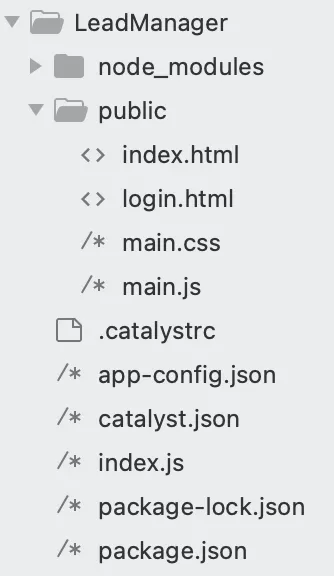
Codificarás los archivos index.html, login.html y main.js. También actualizarás el archivo app-config.json.
Copia el código a continuación y pégalo en los archivos respectivos de tu proyecto usando un IDE y guarda los archivos.
<!DOCTYPE html>
<html>
<head>
<meta charset="utf-8" />
<meta http-equiv="X-UA-Compatible" content="IE=edge">
<title>CRM Lead Manager</title>
<meta name="viewport" content="width=device-width, initial-scale=1">
<link rel="stylesheet" type="text/css" media="screen" href="main.css" />
<link rel="stylesheet" href="https://stackpath.bootstrapcdn.com/bootstrap/4.3.1/css/bootstrap.min.css"
integrity="sha384-ggOyR0iXCbMQv3Xipma34MD+dH/1fQ784/j6cY/iJTQUOhcWr7x9JvoRxT2MZw1T" crossorigin="anonymous">
<link href="https://cdnjs.cloudflare.com/ajax/libs/twitter-bootstrap/4.5.0/css/bootstrap.min.css" rel="stylesheet">
<link href="https://cdnjs.cloudflare.com/ajax/libs/mdbootstrap/4.19.1/css/mdb.min.css" rel="stylesheet">
<script src="https://code.jquery.com/jquery-3.4.1.min.js"
integrity="sha256-CSXorXvZcTkaix6Yvo6HppcZGetbYMGWSFlBw8HfCJo=" crossorigin="anonymous"> </script>
<script src="https://cdnjs.cloudflare.com/ajax/libs/popper.js/1.14.7/umd/popper.min.js"
integrity="sha384-UO2eT0CpHqdSJQ6hJty5KVphtPhzWj9WO1clHTMGa3JDZwrnQq4sF86dIHNDz0W1" crossorigin="anonymous">
</script>
<script src="https://stackpath.bootstrapcdn.com/bootstrap/4.3.1/js/bootstrap.min.js"
integrity="sha384-JjSmVgyd0p3pXB1rRibZUAYoIIy6OrQ6VrjIEaFf/nJGzIxFDsf4x0xIM+B07jRM" crossorigin="anonymous">
</script>
<script src="main.js"> </script>
<script src="https://static.zohocdn.com/catalyst/sdk/js/4.6.2/catalystWebSDK.js"> </script>
<script src="/__catalyst/sdk/init.js"> </script>
<link href="//maxcdn.bootstrapcdn.com/bootstrap/4.0.0/css/bootstrap.min.css" rel="stylesheet" id="bootstrap-css">
<style>
#connect {
height: 260px;
width: 500px;
position: absolute;
top: 0;
bottom: 0;
left: 0;
right: 0;
margin: auto;
}
</style>
</head>
<body onload="getUserDetails()">
<br>
<center>
<h1>CRM Lead Manager</h1> <br>
</center>
<div id="connect">
<center>
<p>Click here to connect to Zoho CRM</p>
<button onclick='navigate()'>
<img src="https://www.zohowebstatic.com/sites/default/files/styles/product-home-page/public/icon-crm_blue.png"
style="width: 180px;height: 130px;">
</button>
</center>
</div>
<div style="width: 200px;float: right; margin-right: 30px;"> <label for="logoutbtn"
class="btn btn-success btn-block btn-outlined">Logout</label>
<button id="logoutbtn" onclick="logout()" style="display: none;"> </button>
</div>
<div id="main">
<div class="container">
<ul class="nav nav-tabs nav-justified mb-3" id="myTab" role="tablist">
<li class="nav-item">
<a class="nav-link active" id="check-tab" data-toggle="tab" href="#check" role="tab"
aria-controls="check" aria-selected="true">Add a Lead</a>
</li>
<li class="nav-item">
<a class="nav-link" id="report-tab" data-toggle="tab" href="#report" onclick="getLeads()" role="tab"
aria-controls="report" aria-selected="false">Manage Leads</a>
</li>
</ul> <br>
<div class="tab-content" id="myTabContent">
<div class="tab-pane fade show active" id="check" role="tabpanel" aria-labelledby="check-tab">
<div class="tab-pane fade show active" id="ex3-tabs-1" role="tabpanel" aria-labelledby="ex3-tab-1">
<div style="margin-left: 100px; margin-right:100px;">
<form id="leads">
<!-- 2 column grid layout with text inputs for the first and last names -->
<div class="row mb-4">
<div class="col">
<div class="form-outline">
<label class="form-label" for="form6Example1">First name</label>
<input type="text" id="firstName" class="form-control" />
</div>
</div>
<div class="col">
<div class="form-outline">
<label class="form-label" for="form6Example2">Last name</label>
<input type="text" id="lastName" class="form-control" required />
</div>
</div>
</div>
<!-- Text input -->
<div class="form-outline mb-4">
<label class="form-label" for="form6Example3">Company name</label>
<input type="text" id="companyName" class="form-control" />
</div>
<!-- Email input -->
<div class="form-outline mb-4">
<label class="form-label" for="form6Example5">Email</label>
<input type="email" id="email" class="form-control" />
</div>
<!-- Text input -->
<div class="form-outline mb-4">
<label class="form-label" for="form6Example4">State</label>
<input type="text" id="state" class="form-control" />
</div>
<!-- Number input -->
<div class="form-outline mb-4">
<label class="form-label" for="form6Example6">Phone</label>
<input type="number" id="phone" class="form-control" />
</div>
<!-- Number input -->
<div class="form-outline mb-4">
<label class="form-label" for="form6Example6">Lead Source</label>
<input type="text" id="leadSource" class="form-control" />
</div>
<!-- Submit button -->
<center> <button type="submit" onclick="createLead();return false;"
class="btn btn-primary btn-block mb-4" style="width: 100px;">Add Lead</button>
<div id="loader" style="display: none;">
<div class="spinner-border" role="status">
<span class="sr-only">Loading...</span>
</div>
</div>
</center>
</form>
</div>
</div>
</div>
<div class="tab-pane fade" id="report" role="tabpanel" aria-labelledby="report-tab">
<center>
<div id="loaders" style="display: none; padding-top: 200px;">
<div class="spinner-border" role="status">
<span class="sr-only">Loading...</span>
</div>
</div>
</center>
<p id="showData"> </p>
</div>
</div>
</div>
<!-- Modal -->
<div class="modal fade" id="myModal" tabindex="-1" role="dialog" aria-labelledby="myModalLabel"
aria-hidden="true">
<div class="vertical-alignment-helper">
<div class="modal-dialog vertical-align-center">
<div class="modal-content">
<center>
<h4 class="modal-title" id="myModalLabel"> </h4>
<div class="modal-body" id="message"> </div>
<div class="modal-footer">
<button type="button" style="background-color: #007bff;color: white;"
class="btn btn-default" data-dismiss="modal">Close</button>
</div>
</center>
</div>
</div>
</div>
</div>
<div class="modal fade" id="editForm" tabindex="-1" role="dialog" aria-labelledby="myModalLabel"
aria-hidden="true">
<div class="vertical-alignment-helper">
<div class="modal-dialog vertical-align-center">
<div class="modal-content">
<div style="margin-left: 80px; margin-right:80px;">
<br>
<center>
<h2>Edit Lead</h2>
</center>
<br>
<form id="editLeads">
<!-- 2 column grid layout with text inputs for the first and last names -->
<div class="row mb-4">
<div class="col">
<div class="form-outline">
<label class="form-label" for="form6Example1">First name</label>
<input type="text" id="editfirstName" class="form-control" />
</div>
</div>
<div class="col">
<div class="form-outline">
<label class="form-label" for="form6Example2">Last name</label>
<input type="text" id="editlastName" class="form-control" required />
</div>
</div>
</div>
<!-- Text input -->
<div class="form-outline mb-4">
<label class="form-label" for="form6Example3">Company name</label>
<input type="text" id="editcompanyName" class="form-control" />
</div>
<!-- Email input -->
<div class="form-outline mb-4">
<label class="form-label" for="form6Example5">Email</label>
<input type="email" id="editemail" class="form-control" />
</div>
<!-- Text input -->
<div class="form-outline mb-4">
<label class="form-label" for="form6Example4">State</label>
<input type="text" id="editstate" class="form-control" />
</div>
<!-- Number input -->
<div class="form-outline mb-4">
<label class="form-label" for="form6Example6">Phone</label>
<input type="number" id="editphone" class="form-control" />
</div>
<!-- Submit button -->
<center> <button type="submit" id="editBtn" onclick="editLead();return false;"
class="btn btn-primary btn-block mb-4" style="width: 100px;">Edit</button>
<div id="loader" style="display: none;">
<div class="spinner-border" role="status">
<span class="sr-only">Loading...</span>
</div>
</div>
</center>
</form>
</div>
</div>
</div>
</div>
</div>
<div class="modal fade right" id="ModalDanger" tabindex="-1" role="dialog" aria-labelledby="myModalLabel"
aria-hidden="true">
<div class="modal-dialog modal-notify modal-danger modal-side modal-top-right" role="document">
<!--Content-->
<div class="modal-content">
<!--Header-->
<div class="modal-header">
<p class="heading">Lead Deletion</p>
<button type="button" class="close" data-dismiss="modal" aria-label="Close">
<span aria-hidden="true" class="white-text">×</span>
</button>
</div>
<!--Body-->
<div class="modal-body">
<div class="row">
<div class="col-9">
<p>Are you sure you want to delete the Lead?</p>
</div>
</div>
</div>
<!--Footer-->
<div class="modal-footer justify-content-center">
<a type="button" class="btn btn-danger" id="delete-btn" onclick="deleteLead()">Delete</a>
<a type="button" class="btn btn-outline-danger waves-effect" data-dismiss="modal">Cancel</a>
</div>
</div>
<!--/.Content-->
</div>
</div>
</div>
</body>
<script>
//Agrega tu Client ID y URL de redirección aquí
function navigate() {
window.location.href = "https://accounts.zoho.com/oauth/v2/auth?scope=ZohoCRM.modules.ALL&client_id=<<client_id>>&response_type=code&access_type=offline&redirect_uri=" + location.protocol + '//' + location.host + "/generateToken";
}
</script>
</html>
<html>
</html>
<meta charset="utf-8" />
<meta http-equiv="X-UA-Compatible" content="IE=edge">
<title>CRM Lead Manager</title>
<meta name="viewport" content="width=device-width, initial-scale=1">
<link rel="stylesheet" type="text/css" media="screen" href="main.css" />
<script src="main.js"> </script>
<link rel="stylesheet" type="text/css" media="screen" href="main.css" />
<link rel="stylesheet" href="https://stackpath.bootstrapcdn.com/bootstrap/4.3.1/css/bootstrap.min.css"
    integrity="sha384-ggOyR0iXCbMQv3Xipma34MD+dH/1fQ784/j6cY/iJTQUOhcWr7x9JvoRxT2MZw1T" crossorigin="anonymous">
<script src="https://static.zohocdn.com/catalyst/sdk/js/4.6.2/catalystWebSDK.js"> </script>
<script src="https://code.jquery.com/jquery-3.4.1.min.js"
    integrity="sha256-CSXorXvZcTkaix6Yvo6HppcZGetbYMGWSFlBw8HfCJo=" crossorigin="anonymous"> </script>
<script src="https://cdnjs.cloudflare.com/ajax/libs/popper.js/1.14.7/umd/popper.min.js"
    integrity="sha384-UO2eT0CpHqdSJQ6hJty5KVphtPhzWj9WO1clHTMGa3JDZwrnQq4sF86dIHNDz0W1" crossorigin="anonymous">
    </script>
<script src="https://stackpath.bootstrapcdn.com/bootstrap/4.3.1/js/bootstrap.min.js"
    integrity="sha384-JjSmVgyd0p3pXB1rRibZUAYoIIy6OrQ6VrjIEaFf/nJGzIxFDsf4x0xIM+B07jRM" crossorigin="anonymous">
    </script>
<script src="https://static.zohocdn.com/catalyst/sdk/js/4.6.2/catalystWebSDK.js"> </script>
<script src="/__catalyst/sdk/init.js"> </script>
<script>
    catalyst.auth.signIn("login");
</script>
<link href="//maxcdn.bootstrapcdn.com/bootstrap/4.0.0/css/bootstrap.min.css" rel="stylesheet" id="bootstrap-css">
<style>
    #login {
        height: 260px;
        width: 500px;
        position: absolute;
        top: 0;
        bottom: 0;
        left: 0;
        right: 0;
        margin: auto;
    }
</style>
<body>
    <br>
    <center>
        <h1>CRM Lead Manager</h1>
    </center>
    <div id="login"> </div>
</body>
</html>
function createLead() {
    debugger;
    $("#loader").show();
    var firstName = $("#firstName").val();
    var lastName = $("#lastName").val();
    if (lastName == "") {
        alert("Kindly Enter the Last Name");
        $("#loader").hide();
        return;
    }
    var companyName = $("#companyName").val();
    var email = $("#email").val();
    var state = $("#state").val();
    var phone = $("#phone").val();
    var leadSource = $("#leadSource").val();
    $.ajax({
        url: "/crmData",
        type: "post",
        contentType: "application/json",
        data: JSON.stringify({
            "First_Name": firstName,
            "Last_Name": lastName,
            "Company": companyName,
            "Email": email,
            "State": state,
            "Phone": phone,
            "Lead_Source": leadSource,
        }),
        success: function(data) {
            debugger;
            $('#leads').trigger("reset");
            $("#myModalLabel").html("Success");
            $("#message").html("Lead Created Successfully");
            $("#loader").hide();
            $('#myModal').modal('show');
        },
        error: function(error) {
            $('#leads').trigger("reset");
            $("#myModalLabel").html("Failure");
            $("#message").html("Please try again after Sometime");
            $("#loader").hide();
            $('#myModal').modal('show');
        }
    });
}
function logout() {
    var redirectURL = "/login.html"; //Agrega el dominio de tu aplicación
    var auth = catalyst.auth;
    auth.signOut(redirectURL);
}
function getUserDetails() {
    $("#main").hide();
    $("#connect").hide();
    catalyst.auth.isUserAuthenticated().then(result => {
        console.log(result)
        $("#loader").show();
        $.ajax({
            url: "/getUserDetails",
            type: "get",
            success: function(data) {
                $("#loader").hide();
                if (data.userId) {
                    $("#main").show();
                    $("#connect").hide();
                } else {
                    $("#connect").show();
                    $("#main").hide();
                }
            },
            error: function(error) {
                $("#myModalLabel").html("Failure");
                $("#message").html("Please try again after Sometime");
                $("#loader").hide();
                $('#myModal').modal('show');
            }
        });
    }).catch(err => {
        document.body.innerHTML = 'You are not logged in. Please log in to continue. Redirecting you to the login page..';
        setTimeout(function() {
            window.location.href = "login.html";
        }, 3000);
    });
}
function getLeads() {
    debugger;
    var tableContainer = document.getElementById("showData");
    tableContainer.innerHTML = "";
    $("#loaders").show();
    $.ajax({
        url: "/crmData",
        type: "get",
        success: function(data) {
            debugger;
            var reqData = getRequiredData(data.data);
            $("#loaders").hide();
            renderTable(reqData);
        },
        error: function(error) {
            $("#myModalLabel").html("Failure");
            $("#message").html("Please try again after Sometime");
            $("#loader").hide();
            $('#myModal').modal('show');
        }
    });
}
function showDeletePopup(leadID) {
    $('#ModalDanger').modal('show');
    var deleteBtn = document.getElementById("delete-btn");
    deleteBtn.value = leadID;
}
function deleteLead() {
    var leadID = document.getElementById('delete-btn').value;
    $.ajax({
        url: "/crmData/" + leadID,
        type: "delete",
        success: function(data) {
            debugger;
            $('#ModalDanger').modal('toggle');
            $("#myModalLabel").html("Success");
            $("#message").html("Lead Deleted Successfully");
            $('#myModal').modal('show');
            setTimeout(function() {
                location.reload();
            }, 3000);
        },
        error: function(error) {
            $("#myModalLabel").html("Failure");
            $("#message").html("Please try again after Sometime");
            $("#loader").hide();
            $('#myModal').modal('show');
        }
    });
}
function showEditPopup(leadID) {
    $.ajax({
        url: "/crmData/" + leadID,
        type: "get",
        success: function(data) {
            debugger;
            var respData = data.data;
            $('#editfirstName').val(respData[0].First_Name);
            $('#editlastName').val(respData[0].Last_Name);
            $('#editcompanyName').val(respData[0].Company);
            $('#editemail').val(respData[0].Email);
            $('#editstate').val(respData[0].State);
            $('#editphone').val(respData[0].Phone);
            $('#editleadSource').val(respData[0].Lead_Source);
            $('#editBtn').val(respData[0].id);
            $('#editfirstName').html(respData[0].First_Name);
            $('#editlastName').html(respData[0].Last_Name);
            $('#editcompanyName').html(respData[0].Company);
            $('#editemail').html(respData[0].Email);
            $('#editstate').html(respData[0].State);
            $('#editphone').html(respData[0].Phone);
            $('#editleadSource').html(respData[0].Lead_Source);
            $('#editForm').modal('show');
        },
        error: function(error) {
            $("#myModalLabel").html("Failure");
            $("#message").html("Please try again after Sometime");
            $("#loader").hide();
            $('#myModal').modal('show');
        }
    });
}
function editLead() {
    var firstName = $("#editfirstName").val();
    var lastName = $("#editlastName").val();
    if (lastName == "") {
        alert("Kindly Enter the Last Name");
        return;
    }
    var companyName = $("#editcompanyName").val();
    var email = $("#editemail").val();
    var state = $("#editstate").val();
    var phone = $("#editphone").val();
    var leadSource = $("#editleadSource").val();
    var leadID = $("#editBtn").val();
    $.ajax({
        url: "/crmData/" + leadID,
        type: "put",
        contentType: "application/json",
        data: JSON.stringify({
            "First_Name": firstName,
            "Last_Name": lastName,
            "Company": companyName,
            "Email": email,
            "State": state,
            "Phone": phone,
            "Lead_Source": leadSource
        }),
        success: function(data) {
            debugger;
            $('#editForm').modal('toggle');
            $("#myModalLabel").html("Success");
            $("#message").html("Lead Edited Successfully");
            $('#myModal').modal('show');
            setTimeout(function() {
                location.reload();
            }, 3000);
        },
        error: function(error) {
            $('#leads').trigger("reset");
            $("#myModalLabel").html("Failure");
            $("#message").html("Please try again after Sometime");
            $("#loader").hide();
            $('#myModal').modal('show');
        }
    });
}
function getRequiredData(data) {
    var i;
    var resp = [];
    for (i = 0; i < data.length; i++) {
        var gulp = {
            "First Name": data[i].First_Name,
            "Last Name": data[i].Last_Name,
            "Phone": data[i].Phone,
            "Email": data[i].Email,
            "Company": data[i].Company,
            "Edit": '<center><a href="javascript:showEditPopup(\'' + data[i].id + '\')">✎︎</a></center>',
            "Delete": '<center><a href="javascript:showDeletePopup(\'' + data[i].id + '\')">🗑︎</a></center>'
        }
        resp.push(gulp);
    }
    console.log(resp);
    return resp;
}
function renderTable(respData) {
    var col = [];
    for (var i = 0; i < respData.length; i++) {
        for (var key in respData[i]) {
            if (col.indexOf(key) === -1) {
                col.push(key);
            }
        }
    }
    var table = document.createElement("table");
    table.id = "dataTable";
    var tr = table.insertRow(-1);
    for (var i = 0; i < col.length; i++) {
        var th = document.createElement("th");
        th.innerHTML = col[i];
        tr.appendChild(th);
    }
    for (var i = 0; i < respData.length; i++) {
        tr = table.insertRow(-1);
        for (var j = 0; j < col.length; j++) {
            var tabCell = tr.insertCell(-1);
            tabCell.innerHTML = respData[i][col[j]];
        }
    }
    var divContainer = document.getElementById("showData");
    divContainer.innerHTML = "";
    divContainer.appendChild(table);
}
#dataTable {
	font-family: Arial, Helvetica, sans-serif;
	border-collapse: collapse;
	width: 100%;
}
#dataTable td,
#dataTable th {
border: 1px solid #ddd;
padding: 8px;
}
#dataTable tr:nth-child(even) {
background-color: #f2f2f2;
}
#dataTable tr:hover {
background-color: #ddd;
}
#dataTable th {
padding-top: 12px;
padding-bottom: 12px;
text-align: left;
background-color: #007bff;
color: white;
}
.vertical-alignment-helper {
display: table;
height: 100%;
width: 100%;
pointer-events: none;
}
.vertical-align-center {
display: table-cell;
vertical-align: middle;
pointer-events: none;
}
.modal-content {
width: inherit;
max-width: inherit;
height: inherit;
margin: 0 auto;
pointer-events: all;
}
Actualiza el valor de la clave command como “node index.js” en el archivo app-config.json. Este es el comando de inicio que es específico para este stack de programación y framework.
{
  "command": "node index.js",
  "build_path": "/",
  "stack": "node20",
  "env_variables": {},
  "memory": 256,
  "scripts": {},
  "raw": {},
  "catalyst_auth": true,
  "login_redirect": "/index.html"
}
Ahora repasemos la lógica y funcionalidad del código de la aplicación.
-
El archivo login.html en el componente del cliente habilita el inicio de sesión con Catalyst Embedded Authentication, permitiéndote iniciar sesión usando el inicio de sesión social de Zoho.
-
El archivo index.html contiene el código para el front-end del cliente. Define una función navigate() que habilita la conexión a la cuenta de CRM pasando la información de autorización requerida como el Client ID y el alcance.
-
La lógica del backend de la aplicación define las siguientes APIs que realizan diversas acciones:
- /generateToken: Obtiene el Refresh Token llamando a la función getRefreshToken(), y lo inserta junto con el userID del usuario actual en la tabla Token en el Data Store. Luego redirige a la página principal del cliente.
- /getUserDetails: Obtiene los detalles del usuario llamando a la función getUserDetails(). Si no hay registro en la tabla, se envía una respuesta JSON solo con el userID. Si el registro existe en la tabla, se envía junto con el userID.
- /crmData: Esta ruta define la ruta de todos los leads en el módulo Leads. La función Node ejecuta las operaciones HTTP GET y POST para obtener todos los leads o crear un nuevo lead usando esta ruta, respectivamente.
- /crmData/:id: Esta ruta define la ruta de un lead particular en el módulo Leads. El id representa el ID único del lead en CRM. La función ejecuta las operaciones HTTP PUT y DELETE para editar o eliminar un lead, respectivamente, usando esta ruta.
-
La lógica del backend se implementa usando las siguientes funciones que son llamadas por las APIs:
- getRefreshToken(): Obtiene el Refresh Token pasando el Client ID, Client Secret, Redirect URI y otros valores requeridos como parámetros de cadena de consulta.
- getAccessToken(): Obtiene el Access Token pasando el Refresh Token consultado de la tabla Token usando ZCQL, y otros parámetros requeridos. El Access Token se obtiene cada vez que se necesita realizar una operación en el módulo CRM, como agregar un lead o editar un lead.
- getResponse(): Pasa el Access Token obtenido para conseguir la autorización necesaria para realizar cada acción en el módulo CRM. Esta función se llama con cada API /crmData y /crmData/:id para autorizar la solicitud.
- getUserDetails(): Obtiene el registro de la tabla Token que contiene el Refresh Token, pasando el userID.
-
main.js: Es la función JavaScript en el componente del cliente que analiza las respuestas JSON obtenidas de la función y las renderiza en la página index.html. Esta función define las acciones para todos los elementos de UI en la aplicación del cliente. Por ejemplo, getLeads() obtiene todos los leads de la respuesta de la función y los renderiza en el cliente, y showEditPopup() define las acciones para editar un lead.
Última actualización 2026-08-28 13:29:38 +0530 IST