クライアントの設定
クライアントコンポーネントを設定しましょう。
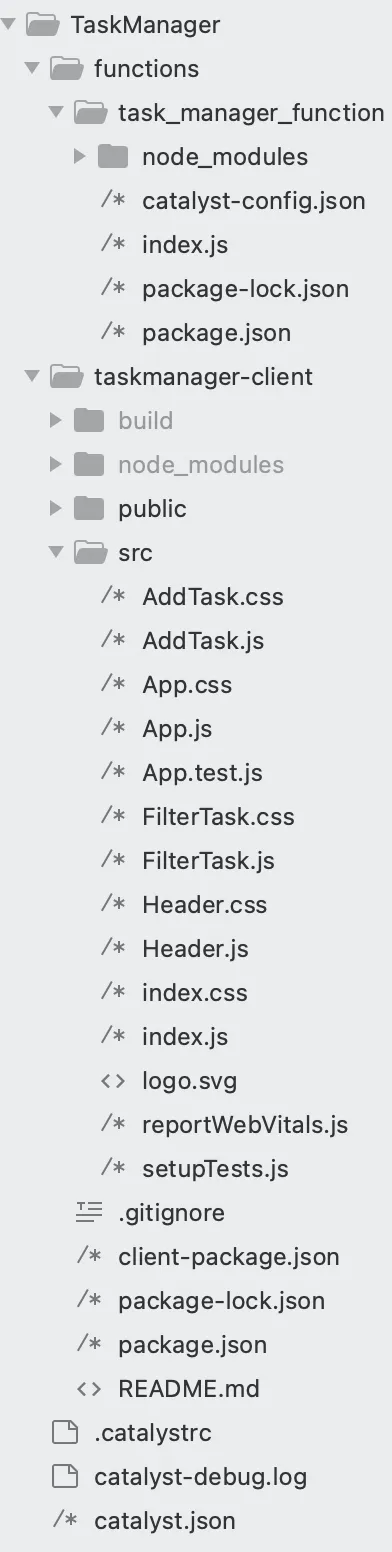
Reactウェブクライアントディレクトリには、以下のファイルが含まれています:
- クライアントのルートディレクトリにはclient-package.jsonファイルがあり、クライアントコンポーネントの名前、バージョン、デフォルトのホームページ、リダイレクトページを定義する設定ファイルです。
- task-manager-clientクライアントディレクトリには、Reactアプリのデフォルトプロジェクト構造に従って2つのサブフォルダが含まれています:
- publicフォルダは、通常、ウェブアプリのアイコンファイル、index.htmlファイル、404.htmlファイルなど、ブラウザからパブリックURLを通じてオープンにアクセスできるファイルを保持するために使用されます。
- srcフォルダには、Reactアプリをコンパイルする際にビルドフォルダに含まれるアプリケーションのソースファイルが含まれています。
- クライアントディレクトリには、package.json依存関係ファイルと、隠し.gitignoreファイルも含まれています。
- srcフォルダに含まれるファイルは以下の通りです:
- ネイティブReactファイル(index.js、index.css、setupTests.js、reportWebVitals.js、logo.svg、App.test.jsなど)
- App.css:アプリケーションインターフェースに必要なスタイリング要素が含まれています。
- App.js:AddTaskおよびFilterTaskファイルのルートを定義するハッシュルーティングロジックが含まれています。
- src/フォルダに以下のファイルを追加する必要があります:
- AddTask.css:タスク作成アクションに必要なスタイリング要素が含まれています。
- AddTask.js:フォーム入力を使用してタスクの詳細を収集します。
- FilterTask.css:フィルター機能に必要なスタイリングが含まれています。
- FilterTask.js:UserID、TaskName、Statusに基づいてタスクをフィルタリングするロジックが含まれています。また、編集および削除操作を実行するロジックも含まれています。
- Header.css:アプリケーションのスタイリング要素が含まれています。
- Header.js:アプリケーションタイトル、ナビゲーションボタンなど、アプリケーションの主要な要素を定義するロジックが含まれています。
追加のReactパッケージのインストール
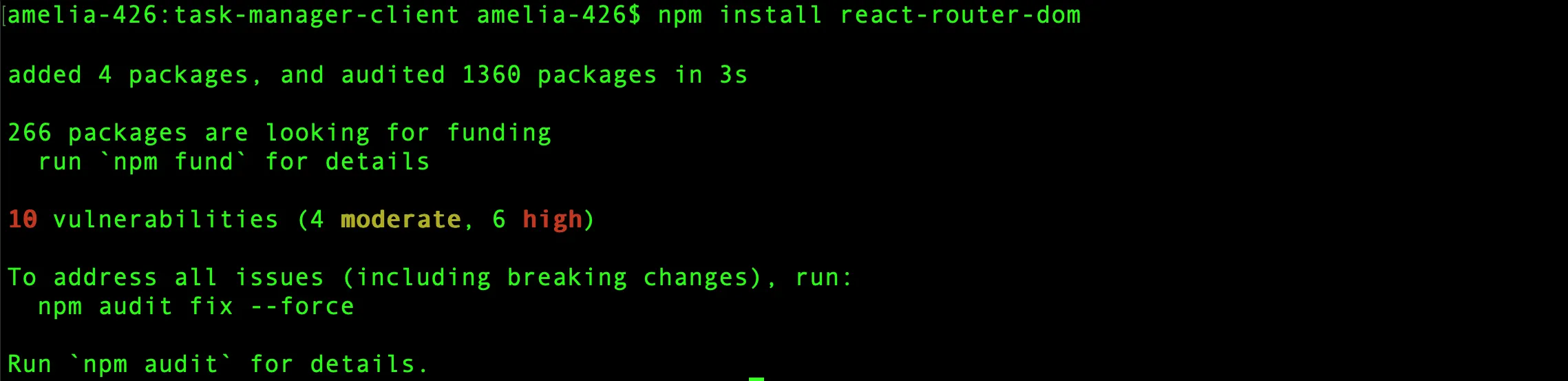
アプリケーションをマルチページアプリケーションとして動作させるために、react-router-domパッケージをインストールする必要があります。
react-router-domパッケージをインストールするには、TaskManager/task-manager-client/ディレクトリに移動して、以下のCLIコマンドを実行します:
copy
$
npm install react-router-dom
このコマンドにより、react-router-domモジュールがインストールされ、依存関係が保存され、アプリケーションで必要なハッシュルーティングを実行できるようになります。
これは、必要なファイルを作成した後のクライアントディレクトリです。
注意: このセクションに記載されているすべてのコードに目を通して、完全に理解していることを確認してください。
以下のコードをコピーして、それぞれのファイルに貼り付けてください。
App.css
copy
.App{
  text-align:center;
}
.App-logo{
  height:40vmin;
  pointer-events:none;
}
@media(prefers-reduced-motion:no-preference){
  .App-logo{
    animation:App-logo-spin infinite 20s linear;
  }
}
.App-header{
  background-color:#282c34;
  min-height:100vh;
  display:flex;
  flex-direction:column;
  align-items:center;
  justify-content:center;
  font-size:calc(10px+2vmin);
  color:white;
}
.App-link{
  color:#61dafb;
}
@keyframes App-logo-spin{
  from{
    transform:rotate(0deg);
  }
  to{
    transform:rotate(360deg);
  }
}
App.js
copy
import React from 'react'
import {HashRouter,Route,Routes,Navigate} from 'react-router-dom'
import AddTask from './AddTask'
import FilterTask from './FilterTask'
import Header from './Header'
export default function App() {
  return (
    <div>
      <HashRouter>
        <Header />
        <div className='router'>
          <Routes>
            <Route path='' element={<Navigate to='/AddTask' />} />
            <Route path='/AddTask' element={<AddTask />} />
            <Route path='/FilterTask' element={<FilterTask />} />
          </Routes>
        </div>
      </HashRouter>
    </div>
  )
}
AddTask.css
copy
body {
  font-family: Arial, sans-serif;
  background-color: #f8f9fa;
  margin: 0;
  padding: 0;
}
.container {
  max-width: 800px;
  margin: 20px auto;
  padding: 20px;
  background: #ffffff;
  box-shadow: 0px 4px 6px rgba(0,0,0,0.1);
  border-radius: 10px;
}
h1 {
  color: #121111;
  font-size: 2.5rem;
  font-weight: bold;
  margin-bottom: 20px;
  text-align: center;
}
.card {
  border: none;
  background-color: #fdfdfd;
  box-shadow: 0 2px 5px rgba(0,0,0,0.1);
  border-radius: 8px;
  overflow: hidden;
}
.card-header {
  background-color: #439600;
  color: white;
  padding: 15px;
  font-size: 1.25rem;
  font-weight: bold;
  text-align: center;
}
.card-body {
  padding: 20px;
}
.form-row {
  display: flex;
  flex-wrap: wrap;
  gap: 15px;
  margin-bottom: 15px;
}
.col-md-6,.col-md-4 {
  flex: 1 1 calc(50% - 15px);
  min-width: 200px;
}
label {
  display: block;
  font-weight: 600;
  margin-bottom: 5px;
  color: #495057;
}
input,select {
  width: 93%;
  padding: 10px;
  font-size: 1rem;
  border: 1px solid #ced4da;
  border-radius: 5px;
  transition: border-color 0.2s;
}
input:focus,select:focus {
  border-color: #007bff;
  outline: none;
  box-shadow: 0 0 4px rgba(0,123,255,0.25);
}
.buttons {
  display: flex;
  justify-content: space-between;
  gap: 10px;
}
button {
  padding: 10px 20px;
  font-size: 1rem;
  border: none;
  border-radius: 5px;
  transition: background-color 0.2s;
}
button.btn-primary {
  width: 16%;
  background-color: #000000;
  color: white;
}
button.btn-primary:hover {
  background-color: #34de19;
}
button.btn-secondary {
  background-color: #000000;
  width: 14%;
  color: white;
  font-size: 1rem;
  font-weight: 600;
}
button.btn-secondary:hover {
  background-color: #f00000;
}
#status.form-control {
  width: 387%;
}
.card-header h2 {
  color: white;
}
AddTask.js
copy
import React, { useState } from 'react'
import './AddTask.css'
import axios from 'axios'
export default function AddTask() {
  const [userID, setUserID] = useState('')
  const [taskName, setTaskName] = useState('')
  const [dueDate, setDueDate] = useState('')
  const [priority, setPriority] = useState('High')
  const [status, setStatus] = useState('Pending')
  const today = new Date().toISOString().split('T')[0]
  const addTask = async (event) => {
    event.preventDefault()
    const newTask = { userID, taskName, dueDate, priority, status }
    await axios.post('/server/task_manager_function/addtask', newTask).then(() => {
      window.confirm('Task added successfully')
      clearForm()
    }).catch((error) => {
      alert(error.message)
    })
  }
  const clearForm = () => {
    setUserID('')
    setTaskName('')
    setDueDate('')
    setPriority('High')
    setStatus('Pending')
  }
  return (
    <div className="container my-4">
      <div className="card my-4">
        <div className="card-header">
          <h2>Add New Task</h2>
        </div>
        <div className="card-body">
          <form onSubmit={addTask}>
            <div className="form-row">
              <div className="col-md-6 mb-3">
                <label htmlFor="userID" className="userID">User ID</label>
                <input type="text" className="form-control" id="userID" value={userID} onChange={(e) => setUserID(e.target.value)} required />
              </div>
              <div className="col-md-6 mb-3">
                <label htmlFor="taskName">Task Name</label>
                <input type="text" className="form-control" id="taskName" value={taskName} onChange={(e) => setTaskName(e.target.value)} required />
              </div>
            </div>
            <div className="form-row align-items-center">
              <div className="col-md-4 mb-3">
                <label htmlFor="dueDate">Due Date</label>
                <input type="date" className="form-control" id="dueDate" value={dueDate} onChange={(e) => setDueDate(e.target.value)} min={today} required />
              </div>
              <div className="col-md-4 mb-3">
                <label htmlFor="priority">Priority</label>
                <select className="form-control" id="priority" value={priority} onChange={(e) => setPriority(e.target.value)} required>
                  <option value="High">High</option>
                  <option value="Medium">Medium</option>
                  <option value="Low">Low</option>
                </select>
              </div>
              <div className="status-cls">
                <label htmlFor="status">Status</label>
                <select className="form-control" id="status" value={status} onChange={(e) => setStatus(e.target.value)} required>
                  <option value="Pending">Pending</option>
                  <option value="Completed">Completed</option>
                </select>
              </div>
            </div>
            <div className="buttons mt-4">
              <button type="submit" className="btn btn-primary">Add Task</button>
              <button type="button" className="btn btn-secondary" onClick={clearForm}>Clear</button>
            </div>
          </form>
        </div>
      </div>
    </div>
  )
}
FilterTask.css
copy
@import url("https://fonts.googleapis.com/css2?family=Inter:wght@100..900&display=swap");
* {
  font-family: "Inter", sans-serif;
  box-sizing: border-box;
  margin: 0;
  padding: 0;
}
h2 {
  font-size: 38px;
  font-weight: bold;
  margin-bottom: 20px;
  text-align: center;
  padding: 10px;
  border-bottom: 1px dashed #ccc;
  color: #000;
}
.btn1 {
  color: white;
  padding: 8px 10px;
  border: none;
  border-radius: 4px;
  cursor: pointer;
  background-color: #ccc;
}
.green {
  background-color: green;
}
.container {
  margin: 30px auto;
  padding: 20px;
  max-width: 900px;
  background-color: #f9f9f9;
  border-radius: 8px;
  box-shadow: 0 4px 8px rgba(0,0,0,0.1);
}
h3 {
  text-align: center;
  color: #333;
  font-family: Arial, sans-serif;
}
.table {
  width: 100%;
  border-collapse: collapse;
  margin-top: 20px;
  font-family: Arial, sans-serif;
}
.table th, .table td {
  padding: 12px 15px;
  text-align: left;
  border-bottom: 1px solid #ddd;
}
.table th {
  background-color: #439600;
  color: white;
}
.table tbody tr:nth-child(even) {
  background-color: #f4f4f4;
}
.table tbody tr:hover {
  background-color: #e9e9e9;
}
.btn {
  padding: 6px 12px;
  border: none;
  border-radius: 4px;
  cursor: pointer;
  font-size: 14px;
  font-weight: bold;
  background-color: #1100ec;
  color: white;
}
.btn:hover {
  background-color: rgb(32,239,0);
}
.btn:focus {
  outline: none;
}
.btn.green {
  background-color: #28a745;
  color: white;
}
.btn.green:hover {
  background-color: #218838;
}
td button {
  margin-right: 8px;
}
table tr:hover {
  background-color: #ddd;
}
.filter-tasks-container {
  background-color: #ffffff;
  padding: 25px 30px;
  border-radius: 10px;
  box-shadow: 0 8px 15px rgba(0,0,0,0.15);
  max-width: 650px;
  margin: 30px auto 59px;
}
.filter-tasks-header {
  font-size: 2rem;
  font-weight: 700;
  color: #ffffff;
  text-align: center;
  padding: 15px;
  background: #439600;
  border-radius: 8px 8px 0 0;
  margin: -30px -30px 20px -30px;
  position: relative;
}
.filter-tasks-header::after {
  content: '';
  display: block;
  width: 50px;
  height: 4px;
  margin: 10px auto 0;
  border-radius: 2px;
}
.form-row {
  display: flex;
  gap: 20px;
  margin-bottom: 15px;
}
.filter-label {
  font-weight: 600;
  margin-bottom: 5px;
  display: block;
  color: #333;
  font-size: 0.9rem;
}
.form-control {
  border: 1px solid #ddd;
  border-radius: 6px;
  font-size: 1rem;
  padding: 3px;
  transition: all 0.3s ease;
  color: black;
}
.form-control:focus {
  border-color: #007bff;
  box-shadow: 0 0 8px rgba(0,123,255,0.2);
  outline: none;
}
.btn-primary {
  color: #ffffff;
  border: none;
  padding: 12px 24px;
  font-size: 1rem;
  font-weight: 600;
  border-radius: 6px;
  width: 26%;
  background-color: black;
}
.btn-wraper {
  display: flex;
  align-items: center;
  justify-content: space-between;
}
.cleartask-btn {
  width: 22%;
  color: #ffffff;
  border: none;
  padding: 12px 24px;
  font-size: 1rem;
  font-weight: 600;
  border-radius: 6px;
  background-color: black;
}
.cleartask-btn:hover {
  background-color: #e80000;
  transform: translateY(-2px);
}
.btn-primary:hover {
  background-color: #60f389;
  transform: translateY(-2px);
}
.btn-primary:active {
  background-color: #141517;
  transform: translateY(0);
}
@media (max-width: 768px) {
  .form-row {
    flex-direction: column;
    gap: 15px;
  }
  .btn-primary {
    width: 100%;
  }
}
.task-list-container {
  width: 59%;
  padding: 5px;
  background-color: #f9f9f9;
  border-radius: 8px;
  box-shadow: 0 4px 12px rgba(0,0,0,0.1);
  margin-left: 20%;
}
.task-list-table {
  width: 100%;
  border-collapse: collapse;
}
.task-list-table-striped thead {
  background-color: #69f086;
  color: #ffffff;
}
.task-list-table-striped th, .task-list-table-striped td {
  padding: 12px 15px;
  text-align: left;
}
.task-list-table-striped tbody tr:nth-child(even) {
  background-color: #f2f2f2;
}
.task-list-table-striped tbody tr:hover {
  background-color: #e0e0e0;
}
.task-list-table-striped th {
  font-weight: bold;
  font-size: 16px;
}
.task-list-table-striped td {
  font-size: 14px;
}
.task-list-table-striped td[data-priority="High"] {
  color: #dc3545;
  font-weight: bold;
}
.task-list-table-striped td[data-priority="Medium"] {
  color: #ffc107;
}
.task-list-table-striped td[data-priority="Low"] {
  color: #28a745;
}
.task-list-table-striped td[data-status="Completed"] {
  color: #28a745;
  font-weight: bold;
}
.task-list-table-striped td[data-status="Pending"] {
  color: #ffc107;
  font-weight: bold;
}
.task-list-table-striped td[data-status="Overdue"] {
  color: #dc3545;
  font-weight: bold;
  text-decoration: underline;
}
@media (max-width: 768px) {
  .task-list-table-striped th, .task-list-table-striped td {
    padding: 10px;
  }
}
.modal {
  display: block;
  position: fixed;
  z-index: 1;
  left: 0;
  top: 0;
  width: 100%;
  height: 100%;
  background-color: rgba(0,0,0,0.5);
  overflow: auto;
}
.modal-content {
  background-color: white;
  margin: 10% auto;
  padding: 20px;
  text-align: left;
  width: 56%;
  height: 62%;
  border: 1px solid black;
}
.close {
  color: #aaa;
  float: right;
  font-size: 28px;
  font-weight: bold;
}
.close:hover, .close:focus {
  color: rgb(245,0,0);
  cursor: pointer;
}
.updateContent {
  margin-bottom: 10%;
}
.modal-content h2 {
  font-size: 20px;
  margin-bottom: 20px;
  text-align: center;
}
.modal-content div {
  margin-bottom: 15px;
}
.modal-content label {
  display: block;
  font-weight: bold;
  margin-bottom: 5px;
}
.modal-content input[type="text"], .modal-content input[type="date"], .modal-content select {
  width: 100%;
  padding: 8px;
  border: 1px solid #ccc;
  border-radius: 4px;
  box-sizing: border-box;
}
.modal-content select {
  cursor: pointer;
}
.modal-content button {
  display: inline-block;
  width: 19%;
  padding: 10px;
  background-color: #2c2d2e;
  color: white;
  font-size: 16px;
  font-weight: bold;
  border: none;
  border-radius: 4px;
  cursor: pointer;
}
.modal-content button:hover {
  background-color: #43c265;
}
.head {
  display: flex;
}
.applyfilter {
  font-weight: bold;
  background-color: black;
  color: white;
}
.applyfilter:hover {
  background-color: #00fe19;
  transform: translateY(-2px);
}
.btnDelete {
  padding: 6px 12px;
  border: none;
  border-radius: 4px;
  cursor: pointer;
  font-size: 14px;
  font-weight: bold;
  background-color: rgb(200,26,17);
  color: white;
}
.btnDelete:hover {
  background-color: rgb(255,0,0);
}
.btnDelete.green {
  background-color: #ba2929;
  color: white;
}
.btnDelete.green:hover {
  background-color: #218838;
}
.btnDelete:focus {
  outline: none;
}
.placeholder {
  color: gray;
}
FilterTask.js
copy
import React from 'react'
import { useState } from 'react'
import axios from "axios"
import './FilterTask.css'
export default function FilterTask() {
  const [tasks,setTasks]=useState([])
  const [isModelopen,setModal]=useState(false)
  const [userData,setUserdata]=useState({UserID:"",TaskName:"",DueDate:"",Status:""})
  const [userID,setUserID]=useState('')
  const [taskName,setTaskName]=useState('')
  const [status,setStatus]=useState('')
  const filterTasks=async()=>{try{const response=await axios.get('/server/task_manager_function/filtertask',{params:{userID,taskName,status}});setTasks(response.data)}catch(error){if(error.response&&error.response.data&&error.response.data.error){console.error('Backend Error:',error.response.data.error);alert(error.response.data.error)}else{alert('Something went wrong. Please try again.')}}}
  const handleDelete=async(taskData)=>{const isConfirmed=window.confirm("Are you sure you want to delete this task!");const userID=taskData.UserID;const taskName=taskData.TaskName;if(isConfirmed){await axios.delete(`/server/task_manager_function/deleteTask`,{params:{userID,taskName}}).then((response)=>{if(window.confirm(response.data.message)){window.location.reload()}}).catch(function(error){alert(error.message)})}}
  const handleEdit=async(data)=>{setUserdata(data);setModal(true)}
  const closeModal=async()=>{setModal(false)}
  const clearTask=()=>{setUserID('');setTaskName('');setStatus('')}
  const handleChange=(e)=>{const{name,value}=e.target;setUserdata(prevData=>({...prevData,[name]:value}))}
  const handleSubmit=async(e)=>{e.preventDefault();await axios.post("/server/task_manager_function/updatetask",userData).then((response)=>{if(window.confirm(response.data.message)){window.location.reload()}}).catch(function(error){alert(error.message)})}
  return(
    <>
      <div className="filter-tasks-container">
        <h4 className="filter-tasks-header">Filter Tasks</h4>
        <div className="form-row">
          <div className="col-md-4">
            <label htmlFor="filterUserID" className="filter-label">User ID</label>
            <input type="text" className="form-control" id="filterUserID" placeholder="Enter User ID" value={userID} onChange={(e)=>setUserID(e.target.value)}/>
          </div>
          <div className="col-md-4">
            <label htmlFor="filterTaskName" className="filter-label">Task Name</label>
            <input type="text" className="form-control" id="filterTaskName" placeholder="Enter Task Name" value={taskName} onChange={(e)=>setTaskName(e.target.value)}/>
          </div>
          <div className="col-md-4">
            <label htmlFor="filterStatus" className="filter-label">Status</label>
            <select className="form-control" id="filterStatus" value={status} onChange={(e)=>setStatus(e.target.value)}>
              <option value="" disabled hidden className="placeholder">Status</option>
              <option value="Pending">Pending</option>
              <option value="Completed">Completed</option>
            </select>
          </div>
        </div>
        <div className="btn-wraper mt-3">
          <button className="applyfilter" onClick={filterTasks}>Apply Filters</button>
          <button className="cleartask-btn" onClick={clearTask}>Clear</button>
        </div>
      </div>
      {tasks.length>0&&(
        <div className='container'>
          <h2>Task List</h2>
          <table className='table'>
            <thead>
              <tr>
                <th>S. No</th>
                <th>User ID</th>
                <th>Task Name</th>
                <th>Due Date</th>
                <th>Status</th>
                <th>Update</th>
                <th>Delete</th>
              </tr>
            </thead>
            <tbody>
              {tasks.map((task,index)=>(
                <tr key={index+1}>
                  <td>{index+1}</td>
                  <td>{task.UserID}</td>
                  <td>{task.TaskName}</td>
                  <td>{task.DueDate}</td>
                  <td>{task.Status}</td>
                  <td><button className='btn' onClick={()=>handleEdit(task)}>Edit</button></td>
                  <td><button className='btnDelete' onClick={()=>handleDelete(task)}>Delete</button></td>
                </tr>
              ))}
            </tbody>
          </table>
          {isModelopen&&(
            <div className='modal'>
              <div className='modal-content'>
                <span className='close' onClick={closeModal}>×</span>
                <h2>User Details</h2>
                <div>
                  <label htmlFor="userID">UserID:</label>
                  <input type="text" id="userID" name="UserID" value={userData.UserID} onChange={handleChange} required/>
                </div>
                <div>
                  <label htmlFor="taskName">TaskName:</label>
                  <input type="text" id="taskName" name="TaskName" value={userData.TaskName} onChange={handleChange} required/>
                </div>
                <div>
                  <label htmlFor="dueDate">DueDate:</label>
                  <input type="date" id="dueDate" name="DueDate" value={userData.DueDate} onChange={handleChange} min={new Date().toISOString().split('T')[0]} required/>
                </div>
                <div>
                  <label htmlFor="status">Status:</label>
                  <select id="status" name="Status" value={userData.Status} onChange={handleChange} required>
                    <option value="">Select Status</option>
                    <option value="Pending">Pending</option>
                    <option value="Completed">Completed</option>
                  </select>
                </div>
                <div>
                  <button onClick={handleSubmit}>Submit</button>
                </div>
              </div>
            </div>
          )}
        </div>
      )}
    </>
  )
}
Header.css
copy
#root{
  display:flex;
  flex-direction:column;
  height:100vh;
}
.heading{
  align-items:center;
  background-color:black;
  box-shadow:0 2px 4px #0000001a;
  color:#fff;
  display:flex;
  justify-content:space-between;
  padding:10px 20px;
}
.heading span{
  font-size:1.5rem;
  font-weight:bold;
}
.heading ul{
  list-style:none;
  display:flex;
  gap:20px;
  margin:0;
  padding:0;
}
.heading li{
  font-size:1rem;
}
.heading a{
  text-decoration:none;
  color:#ffffff;
  transition:color 0.3s ease;
  font-weight:bold;
}
.heading a:hover{
  color:#007bff;
}
.naviagtion-btn{
  height:36px;
  background-color:white;
  border:none;
  border-radius:7px;
  font-size:13px;
  font-weight:bold;
}
.naviagtion-btn:hover{
  background-color:blue;
  color:white;
}
Header.js
copy
import React from 'react'
import { Link } from 'react-router-dom'
import './Header.css'
export default function Header() {
  return (
    <div className='heading'>
      <span>Task Manager</span>
      <ul>
        <li>
          <Link to='/AddTask'>
            <button className='naviagtion-btn'>Add task</button>
          </Link>
        </li>
        <li>
          <Link to='/FilterTask'>
            <button className='naviagtion-btn'>Filter task</button>
          </Link>
        </li>
      </ul>
    </div>
  )
}
クライアントディレクトリの設定が完了しました。
アプリケーションの動作を確認しましょう:
-
タスクの作成
- エンドユーザーがAdd TaskページからUserID、Task Name、期限日、Statusを入力して新しいタスクを送信すると、タスク作成アクションが開始されます。
- 詳細はAxios POST呼び出しを通じて/server/task_manager_function/addtask APIエンドポイントにバックエンドへ送信されます。
- このAPIは新しいタスクを検証し、NoSQLストレージに保存します。このアクションにより確認メッセージがトリガーされます。
- これで、タスクは操作を通じて取得可能になります。
-
タスクのフィルタリング
- Filter Taskページでは、フィルタリング操作はすべて/filtertask APIエンドポイントを通じて処理されます。
- エンドユーザーはUserID、Task Name、またはStatusで作成されたタスクをフィルタリングできます。フィルター要件を満たすタスクは、Axios GET呼び出しを使用して/server/task_manager_function/filtertask APIエンドポイントから取得されます。この呼び出しにより、NoSQLテーブルから必要な詳細が取得されます。
-
タスクの編集または削除
- フィルタリングされたタスクとともに、リストされた各タスクには、エンドユーザーが編集または削除を行うオプションが提供されます。
- 編集および削除操作のロジックは、handleEdit()およびhandleDelete()関数で定義されています。
- エンドユーザーがタスクの削除を選択した場合:
- Axios DELETEリクエストを使用して/deleteTask APIエンドポイントが呼び出されます。
- これにより、NoSQLテーブルから対応するエントリが削除されます。
- 必要なタスクが正常に削除されると、クライアントに成功メッセージが表示されます。
- エンドユーザーがタスクの更新を選択した場合:
- handleEdit()関数を使用して、既存のタスク詳細がモーダルに表示されます。
- エンドユーザーが変更されたタスク情報を更新して送信すると、Axios POSTリクエストを通じて/updatetask APIエンドポイントが呼び出されます。
- このAPIは、新しく提供された値でNoSQLテーブルのタスクレコードを更新します。
- 更新操作が完了した後、フィルタリングされたタスクリストに最新のデータを反映するためにページがリロードされます。
最終更新日 2026-08-17 17:46:04 +0530 IST