---
title: "Execute Vision Model Endpoint"
url: https://docs.catalyst.zoho.com/en/sdk/python/v1/quickml/execute-vision-model-endpoint/
description: "This page describes the method to execute QuickML endpoints in your Python application with a sample code snippet."
last_updated: 2026-09-09T11:01:45Z
service: QuickML
type: general
related_links:
- name: "QuickML Help"
url: /en/quickml/
- name: "QuickML Pipeline Endpoints"
url: /en/quickml/help/pipeline-endpoints/
- name: "SDK Scopes"
url: /en/sdk/python/v1/sdk-scopes
---
**Vision Language Model**
QuickML hosts Vision Language Models in the LLM Serving module under the Generative AI section in the console. VLMs are multimodal models that accept a file object along with a text prompt and return a natural language response. The model interprets the image according to the text prompt instruction and generates an appropriate response.
Interaction with Vision Language Model works similar to single shot interaction mode with LLM. Each request must carry its own file and prompt and is processed independently, with no memory of previous requests. To analyze the same image again with a different instruction, send a new request.
**Execute Vision Model Endpoint**
VLM is served with its own set of parameters, giving you control over the response before publishing it. You can test a model with sample images and prompts in the test interface, save the configuration, and create an endpoint from it to integrate with your application.
A Vision Model endpoint is created from a saved parameter configuration, so the model, system prompt, instructions, and generation parameters you tested in the console are exactly what your application calls. The endpoint must be created from a configuration that uses a Vision Language Model, text-only LLM endpoints do not accept image input. Open the image in binary read mode and pass the file object to the method
> **Note:**
1. You will need to have the Vision Language Model endpoint created and published in your project using the Catalyst console, before you execute the code snippet below.
2. QuickML is currently available to Catalyst users accessing from the US, IN, and EU data centers.
### a. Analyze an Image
The `analyze_image(endpoint_key, image, prompt)` method requires the input prompt along with a file object and the endpoint_key. The endpoint key will be generated at the time of endpoint creation. It sends an image and an accompanying prompt to a published Vision Language Model endpoint and returns the model's response. The model executes the prompt as described in the file attached.
**Parameters used**
Parameter
Description
Values
endpoint_key
The unique ID of the VLM endpoint published in your project
String
image
The image file object to be analy z ed
File object
prompt
The task the model must perform on the image
String
**Allowed file formats:** jpg, .jpeg, .png,
**File Size Limit:** 500KB
**Sample Code Snippet**
```python
# Create a QuickML instance.
quickml = app.quick_ml()
# Analyze Image
# Replace with your endpoint key copied from the Catalyst console.
endpoint_key = ""
# Replace with the path to your image.
image_path = ""
with open(image_path, "rb") as image:
# Enter the prompt describing the task to perform on the image.
prompt = ""
response = quickml.analyze_image (
endpoint_key,
image,
prompt
)
print(response)
```
The syntax of the response received is shown below:
```json
{
"status": "success",
"result": [
{
"content": "A description of the image, as instructed by the prompt.",
"finish_reason": "stop",
"usage": {
"input_tokens": 1064,
"output_tokens": 74,
"total_tokens": 1138
}
}
]
}
```
Use Vision Language Model for tasks such as image description, document and receipt understanding, chart interpretation, and visual question answering, etc.
**Where to find the endpoint information**
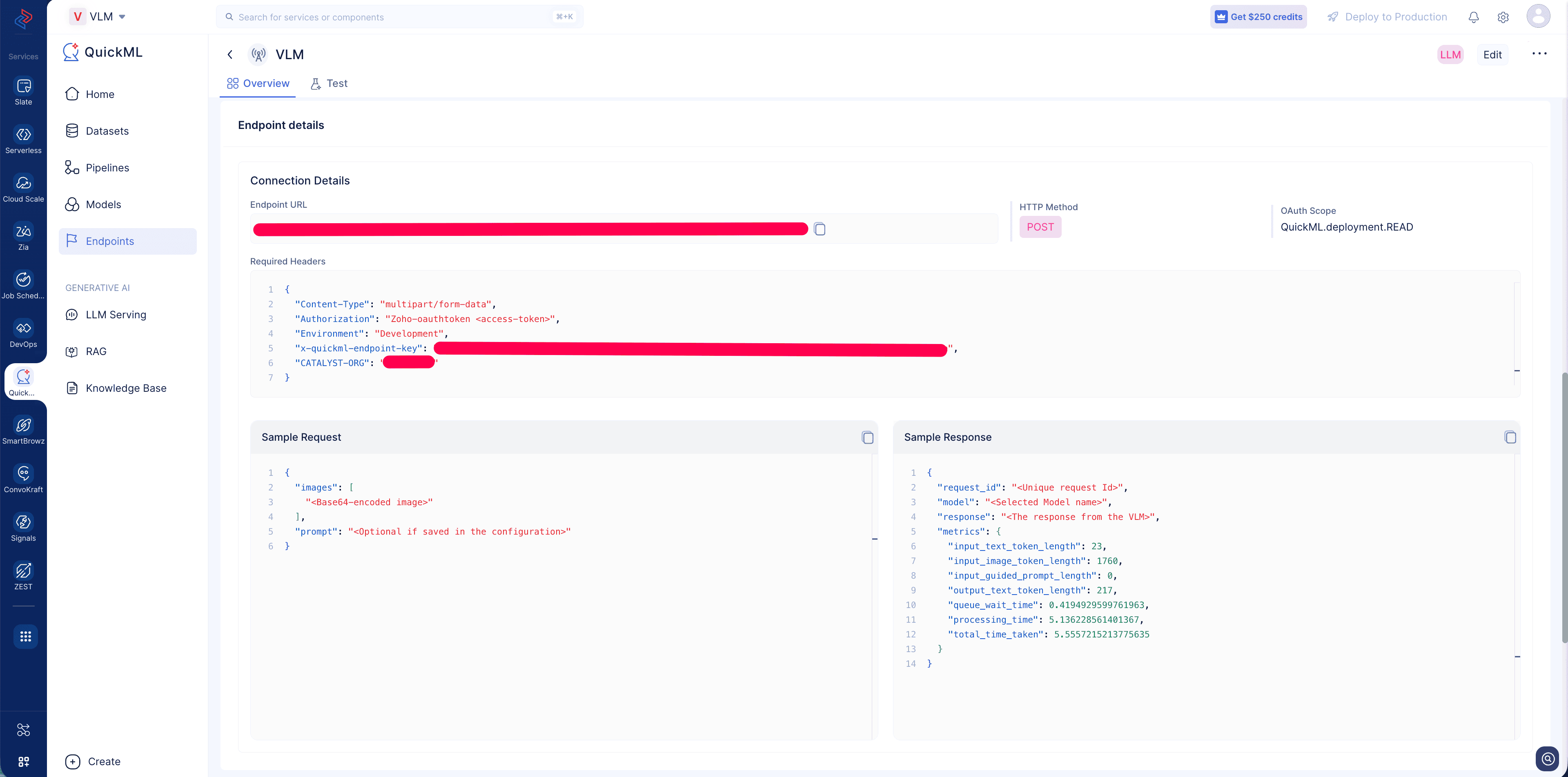
Create an endpoint for your Saved VLM configuration and access the endpoint details page to view the Endpoint URL, required headers and a sample request response.
> **Info :** Refer to the [SDK Scopes table](https://docs.catalyst.zoho.com/en/sdk/python/v1/sdk-scopes) to determine the required permission level for performing the above operation.