---
title: "Overview"
url: https://docs.catalyst.zoho.com/en/ai-toolkit/catalyst-mcp-server/overview/
description: "An overview of Catalyst MCP Server — what MCP is, how Zoho MCP works, and the types of Catalyst MCP Servers available."
last_updated: 2026-09-15T06:29:39Z
service: AI Toolkit
type: general
related_links:
- name: "Zoho MCP Help"
url: https://help.zoho.com/portal/en/kb/mcp
- name: "Zoho MCP Tool List"
url: https://zoho-mcp-manual-tool-guide.onslate.in/
- name: "Catalyst MCP Server Example Prompts"
url: /en/ai-toolkit/catalyst-mcp-server/example-prompts/
repository:
name: "Agent Skills"
url: https://github.com/catalystbyzoho/agent-skills
---
# Catalyst MCP Server
### What is MCP?
Model Context Protocol (**MCP**), is an open-source standard that defines how AI models and LLMs can connect, interact, and operate on other systems. Using MCP, you can instruct an AI model with precise context on the operation you require it to carry out in another system.
### What is Zoho MCP?
[Zoho MCP](https://www.zoho.com/mcp/), is a service that offers you pre-defined, and on-demand MCP servers to which you can add MCP tools to from Zoho and other supported third party services.
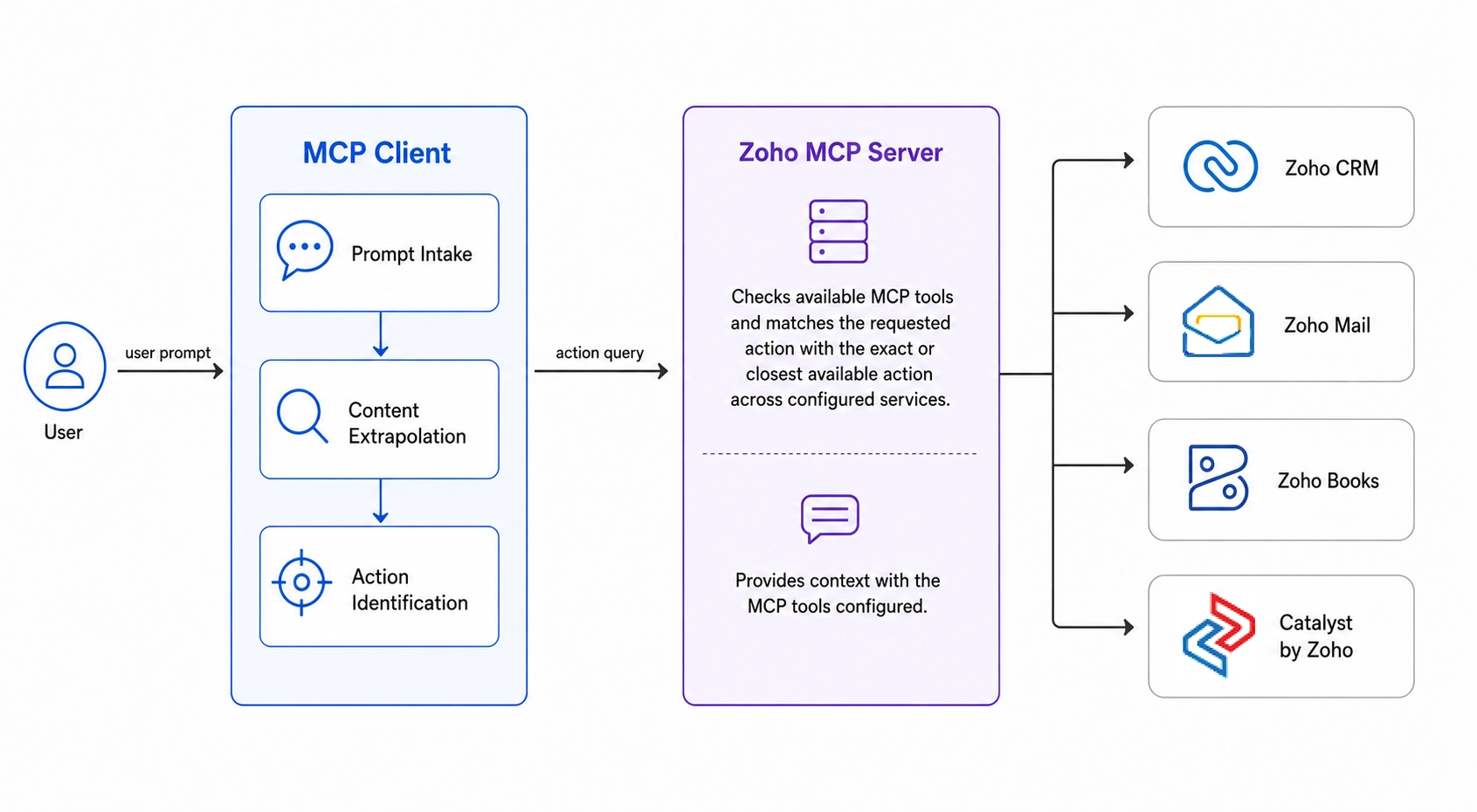
A Zoho MCP Server acts as the communicative bridge between your LLM and a supported service. The [MCP tools](https://help.zoho.com/portal/en/kb/mcp/reference/articles/zoho-mcp-glossary#MCP_Tool) configured in the server provide your LLM with the context it needs to understand and interact with that service. With this context, your LLM can precisely carry out your prompted actions.
> **Learn more**:
* [Zoho MCP service](https://help.zoho.com/portal/en/kb/mcp)
* [List of Zoho MCP supported services](https://zoho-mcp-manual-tool-guide.onslate.in/)
### Catalyst MCP Server
The Catalyst MCP server's primary objective is to provide your preferred LLM with the required context to interact and perform operations in the Catalyst console, without ever leaving your coding environment.
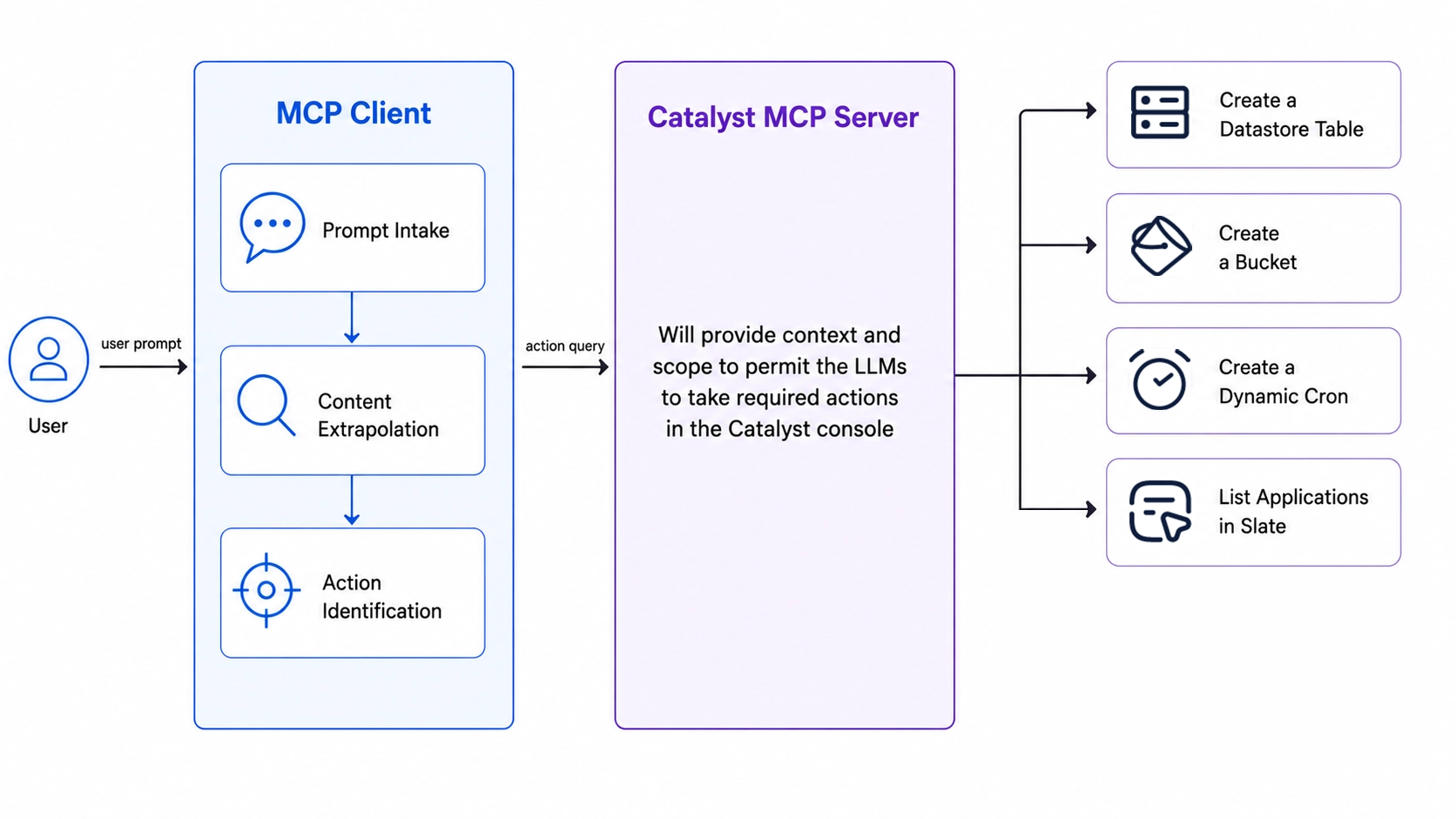
The Catalyst MCP server, is essentially, a Zoho MCP server that is configured with all the MCP tools of the Catalyst service.
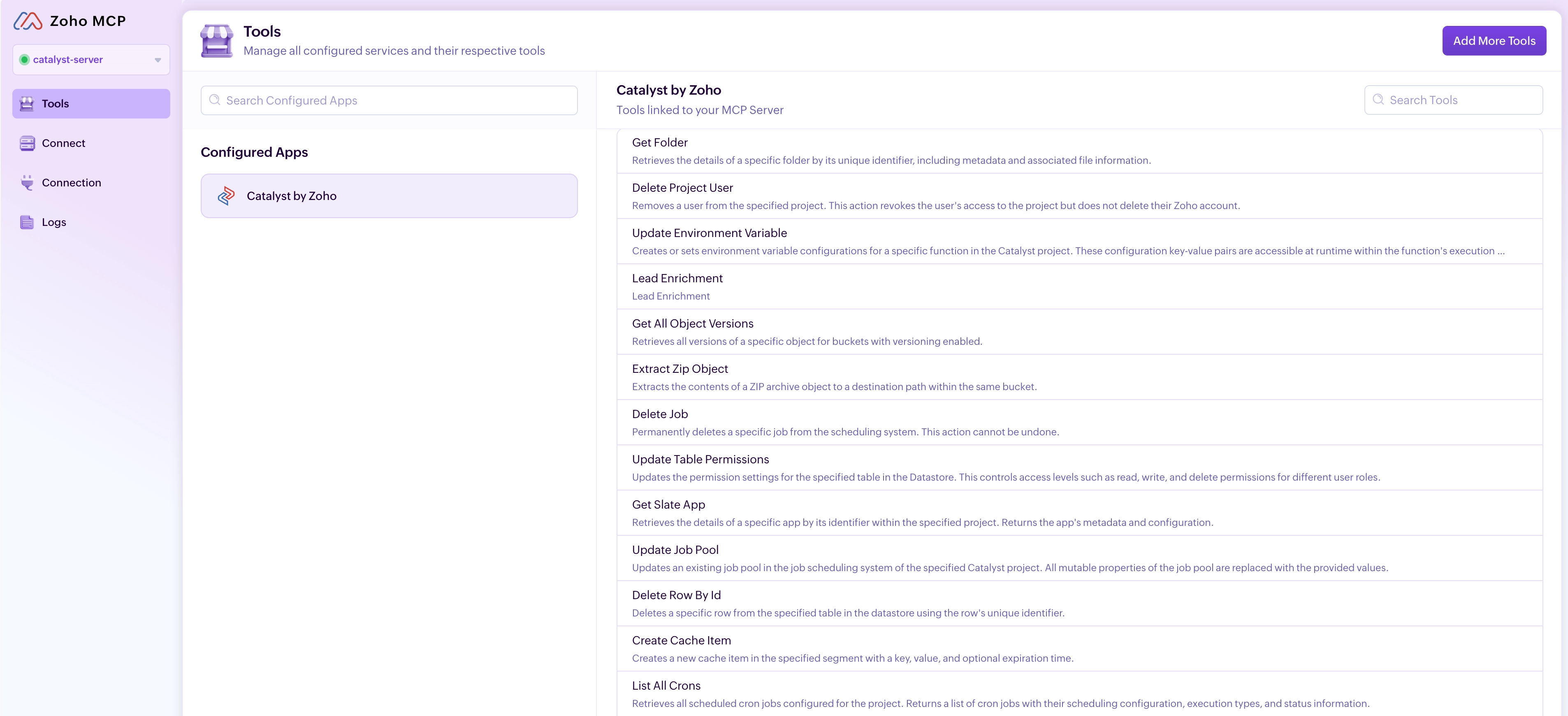
> **Learn more**: [Complete list of Catalyst's MCP tools](https://zoho-mcp-manual-tool-guide.onslate.in/zoho-services/catalyst-by-zoho).
You can invoke two types of Catalyst MCP servers; **Catalyst Dynamic MCP Server**, **Catalyst Custom MCP Servers**.
#### Catalyst Dynamic MCP Server
A Dynamic MCP Server does not load all its configured tools with every invocation, instead, it uses dynamic discovery. When a prompt is provided, the LLM infers the required actions and queries the Dynamic MCP Server directory to identify only the tools needed to complete those actions. Only those tools are loaded and enabled for use.
This eliminates unnecessary hallucinations caused by tool overload. Furthermore, it removes the manual effort of selecting tools from the MCP console. Also, using a Dynamic MCP Server effectively lifts any tool limitation put in place by the LLMs by ensuring only the required tool is active at any given time.
The *Catalyst by Zoho* service is MCP-compatible and has a Dynamic MCP server. Meaning by just connecting and authorizing this server, your LLM will be able to access all **100+ MCP tools** of the Catalyst service and perform required actions in the console.
The access URL to use Catalyst Dynamic MCP server is: `https://catalyst.zohomcp.com/mcp/message`
#### Catalyst Custom MCP Server
A Custom MCP Server is a Zoho MCP Server where you manually configure the exact tools required for your operation using the MCP console. Using a Custom MCP server is recommended when you are absolutely sure about the list of tools that you would require for your operation.
> **Learn more:** [Adding Catalyst MCP tools to an MCP server](https://docs.catalyst.zoho.com/en/ai-toolkit/catalyst-mcp-server/connect-catalyst-mcp/connect-custom-mcp/#configure-mcp-server-with-catalysts-mcp-tools).
A typical access url structure for a Custom MCP server is:
`https://mcp-server-name-serverID.zohomcp.com/mcp/APIKEY/message`