---
title: "Claude.ai"
url: https://docs.catalyst.zoho.com/en/ai-toolkit/catalyst-mcp-server/connect-catalyst-mcp/dynamic-mcp/connect-dynamic-mcp-claude/
description: "Connect the Catalyst Dynamic MCP Server to Claude.ai using the universal MCP URL."
last_updated: 2026-10-01T07:03:46Z
service: AI Toolkit
type: general
related_links:
- name: "Zoho MCP Help"
url: https://help.zoho.com/portal/en/kb/mcp
- name: "Zoho MCP Tool List"
url: https://zoho-mcp-manual-tool-guide.onslate.in/
- name: "Connect Catalyst Custom MCP Server"
url: /en/ai-toolkit/catalyst-mcp-server/connect-catalyst-mcp/connect-custom-mcp/
repository:
name: "Agent Skills"
url: https://github.com/catalystbyzoho/agent-skills
---
# Connect Catalyst Dynamic MCP Server to Claude.ai
A [Catalyst Dynamic MCP server](https://docs.catalyst.zoho.com/en/ai-toolkit/catalyst-mcp-server/overview/#catalyst-mcp-server-1) has a universal MCP URL, you can use to connect to your required MCP Client (LLM). No MCP Tool configuration needs to be done in the MCP console.
You only have to connect the following MCP URL to Claude.ai.
`https://catalyst.zohomcp.com/mcp/message`
To connect your Catalyst Dynamic MCP Server to Claude.ai:
1. Copy the Catalyst Dynamic MCP URL [`https://catalyst.zohomcp.com/mcp/message`].
2. Go to [http://claude.ai/settings/integrations](http://claude.ai/settings/integrations).
3. Click the **Add** drop-down.
4. Click **Add Custom Connectors**.
5. Provide a name for the MCP server, and paste the global MCP URL.
The MCP server is now added to your MCP Client. To complete the connection, you need to authorize the MCP Server connection to Claude.
6. Access your MCP server from the list of *Connectors* and click **Connect**.
7. Follow the authorization process, and your MCP server will be connected and ready to use.
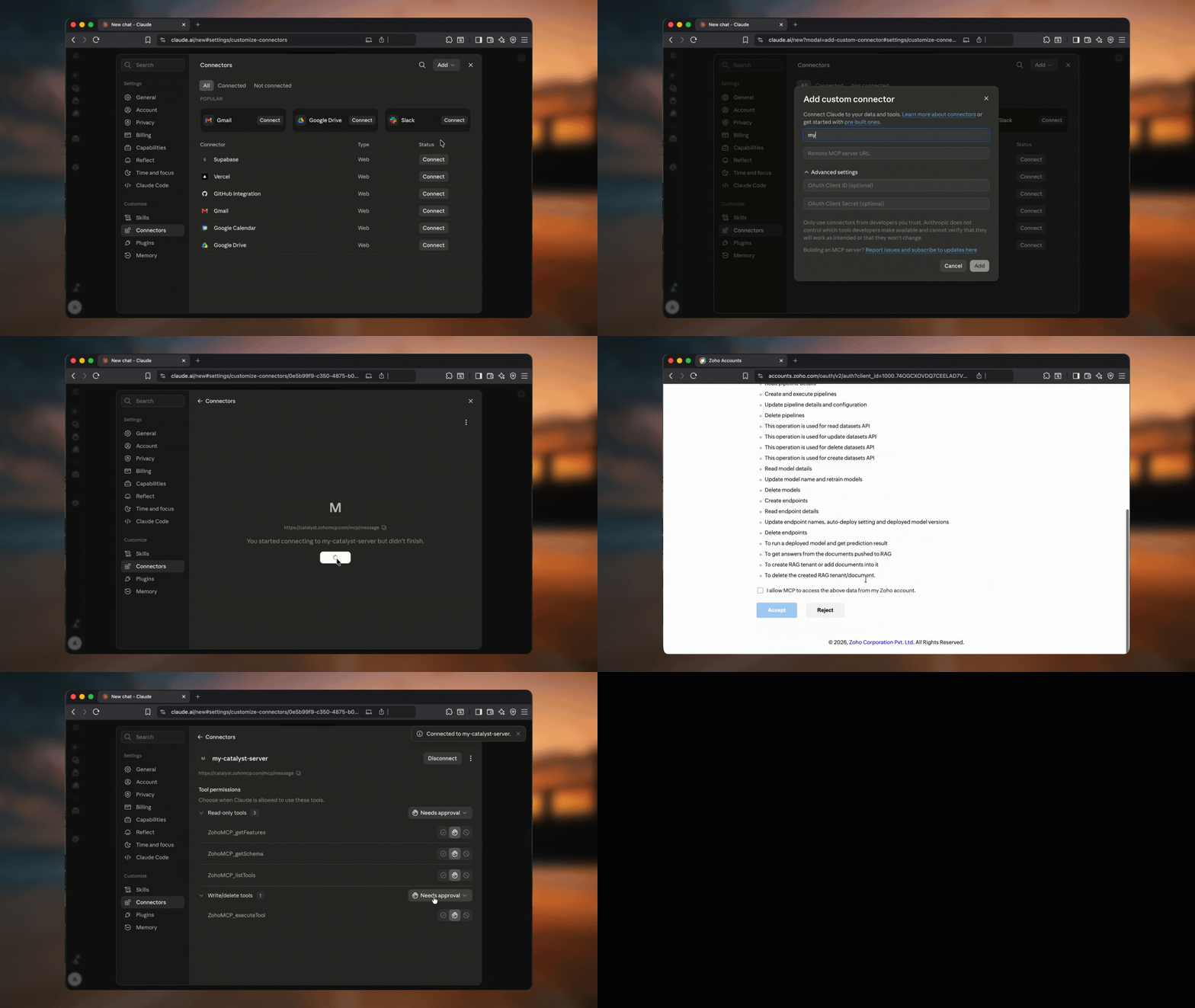
You can now leverage the artificial intelligence of Claude.ai through the Catalyst Dynamic MCP Server, which equips Claude with the context it needs to understand and execute your operations on the Catalyst console.